1. Introduction
Thank you for purchasing the Supersonic SC-20H DVD Player. This manual provides essential information for the proper installation, operation, and maintenance of your device. Please read this manual thoroughly before using the product and retain it for future reference.
2. Safety Information
To ensure safe operation and prevent damage, observe the following precautions:
- Power Source: Connect the player only to a power supply within the specified range (110-240V, 50/60Hz).
- Ventilation: Do not block ventilation openings. Ensure adequate space around the unit for proper airflow.
- Moisture: Do not expose the player to rain, moisture, or dripping/splashing liquids. Do not place objects filled with liquids, such as vases, on the apparatus.
- Heat: Keep the player away from heat sources such as radiators, heat registers, stoves, or other apparatus (including amplifiers) that produce heat.
- Cleaning: Unplug the player from the wall outlet before cleaning. Use a dry cloth for cleaning.
- Servicing: Do not attempt to service this product yourself. Refer all servicing to qualified service personnel.
- California Proposition 65 Warning: This product contains chemicals known to the State of California to cause cancer and birth defects or other reproductive harm.
3. Package Contents
Verify that all items are present in the package:
- Supersonic SC-20H DVD Player
- Power Supply Cable
- AV Cables (Composite)
- Full Function Remote Control (Batteries not included)
- User Manual (this document)
4. Product Overview
4.1 Front Panel
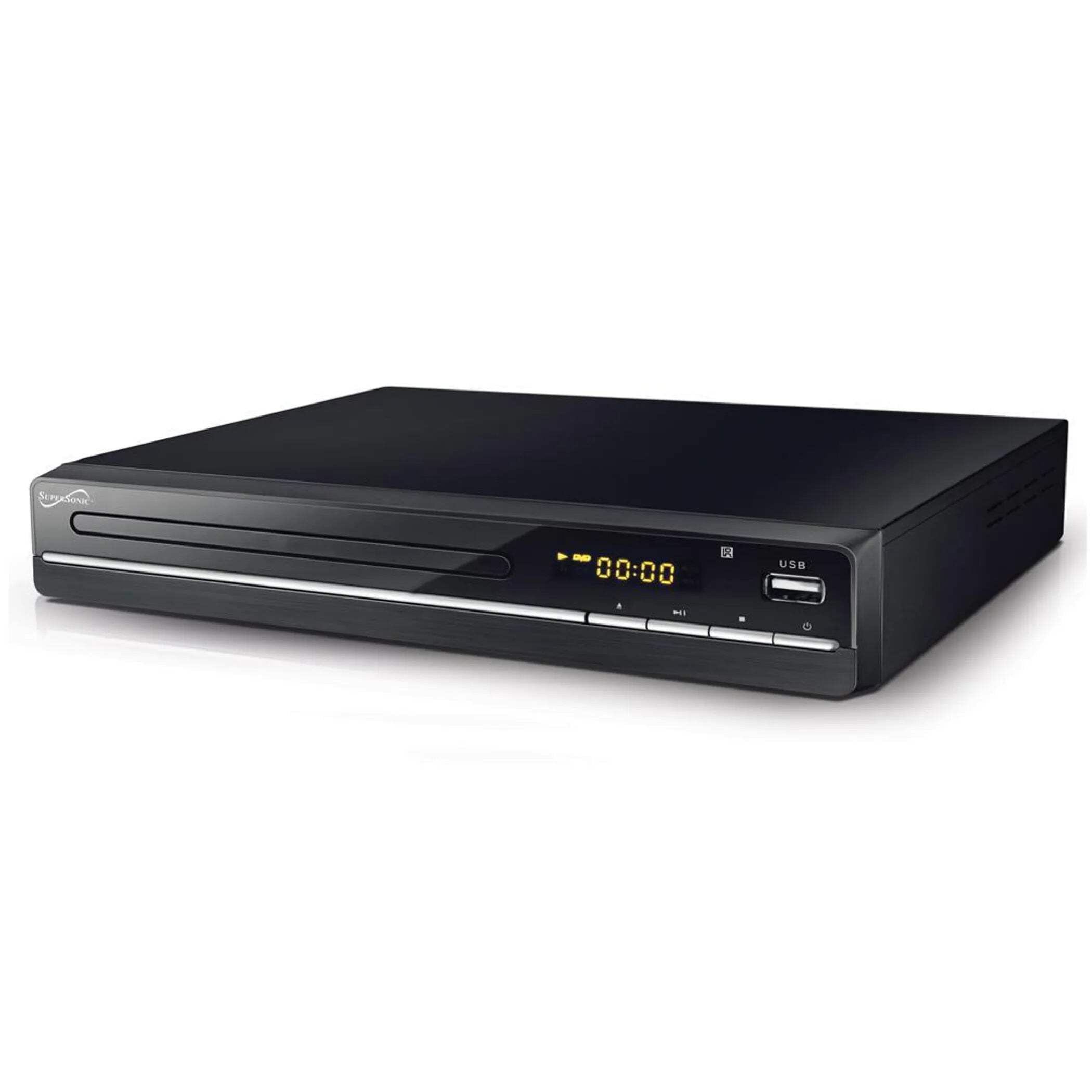
The image above displays the front panel of the SC-20H DVD Player. Key features include:
- Disc Tray: For inserting DVDs, VCDs, CDs, and other compatible discs.
- Display Screen: Shows playback time, track number, and other operational information.
- Control Buttons: Includes Play/Pause, Stop, Previous, Next, and Power buttons for direct control.
- USB Input: Allows connection of USB flash drives for media playback.
- SD Card Slot: For inserting SD cards to play media files. (Note: The image primarily shows the USB port, but the product features indicate an SD input as well, typically located near the USB port or on the side).
4.2 Rear Panel
The rear panel of the DVD player contains all the necessary connection ports for audio and video output.
- HDMI Output: Connects to an HDMI-enabled TV or display for high-definition audio and video.
- Composite A/V Output (RCA): Yellow (Video), White (Left Audio), Red (Right Audio) jacks for standard definition connection to older TVs.
- Component YUV Output: Y (Luminance), Pb (Blue difference), Pr (Red difference) jacks for progressive scan video output, offering better quality than composite.
- Power Input: For connecting the power supply cable.
5. Setup
5.1 Connecting to a Television
Choose one of the following connection methods:
- HDMI Connection (Recommended):
- Connect one end of an HDMI cable (not included) to the HDMI OUT port on the DVD player.
- Connect the other end of the HDMI cable to an HDMI IN port on your television.
- Select the corresponding HDMI input on your TV using its remote control.
- Composite A/V Connection:
- Connect the yellow RCA cable to the VIDEO OUT port on the DVD player and the VIDEO IN port on your TV.
- Connect the white RCA cable to the L AUDIO OUT port on the DVD player and the L AUDIO IN port on your TV.
- Connect the red RCA cable to the R AUDIO OUT port on the DVD player and the R AUDIO IN port on your TV.
- Select the corresponding A/V input on your TV.
- Component YUV Connection:
- Connect the Y, Pb, and Pr cables to the corresponding YUV OUT ports on the DVD player and YUV IN ports on your TV.
- For audio, use the white and red RCA cables to connect the L/R AUDIO OUT ports on the DVD player to the L/R AUDIO IN ports on your TV.
- Select the corresponding Component input on your TV.
5.2 Power Connection
After connecting the audio/video cables, plug the power supply cable into the DVD player's power input and then into a wall outlet.
6. Operating Instructions
6.1 Basic Disc Playback
- Power On: Press the Power button on the front panel or remote control.
- Insert Disc: Press the OPEN/CLOSE button to open the disc tray. Place a compatible disc (DVD, VCD, CD, KODAK CD, DVD±R/RW, CD-R, CD-RW) onto the tray with the label side facing up. Press OPEN/CLOSE again to close the tray.
- Playback: The player will typically begin playback automatically. If not, press the PLAY button.
- Pause/Resume: Press the PAUSE button to temporarily stop playback. Press PLAY again to resume.
- Stop: Press the STOP button to end playback.
- Skip Tracks/Chapters: Use the PREVIOUS and NEXT buttons to navigate between tracks or chapters.
6.2 USB/SD Media Playback
- Insert Media: Insert a USB flash drive into the USB port or an SD card into the SD card slot.
- Select Source: Use the SOURCE or USB/SD button on the remote control to switch to the USB or SD input.
- Browse Files: Use the navigation buttons (Up, Down, Left, Right) and OK button on the remote to browse through your media files (MP3, video formats).
- Play File: Select the desired file and press the PLAY button to begin playback.
6.3 System Settings (OSD Menu)
Access the On-Screen Display (OSD) menu to configure various settings:
- Access Menu: Press the SETUP button on the remote control.
- Navigation: Use the navigation buttons to move through menu options.
- Selection: Press OK to select an option or enter a sub-menu.
- Exit: Press SETUP again to exit the menu.
Key settings include:
- Language: Set OSD menu language and subtitle language (supports multiple languages).
- Aspect Ratio: Choose between 4:3 (Standard) and 16:9 (Widescreen) for video output.
- Parental Control: Set a password and rating level to restrict playback of certain content.
- Audio Settings: Adjust audio output modes (e.g., Surround).
7. Maintenance
Proper maintenance ensures the longevity of your DVD player:
- Cleaning the Unit: Wipe the exterior of the player with a soft, dry cloth. Do not use liquid cleaners or aerosol sprays.
- Cleaning Discs: Use a soft, lint-free cloth to wipe discs from the center outwards. Do not use abrasive cleaners or solvents.
- Disc Handling: Always hold discs by their edges to avoid fingerprints and scratches. Store discs in their cases when not in use.
- Ventilation: Ensure the ventilation openings are clear of dust and debris to prevent overheating.
8. Troubleshooting
If you encounter issues, refer to the following common problems and solutions:
| Problem | Possible Cause | Solution |
|---|---|---|
| No power | Power cable not connected; Power outlet faulty | Ensure power cable is securely plugged in. Test the outlet with another device. |
| No picture | Incorrect video connection; Wrong TV input selected | Check video cables (HDMI, Composite, Component) are correctly connected. Select the correct input source on your TV. |
| No sound | Incorrect audio connection; TV/player volume too low; Mute activated | Check audio cables (HDMI, RCA) are correctly connected. Increase volume on TV and player. Deactivate mute function. |
| Disc not playing | Disc inserted incorrectly; Disc is dirty or scratched; Incompatible disc format | Ensure disc is inserted label-side up. Clean the disc. Check if the disc format is supported (DVD, VCD, CD, KODAK CD, DVD±R/RW, CD-R, CD-RW, MP3). |
| USB/SD media not playing | Incorrect source selected; Incompatible file format; USB/SD device faulty | Select USB or SD source. Ensure media files are compatible. Try another USB/SD device. |
9. Specifications
Detailed technical specifications for the Supersonic SC-20H DVD Player:
- Model: SC-20H
- Brand: Supersonic
- Disc Compatibility: DVD, VCD, KODAK CD, DVD±R/RW, CD, CD-R, CD-RW, MP3
- Video Output: HDMI, Composite A/V, Component YUV
- Audio Output Mode: Surround
- Resolution: 1920x1080 (via HDMI)
- Connectivity: USB 2.0, SD Card Slot
- Power Supply: 110-240V, 50/60Hz
- Power Consumption: 15W
- Dimensions (L x W x H): 10.5 x 10 x 3.3 inches
- Item Weight: 1.75 pounds
- Special Features: Multi-language subtitles (up to 32 languages), PAL/NTSC compatible, Parental Lock, Aspect Ratio (4:3, 16:9)
10. Warranty & Support
For warranty information and technical support, please refer to the documentation included with your purchase or visit the official Supersonic website. Keep your proof of purchase for any warranty claims.


