
hipargero A30
HIPARGERO A029 Aquarium LED Light A30 User Manual
Model: A30 | Brand: HIPARGERO
1. Introduction
This manual provides comprehensive instructions for the installation, operation, and maintenance of your HIPARGERO A029 Aquarium LED Light A30. This 3rd generation LED light is designed for saltwater coral reef and fish tanks, featuring touch control, a display screen, and integrated timer functions including sunrise and sunset simulation.
Please read this manual thoroughly before using the product to ensure proper function and longevity.
2. Safety Information
- Always disconnect the power supply before performing any maintenance or installation.
- Ensure the power cord is not damaged and is properly connected to a suitable power outlet (110 Volts).
- Do not immerse the light fixture or power adapter in water.
- Keep the light away from flammable materials.
- This product is designed for indoor use with aquariums only.
- Ensure the tank glass thickness is less than or equal to 0.8 inches (20mm) for secure bracket mounting.
3. Package Contents
Verify that all items are present in the package:
- HIPARGERO A029 Aquarium LED Light Unit
- Adjustable Mounting Bracket
- Power Supply Adapter
4. Product Features
- High Quality LED & Reef Spectrum: Features 5W high-power LEDs (Royal blue, Blue, White, Violet) with a professional blue and white light proportion to mimic deep-sea environments and enhance coral coloration.
- Two Dimmable Channels with Touch Control: Light intensity can be adjusted from 0% to 100% for both blue and white channels independently via touch controls.
- Integrated Timer & Screen: Built-in timer allows setting working hours from 1 to 24 hours per day. The display screen shows working time and channel brightness.
- Sunrise/Sunset Function: Supports a 30-minute sunrise and sunset simulation period for a gradual light transition.
- Intelligent Fan Control: The cooling fan operates only when LEDs are active, ensuring quiet operation when the light is off. Noise levels are below 44.7 dB(A).
- Efficient Heat Dissipation: Utilizes a high rotation fan and all-aluminum multi-fin cooling for effective heat management.
- New Wider Adjustable Rack: The updated bracket clamp supports both rimmed and rimless tanks, suitable for tank lengths of 10"-18" and glass thickness up to 0.8 inches.
- Self-test Function: Upon AC power connection, the internal CPU performs a self-test of control circuits, LEDs, and fan. During this 10-second process, blue and white LEDs will fade on and off.
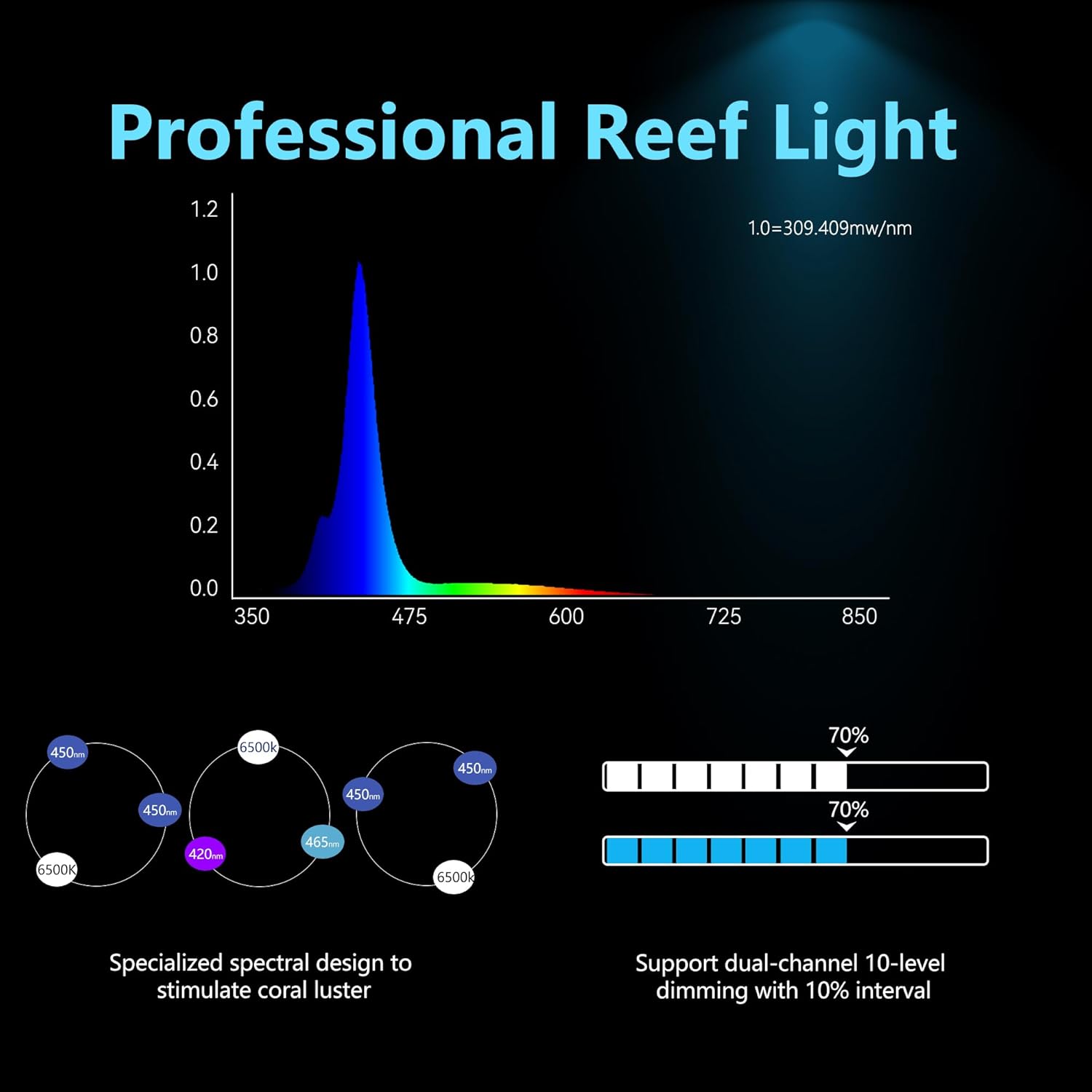
Figure 4.1: Spectral distribution of the HIPARGERO A029 LED light, optimized for coral health and coloration.

Figure 4.2: Illustration of the efficient heat dissipation system, including the high rotation fan and multi-fin cooling.
5. Setup and Installation
- Attach the Mounting Bracket: Securely attach the adjustable mounting bracket to your aquarium. Ensure the bracket is stable and the light unit is positioned correctly over the tank. The bracket is designed for tank glass thickness up to 0.8 inches (20mm).
- Mount the LED Light: Slide the HIPARGERO A029 LED light unit onto the bracket. Adjust the height and distance as needed for optimal light coverage. The bracket allows for a height adjustment between 2.87" and 4.21" and a distance adjustment between 6.25" and 8.62" from the tank edge.
- Connect Power: Plug the power supply adapter into the light unit, then connect the adapter to a standard 110V AC power outlet.
- Initial Self-Test: Upon plugging in, the light will perform a self-test. The blue and white LEDs will flash briefly (approximately 10 seconds). This is normal operation.

Figure 5.1: HIPARGERO A029 Aquarium LED Light A30 mounted on an aquarium.

Figure 5.2: Adjustable bracket dimensions and compatibility for the A029 light.
6. Operation
The A029 light features touch controls for easy adjustment.
6.1 Setting Working Hours (Timer)
- Touch the Timer button repeatedly to cycle through and set the desired working hours per day (1-24 hours).
- The screen will display the selected working hours.
- The timer starts counting when the AC power is connected. If you want the light to start at a specific time (e.g., 7:00 AM), plug in the light at that exact time.
6.2 Adjusting Brightness
- Touch the "W" button to adjust the brightness of the white LED channel.
- Touch the "B" button to adjust the brightness of the blue LED channel.
- Brightness can be set from 0% to 100%.
6.3 Activating Sunrise/Sunset Function
- After setting the working hours and brightness, press and hold the Timer button for approximately 5 seconds to toggle the sunrise/sunset function ON or OFF.
- When the function is turned ON, the white channel LEDs will flash three times.
- When the function is turned OFF, the blue channel LEDs will flash three times.
- If sunrise is enabled, the light will gradually increase in brightness over 30 minutes at the start of the set working period. Similarly, it will gradually decrease in brightness over 30 minutes before turning off.
- The default setting for sunrise/sunset is OFF.

Figure 6.1: Touch control panel and display screen on the A029 light.

Figure 6.2: Example of a 24-hour light cycle with sunrise and sunset simulation.
7. Maintenance
- Cleaning: Regularly wipe the light fixture and lens with a soft, damp cloth to remove salt creep, dust, and water spots. Ensure the light is unplugged before cleaning. Do not use abrasive cleaners or solvents.
- Fan Maintenance: Periodically check the cooling fan for any obstructions. Ensure proper airflow to maintain efficient heat dissipation.
- Bracket Inspection: Inspect the mounting bracket periodically to ensure it remains securely fastened to the aquarium and shows no signs of corrosion or wear.
8. Troubleshooting
| Problem | Possible Cause | Solution |
|---|---|---|
| Light does not turn on. | No power, faulty connection, or internal issue. | Check power cord connection. Ensure outlet has power. If problem persists, contact support. |
| LEDs flash briefly upon power-on. | Normal self-test function. | No action required. This is part of the normal startup sequence. |
| Sunrise/Sunset function not working. | Function not enabled or incorrect timer setting. | Ensure you have pressed and held the Timer button for 5 seconds to enable the function (white LEDs flash three times). Verify working hours are set correctly. |
| Fan is not running. | Intelligent fan control; LEDs are off or dimmed very low. | The fan only operates when LEDs are active. If LEDs are on and fan is not, check for obstructions or contact support. |
| Light intensity is too low/high. | Brightness settings are incorrect. | Use the 'W' and 'B' touch buttons to adjust white and blue channel brightness to desired levels. |
9. Specifications
| Feature | Detail |
|---|---|
| Model | A30 (A029 3rd Generation) |
| Power Consumption | 30 Watts |
| Voltage | 110 Volts |
| Light Source Type | LED (5W chips: Royal blue, Blue, White, Violet) |
| Color Temperature | 6500 Kelvin |
| Brightness | 2500 Lumens |
| Dimmable | Yes, two independent channels (0-100%) |
| Control Method | Touch Control |
| Timer Function | 1-24 hour adjustable timer, with Sunrise/Sunset (30 min) |
| Product Dimensions | 11.8"L x 9.25"W x 2.4"H |
| Item Weight | 2.01 pounds |
| Mounting Type | Adjustable Bracket Mount (for tank glass up to 0.8" thick) |
| Material | Aluminum, Plastic, Acrylic |
| Recommended Tank Size | 5-20 gallons (nano reef tanks) |
10. Warranty and Support
The HIPARGERO A029 Aquarium LED Light A30 comes with a 1-year warranty from the date of purchase.
For technical assistance, troubleshooting, or warranty claims, please contact HIPARGERO customer support. Any questions will be replied to within 24 hours.
You may also refer to the official User Manual (PDF) for additional information.
Related documentsA30

Ask a question about this manual
Ask about setup, troubleshooting, compatibility, parts, safety, or missing instructions. Manuals+ will review the question and use this page’s manual context to help answer it.