
1. Introduction
The Philips Hue White Ambiance Fair Dimmable LED Smart Flushmount is designed to transform your home lighting experience. It offers wireless control via your smartphone or tablet, allowing you to select the ideal light setting for various activities, from reading and relaxing to concentrating and energizing. This sleek light, featuring brushed aluminum accents, provides a range of warm white to cool white light to create the perfect ambiance. For a complete Philips Hue experience, the Hue Bridge (sold separately) is required. This flushmount light can be installed in any location suitable for a standard overhead or wall light and integrates seamlessly with the Philips Hue App and other accessories like the Hue Dimmer Switch, Hue Tap, or Hue Motion Sensor. It also supports automation with existing Nest or SmartThings systems.
2. Safety Information
Please read all instructions carefully before installation and use. Retain this manual for future reference.
- Electrical Safety: Installation should be performed by a qualified electrician or a knowledgeable individual. Ensure power is disconnected at the circuit breaker before installation, maintenance, or removal.
- Proper Use: This product is designed for indoor use only. Do not expose to water or excessive moisture.
- Handling: Handle the light fixture with care. Avoid dropping or subjecting it to strong impacts.
- Cleaning: Clean only with a soft, dry cloth. Do not use abrasive cleaners or solvents.
- Disposal: Dispose of the product and its components responsibly according to local regulations.
3. Package Contents
The package includes the following items:
- 1 x Philips Hue White Ambiance Fair Flushmount Light
- User Manual (this document)
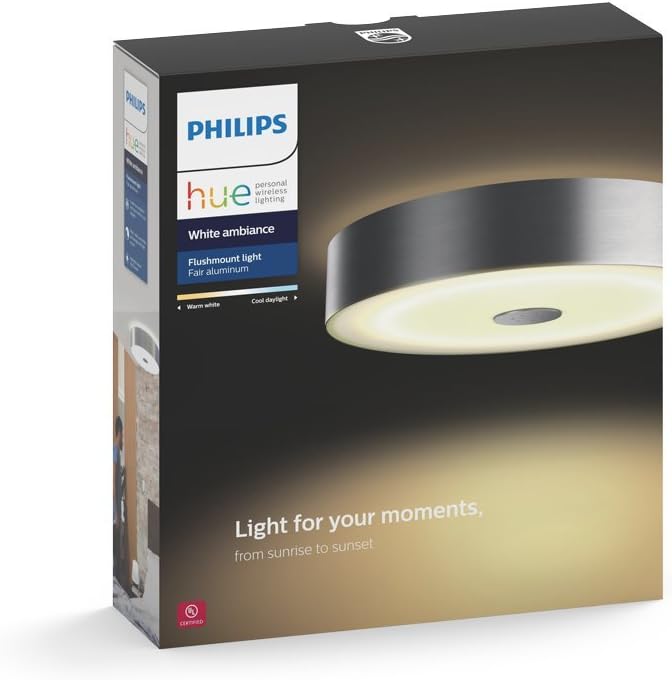
Figure 3.1: Product packaging showing the Philips Hue White Ambiance Fair Flushmount Light.
4. Specifications
| Feature | Detail |
|---|---|
| Brand | Philips Hue |
| Model Name | Hue White Ambiance Fair Dimmable |
| Model Number | 4100248U7 |
| Color | Brush Aluminum |
| Material | Aluminum |
| Dimensions | 17.5 x 17.5 x 8.4 inches |
| Item Weight | 11.1 pounds |
| Light Source Type | LED |
| Brightness | 3000 Lumen |
| Wattage | 39 watts |
| Voltage | 120 Volts |
| Connectivity Protocol | Zigbee |
| Control Method | Voice (via Alexa, Google Assistant, Apple HomeKit) |
| Installation Type | Flush Mount |
| Indoor/Outdoor Usage | Indoor |
5. Setup and Installation
The Philips Hue White Ambiance Fair Flushmount Light is designed for easy integration into your smart home system. A Philips Hue Bridge (sold separately) is required for full functionality and smart control.
5.1 Pre-Installation Checklist
- Ensure power is turned off at the circuit breaker before beginning installation.
- Confirm you have a Philips Hue Bridge connected to your home network.
- Gather necessary tools: screwdriver, wire strippers, electrical tape (if needed).
- Consider having a second person assist with installation, as the fixture can be heavy and awkward to hold while wiring.
5.2 Installation Steps
- Prepare Wiring: Carefully remove your existing light fixture. Ensure the electrical wires from the ceiling are properly stripped and ready for connection.
- Mounting Bracket: Attach the provided mounting bracket to your ceiling electrical box. Ensure it is securely fastened.
- Wire Connections: Connect the wires from the flushmount fixture to the corresponding wires from your ceiling (live to live, neutral to neutral, ground to ground). Use appropriate wire connectors (not always included, consider using lever-style connectors for ease).
- Secure Fixture: Carefully align the flushmount fixture with the mounting bracket and secure it using the provided screws. Note: Some users have reported challenges with aligning and securing the fixture due to recessed screw holes. Patience and a magnetic screwdriver may be helpful.
- Power On: Once the fixture is securely mounted and all connections are made, restore power at the circuit breaker.
- Pair with Hue Bridge: Open the Philips Hue App on your smartphone or tablet. Follow the in-app instructions to discover and add your new Philips Hue Fair Flushmount Light. You may need the serial number located on the fixture.

Figure 5.1: Overview of the Philips Hue setup process, including light installation, bridge connection, and app download.

Figure 5.2: The Philips Hue Fair Flushmount Light, showcasing its sleek design when installed.
6. Operating Instructions
Control your Philips Hue Fair Flushmount Light using various methods:
6.1 Philips Hue App Control
The Philips Hue App (available on iOS and Android) is the primary interface for controlling your light. Once paired with the Hue Bridge, you can:
- Turn On/Off: Toggle the light on or off.
- Dimming: Adjust brightness levels from 1% to 100%.
- Color Temperature: Change the light from warm white (e.g., 2200K) to cool daylight (e.g., 6500K) to suit your mood or activity.
- Scenes: Apply pre-set or custom light scenes for different ambiances (e.g., "Relax," "Concentrate," "Energize").
- Schedules & Routines: Set timers, schedules, and routines for automated lighting based on your daily habits.
- Away from Home Control: Control your lights remotely when you are not at home.

Figure 6.1: The Philips Hue App, demonstrating its intuitive interface for light control.
6.2 Voice Control
Integrate your Philips Hue system with popular voice assistants for hands-free control:
- Amazon Alexa: "Alexa, turn on the living room light."
- Google Assistant: "Hey Google, dim the kitchen light to 50%."
- Apple HomeKit: "Hey Siri, set the bedroom light to warm white."
Video 6.1: An official Philips Hue video demonstrating the versatility and control options of the Philips Hue smart lighting system, including voice control and app usage.
6.3 Smart Accessories
Enhance your control with optional Philips Hue accessories (sold separately):
- Hue Dimmer Switch: A wireless, battery-powered dimmer switch that can be mounted on a wall or used as a remote control.
- Hue Tap: A kinetic-powered switch that allows you to activate up to four pre-set light scenes without batteries.
- Hue Motion Sensor: Automatically turns lights on when motion is detected and off when no motion is present.

Figure 6.2: A user interacting with their Philips Hue lighting in a bedroom setting, demonstrating ambiance control.
7. Maintenance
The Philips Hue Fair Flushmount Light requires minimal maintenance to ensure optimal performance and longevity.
- Cleaning: Gently wipe the exterior of the fixture with a soft, dry, lint-free cloth. Do not use liquid cleaners, aerosols, or abrasive materials, as these can damage the finish or electrical components.
- Light Source: The LED light source is integrated and not user-replaceable. Do not attempt to open the fixture to replace bulbs.
- Regular Checks: Periodically check the fixture for any signs of damage or loose connections. If any issues are observed, disconnect power immediately and consult a qualified electrician.
8. Troubleshooting
If you encounter issues with your Philips Hue Fair Flushmount Light, refer to the following common troubleshooting steps:
| Problem | Possible Cause | Solution |
|---|---|---|
| Light does not turn on. | No power, loose wiring, fixture not paired. | Check circuit breaker. Ensure all electrical connections are secure. Verify the light is properly paired with the Hue Bridge in the app. |
| Light is unresponsive to app/voice commands. | Hue Bridge connectivity issue, Wi-Fi interference, light out of range. | Ensure Hue Bridge is powered on and connected to your network. Restart the Hue Bridge. Check Wi-Fi signal strength. Move the light closer to the Bridge if possible. |
| Light flickers or behaves erratically. | Loose wiring, incompatible dimmer switch (if not Hue-compatible), power fluctuations. | Check wiring connections. Ensure you are using a Hue-compatible dimmer or controlling via the app/Hue accessories. Consult an electrician if power fluctuations are suspected. |
| Difficulty during installation (e.g., alignment). | Design of mounting mechanism, lack of assistance. | As noted in Section 5.2, this can be challenging. Use a magnetic screwdriver. Consider having a second person assist. Loosen mounting screws slightly to allow for minor adjustments before final tightening. |
For further assistance, please visit the Philips Hue support website or contact customer service.
9. Warranty and Support
This Philips Hue White Ambiance Fair Flushmount Light comes with a 2-year limited warranty from the date of purchase. This warranty covers defects in materials and workmanship under normal use.
For warranty claims, technical support, or additional product information, please refer to the official Philips Hue website or contact their customer support channels. Keep your proof of purchase for warranty validation.
Online Resources:
10. Important Notes
- The full smart lighting experience requires the Philips Hue Bridge, sold separately.
- This fixture is designed to work with the Philips Hue ecosystem and may not be compatible with other smart lighting platforms without the Hue Bridge.
- The light output is 3000 lumens, with a color temperature range from warm white to cool white.
- Power consumption is 39 watts at 120 volts.


