
1. Introduction
This manual provides essential information for the safe and efficient operation of your MAD OWL WKL-ST1000RGB LED RGB Strobe Light. Please read this manual thoroughly before installation and use, and retain it for future reference.
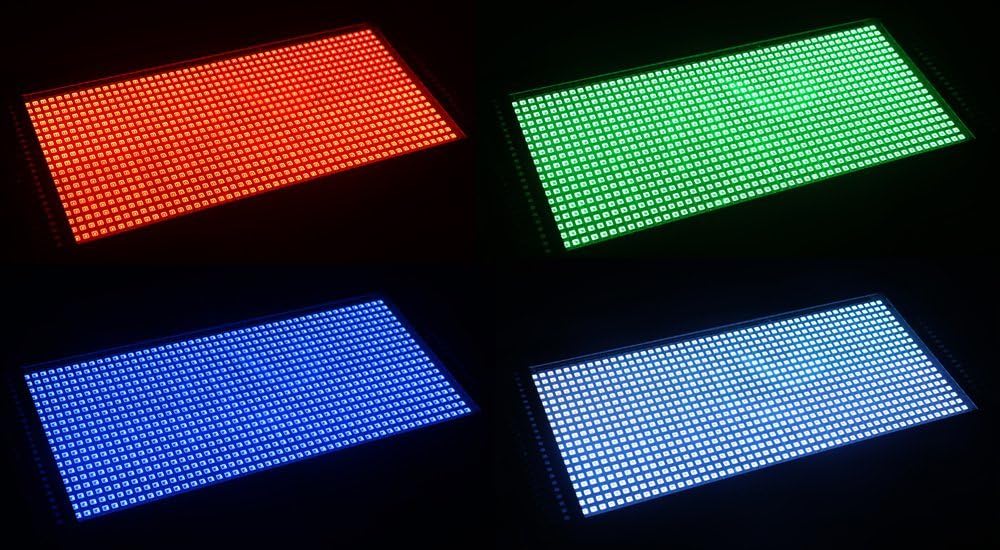
The MAD OWL WKL-ST1000RGB is a powerful 1000W RGB 3-in-1 LED strobe light designed for various event settings such as discos, ballrooms, KTVs, bars, clubs, parties, and weddings. It features a robust flashbulb design and operates on a wide voltage range of 90-240V.
2. Safety Information
Always observe the following safety precautions to prevent electric shock, fire, or injury:
- Power Supply: Ensure the power supply voltage matches the product's requirements (90-240V).
- Grounding: Always connect the unit to a properly grounded power outlet.
- Ventilation: Do not block ventilation openings. Ensure adequate airflow around the unit to prevent overheating.
- Moisture: Do not expose the unit to rain or moisture.
- Servicing: Refer all servicing to qualified personnel. Do not attempt to repair the unit yourself.
- Eye Safety: Avoid direct eye exposure to the light source, as it can cause eye damage.
- Mounting: Securely mount the fixture using appropriate hardware. Ensure the mounting surface can support the weight of the fixture.
3. Package Contents
Verify that all components are present and in good condition upon unpacking:
- MAD OWL WKL-ST1000RGB LED RGB Strobe Light
- Power Cable
- Mounting Bracket (pre-attached or separate)
- User Manual (this document)
4. Product Overview
The MAD OWL WKL-ST1000RGB is a high-power LED strobe light featuring RGB 3-in-1 LEDs for dynamic color mixing. Its robust construction and versatile mounting options make it suitable for professional stage and event lighting.


5. Setup
5.1 Mounting
The strobe light comes with a pre-attached mounting bracket for flexible installation. It can be mounted on a truss, ceiling, or placed on a flat surface.
- Ensure the mounting surface or truss can safely support the weight of the fixture (approximately 17.51 pounds).
- Use appropriate clamps (not included) to secure the mounting bracket to a truss.
- Adjust the angle of the fixture by loosening the side knobs on the bracket, setting the desired angle, and then tightening the knobs securely.
5.2 Power Connection
Connect the provided power cable to the power input on the rear panel of the strobe light and then to a grounded 90-240V AC power outlet.
5.3 DMX Connection (Optional)
For external control, connect a DMX controller to the 3-pin or 5-pin DMX IN port. Use the DMX OUT port to daisy-chain multiple units.
- Connect the DMX output of your controller to the DMX IN of the first strobe light.
- Connect the DMX OUT of the first strobe light to the DMX IN of the next strobe light in the chain.
- Terminate the DMX chain with a 120-ohm DMX terminator on the DMX OUT of the last fixture for reliable signal transmission.
6. Operating Instructions
6.1 Control Panel Overview
The rear panel features an LCD display and control buttons for navigating menus and adjusting settings.
- MENU: Access the main menu or go back to the previous menu level.
- UP/DOWN: Navigate through menu options or adjust parameter values.
- ENTER: Confirm selection or save settings.
6.2 Operating Modes
The strobe light typically supports several operating modes:
- DMX Mode: Allows control of all functions via an external DMX controller. Set the DMX address using the control panel.
- Auto Mode: The fixture runs through pre-programmed internal sequences.
- Sound Active Mode: The fixture reacts to sound via a built-in microphone.
- Master/Slave Mode: Link multiple units together where one acts as the master and others as slaves, synchronizing their operation.
6.3 Adjusting Strobe Effects and Colors
In DMX mode, refer to your DMX controller's manual and the strobe light's DMX chart (usually found in a separate DMX protocol document or advanced manual) to control specific channels for strobe rate, intensity, and RGB color mixing.
In Auto or Sound Active modes, you may be able to select different programs or adjust sensitivity/speed via the control panel.

7. Maintenance
Regular maintenance ensures optimal performance and extends the lifespan of your strobe light.
- Cleaning: Periodically clean the exterior casing and lens with a soft, lint-free cloth. Do not use abrasive cleaners or solvents.
- Ventilation: Ensure ventilation openings are free from dust and debris. Use compressed air to clear any blockages if necessary.
- Power Cable: Inspect the power cable for any damage. Replace immediately if frayed or broken.
- Internal Servicing: There are no user-serviceable parts inside. Do not open the casing.
8. Troubleshooting
| Problem | Possible Cause | Solution |
|---|---|---|
| No power | Power cable not connected; no power from outlet; faulty cable. | Check power cable connection; test outlet with another device; replace power cable. |
| Light not flashing/no output | Incorrect operating mode; DMX signal issue; internal fault. | Verify operating mode (e.g., DMX, Auto); check DMX connections and address; contact support if problem persists. |
| DMX control not working | Incorrect DMX address; faulty DMX cable; missing DMX terminator; DMX controller issue. | Set correct DMX address; check DMX cables; ensure terminator is used; test with another DMX controller. |
| Overheating | Blocked ventilation; prolonged use in high ambient temperature. | Ensure clear ventilation; allow unit to cool down; operate in a well-ventilated area. |
9. Specifications
| Feature | Detail |
|---|---|
| Model Number | WKL-ST1000RGB |
| Light Source Type | LED (RGB 3IN1) |
| Light Source Wattage | 1000 Watts |
| Voltage | 90-240V AC |
| Power Source | Corded Electric |
| Material | Glass (Finish Type) |
| Shape | Rectangular |
| Mounting Type | Bracket Mount |
| Item Weight | 17.51 pounds |
| Package Dimensions | 21.18 x 12.99 x 8.5 inches |
| UPC | 745750033488 |
10. Warranty and Support
For warranty information or technical support, please contact MAD OWL customer service. Details can typically be found on the product packaging or the official MAD OWL website.
Visit the official MAD OWL store for more information: MAD OWL Store