
Severin SC 7148
Severin SC 7148 Cordless Floor Washer-Dryer User Manual
1. Introduction
Thank you for choosing the Severin SC 7148 Cordless Floor Washer-Dryer. This appliance is designed to simplify your floor cleaning routine by washing, vacuuming, and drying hard lacquered floors in a single pass. Its cordless design and high-performance battery offer maximum flexibility and convenience.
Please read this manual carefully before operating the appliance to ensure safe and efficient use. Keep this manual for future reference.
2. Important Safety Instructions
- Always read all instructions before using the appliance.
- This appliance is intended for household use only. Do not use it for commercial purposes.
- Do not immerse the appliance, power cord, or plug in water or other liquids.
- Keep the appliance away from children and pets.
- Use only clean water and non-foaming detergents specifically designed for floor cleaning appliances.
- Do not use the appliance to pick up flammable or combustible liquids, or hot ashes.
- Ensure the dirty water tank is emptied and cleaned after each use to prevent odors and maintain hygiene.
- Do not use the appliance on pet hair or dense, dry dirt, as it is primarily designed for wet cleaning and liquid/light debris pickup.
- Always unplug the appliance before cleaning or performing maintenance.
3. Product Overview
Familiarize yourself with the components of your Severin SC 7148.

Figure 3.1: The Severin SC 7148 Cordless Floor Washer-Dryer, showcasing its sleek white and red design and upright stance.
Components:
- Main Unit with Handle
- Clean Water Tank (550 ml capacity)
- Dirty Water Tank (500 ml capacity)
- Brush Head with Suction Nozzle
- Interchangeable Brushes (Universal Red, Grey for Resistant Floors, Microfiber for Delicate Floors)
- Drip Tray
- Power Supply/Charger
4. Setup
4.1 Unpacking and Initial Charge
- Carefully remove all components from the packaging.
- Connect the power supply to the charging port on the appliance and plug it into a wall outlet.
- Allow the battery to fully charge for approximately 3.5 hours before first use. The charging indicator will show the status.
4.2 Filling the Clean Water Tank
- Remove the clean water tank from the main unit.
- Fill the tank with clean tap water (hot or cold). You may add a small amount of non-foaming floor cleaning detergent if desired. Do not exceed the maximum fill line.
- Securely reattach the clean water tank to the appliance.
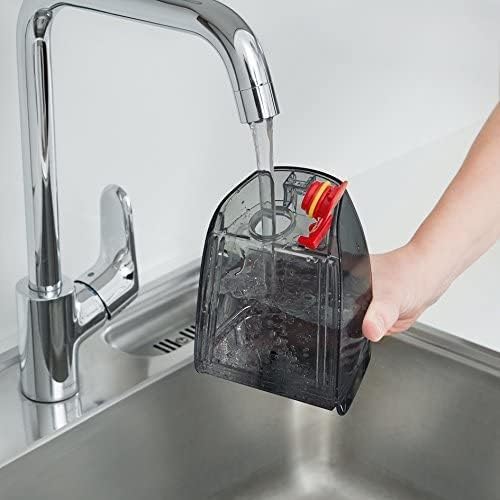
Figure 4.1: A hand holding the clean water tank under a faucet, filling it with water.
4.3 Attaching the Brush
- Select the appropriate brush for your floor type:
- Red Universal Brush: For normal floors such as parquet, laminate, and smooth tiles.
- Grey Brush: For resistant floors like planks, stone, and terraces.
- Microfiber Brush: For delicate floors such as cork.
- Align the chosen brush with the brush head and snap it into place.
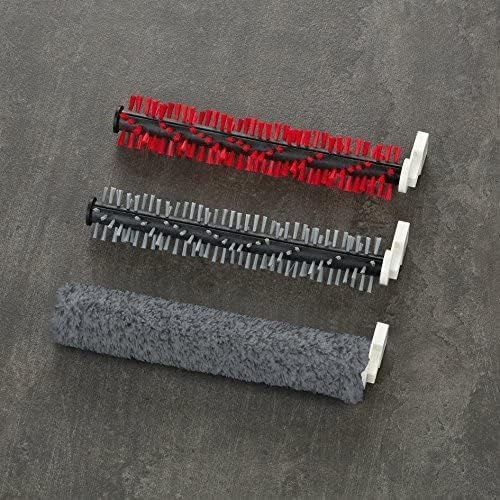
Figure 4.2: A close-up view of the three interchangeable brushes: red universal, grey for resistant floors, and microfiber for delicate surfaces.

Figure 4.3: The brush head with the transparent cover removed, showing the roller brush mechanism inside.
5. Operating Instructions
5.1 Starting the Appliance
- Ensure the clean water tank is filled and the dirty water tank is empty.
- Press the ON/OFF button to start the appliance.
- Select your desired power level (2 speeds available) using the control buttons on the handle.
5.2 Cleaning Your Floors
The Severin SC 7148 is designed for a single-pass cleaning action: washing, vacuuming, and drying.
- Push the appliance forward to dispense water and wash the floor.
- Pull the appliance backward to vacuum up the dirty water and dry the floor.
- Use the pulse button on the handle to control the water dosage for stubborn spots or less soiled areas.
- The 180° rotatable brush joint allows for easy maneuverability around furniture and obstacles.
- The appliance can cover an area of approximately 60 square meters on a single charge (30 minutes runtime).
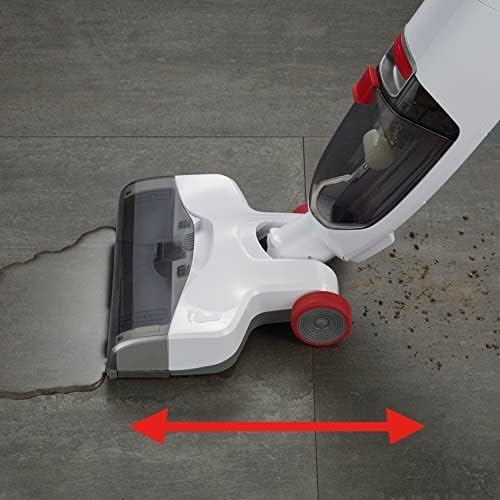
Figure 5.1: The Severin SC 7148 cleaning a tiled floor, showing the wet area being washed and the dry area after vacuuming, with arrows indicating the forward and backward motion.
5.3 Finishing Cleaning
- When finished, turn off the appliance by pressing the ON/OFF button.
- Place the appliance on its drip tray for storage.
6. Maintenance and Cleaning
Regular cleaning and maintenance will ensure optimal performance and extend the lifespan of your appliance.
6.1 Emptying and Cleaning the Dirty Water Tank
- After each use, remove the dirty water tank from the main unit.
- Carefully empty the dirty water into a sink or drain.
- Rinse the tank thoroughly with clean water to remove any residue.
- Allow the tank to air dry before reattaching it to the appliance.
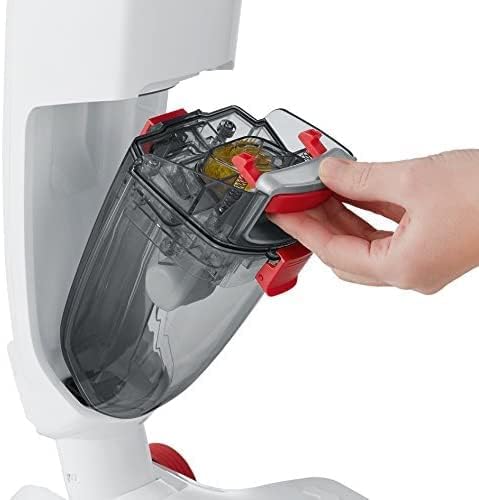
Figure 6.1: A hand removing the transparent dirty water tank from the main body of the floor washer.
6.2 Cleaning the Brushes and Brush Head
- Remove the brush from the brush head.
- Rinse the brush under running water to remove any dirt or debris.
- Clean the brush head and the suction nozzle area, ensuring no blockages.
- Allow the brush and brush head components to dry completely before reassembling.
6.3 General Cleaning and Storage
- Wipe the exterior of the appliance with a damp cloth. Do not use abrasive cleaners.
- Store the appliance in a dry place, preferably on its drip tray, to prevent water marks on your floor.
7. Troubleshooting
| Problem | Possible Cause | Solution |
|---|---|---|
| Appliance does not turn on. | Battery is not charged. | Charge the battery for 3.5 hours. |
| Poor suction/floor remains wet. | Dirty water tank is full or clogged. Suction nozzle is blocked. | Empty and clean the dirty water tank. Clean the suction nozzle and brush head thoroughly. |
| No water dispensed. | Clean water tank is empty. Water dispensing nozzle is blocked. | Refill the clean water tank. Check and clean the water dispensing nozzle. |
| Unpleasant odor during use. | Dirty water tank or brushes are not cleaned properly. | Thoroughly clean all removable parts, especially the dirty water tank and brushes, after each use. |
If you encounter problems not listed here or if the issue persists, please contact Severin customer support.
8. Technical Specifications
| Feature | Specification |
|---|---|
| Brand | Severin |
| Model | SC 7148 |
| Color | White-Garnet Red |
| Product Dimensions | 26 x 27 x 1.1 cm |
| Weight | 3 kg |
| Material | Plastic |
| Number of Speeds | 2 |
| Noise Level | 85 dB |
| Battery Runtime | 30 minutes |
| Charging Time | 3.5 hours |
| Clean Water Tank Capacity | 550 ml |
| Dirty Water Tank Capacity | 500 ml |
| Special Features | Cordless, Washer-Dryer Function, 3 Interchangeable Brushes |
| Included Components | 3 interchangeable brushes, drip tray, power supply |
9. Warranty and Support
Severin products are manufactured to high-quality standards and come with a manufacturer's warranty. Please refer to the warranty card included with your purchase for specific terms and conditions.
For technical support, spare parts, or warranty claims, please contact Severin customer service. Contact information can typically be found on the Severin official website or on your product packaging.
Website: www.severin.com
Related documentsSC 7148

Ask a question about this manual
Ask about setup, troubleshooting, compatibility, parts, safety, or missing instructions. Manuals+ will review the question and use this page’s manual context to help answer it.