
TechCare Massager PRO
TechCare Massager PRO TENS Unit Muscle Stimulator
User Manual
Introduction
The TechCare Massager PRO is a versatile, dual-channel, battery-powered device designed for both Transcutaneous Electrical Nerve Stimulation (TENS) and Powered Muscle Stimulation (PMS). This unit is engineered to provide effective pain relief and muscle rehabilitation through its advanced features, including a large LCD display, 24 pre-programmed modes, and two independent outputs. Its compact design and built-in lithium battery make it convenient for use at home or on the go.
Product Features
- Dual-Channel Output: Allows for simultaneous treatment of two different body areas or two users.
- 24 Pre-programmed Modes: Includes a variety of massage techniques such as Tapping, Acupuncture, Deep Tissue, Foot, Cupping, and Combo, catering to diverse needs.
- Adjustable Timer: Sessions can be set from 20 to 60 minutes using the "T" button.
- Rechargeable Lithium Battery: Provides up to 20 hours of continuous use on a single charge.
- Large LCD Display: Clear and easy-to-read screen for mode, intensity, and timer settings.
- Portable Design: Compact and lightweight for convenient transport and discreet use.
Package Contents
Your TechCare Massager PRO package includes the following items:
- 1 x TechCare Massager PRO Dual A-B Massager Unit
- 1 x Controller
- 2 x Large Electrode Pads (1 Pair)
- 6 x Medium Electrode Pads (3 Pairs)
- 2 x Small Electrode Pads (1 Pair)
- 2 x Electrode Cables
- 1 x User's Manual
- 1 x USB Cable
- 1 x Electrode Pad and Wire Holder
- 1 x Treatment Points Chart

Figure 1: Complete TechCare Massager PRO kit. This image displays all components included in the package, such as the main unit, various sizes of electrode pads, connecting cables, and the user manual.
Setup
- Charge the Device: Before first use, fully charge the TechCare Massager PRO unit using the provided USB cable. Connect the USB cable to the device and a compatible USB power source (e.g., computer USB port, wall adapter). The battery indicator on the LCD screen will show charging progress.
- Attach Electrode Pads: Select the appropriate size of electrode pads for the area you wish to treat. Ensure the skin is clean and dry before applying. Gently peel the pads from their protective film.
- Connect Electrode Cables: Insert the pin connectors of the electrode cables into the output ports on the top of the device. Each cable has two leads, allowing two pads to be connected per cable. Attach the other end of the electrode cables to the metal studs on the electrode pads.
- Apply Pads to Skin: Firmly press the adhesive side of the electrode pads onto the desired treatment area on your body. Ensure good contact for optimal performance.
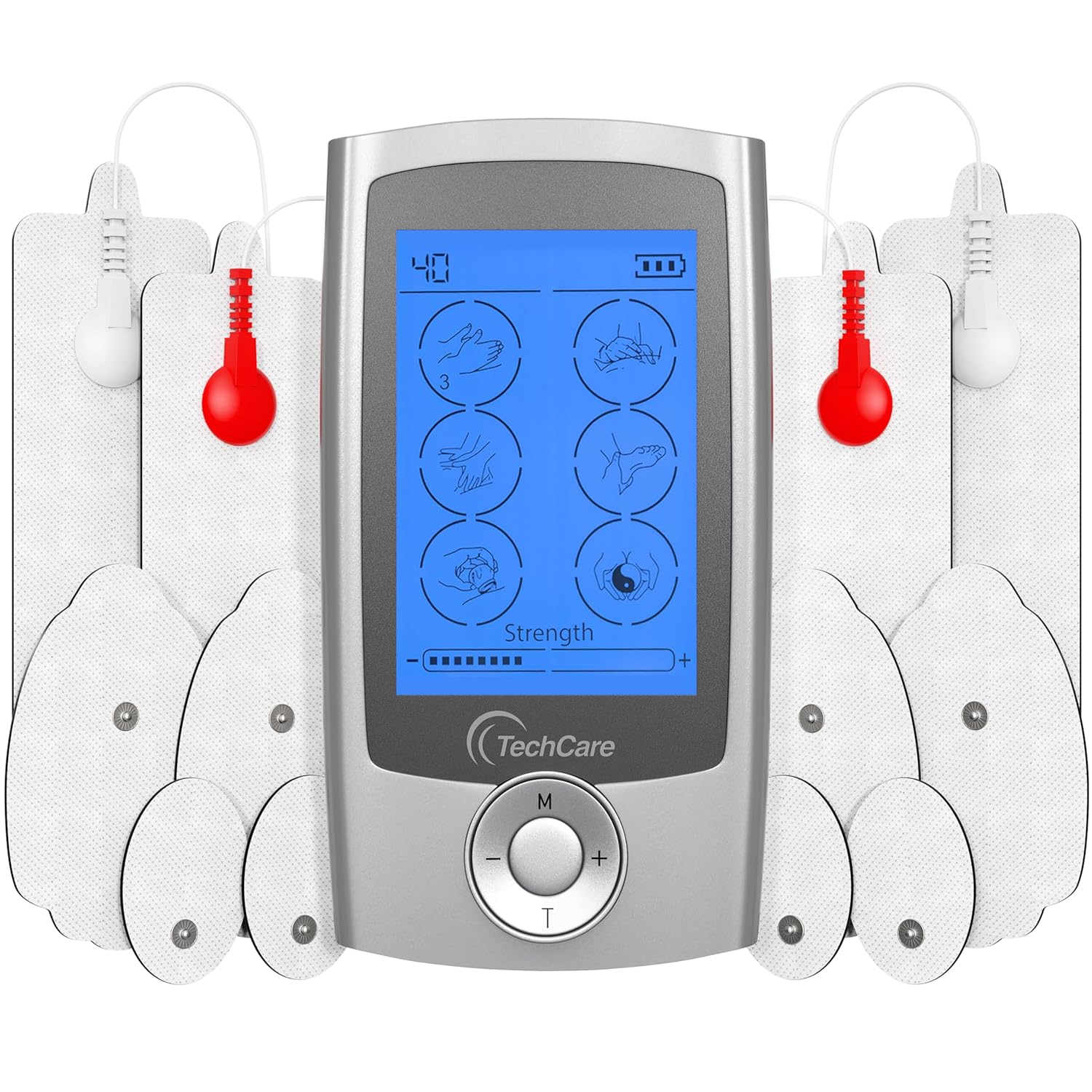
Figure 2: TechCare Massager PRO unit with connected electrode pads. This image illustrates the main device with cables and pads attached, ready for application.
Operating Instructions
- Power On: Press and hold the "M" (Mode) button for a few seconds to turn on the device. The LCD screen will illuminate.
- Select Mode: Press the "M" button repeatedly to cycle through the 24 pre-programmed massage modes. Each press will display a different mode icon on the screen.
- Adjust Intensity: Use the "+" button to increase the intensity of the stimulation and the "-" button to decrease it. Start with a low intensity and gradually increase until you feel a comfortable, yet effective, sensation. The intensity level will be displayed on the screen.
- Set Timer: Press the "T" (Timer) button to adjust the treatment duration. The timer can be set from 20 to 60 minutes. The remaining time will be displayed on the LCD.
- Power Off: To turn off the device, press and hold the "M" button until the screen goes blank. The device will also automatically shut off once the timer completes.

Figure 3: Detailed view of the TechCare Massager PRO's LCD display and controls. This image highlights the time indicator, battery indicator, 6 massage modes display, strength indicator, mode selection button, strength adjusters, and time adjuster.
Modes and Programs
The TechCare Massager PRO offers 24 distinct pre-programmed modes, each designed to provide a specific type of stimulation for various needs. These modes combine different pulse patterns, frequencies, and durations to target different muscle groups and pain types. Experiment with different modes to find what works best for your specific condition.
Common modes include:
- Tapping
- Acupuncture
- Deep Tissue
- Foot Massage
- Cupping
- Combination (Combo)
Refer to the included "Treatment Points Chart" for detailed information on each mode and recommended applications.
Pad Placement Guide
Proper placement of the electrode pads is crucial for effective and safe treatment. Always refer to the "Treatment Points Chart" included in your package for specific recommendations based on the area of the body you intend to treat. General guidelines include:
- Place pads on clean, dry, and healthy skin.
- Avoid placing pads over open wounds, rashes, or irritated skin.
- Avoid placing pads directly over joints (e.g., knee cap, elbow) or bony prominences.
- For pain relief, place pads on or around the area of discomfort.
- For muscle stimulation, place pads on the belly of the muscle you wish to stimulate.
- Maintain at least one inch of space between pads.

Figure 4: Example of electrode pad arrangement. This image shows the device surrounded by electrode pads, illustrating how they connect and can be positioned for different applications.
Maintenance
- Cleaning the Device: Wipe the main unit with a soft, damp cloth. Do not use abrasive cleaners or immerse the device in water.
- Caring for Electrode Pads: After each use, place the electrode pads back onto their protective film. If the pads lose their adhesiveness, gently clean the adhesive surface with a drop of water and let them air dry. Replace pads when they no longer stick effectively.
- Storage: Store the device and accessories in a cool, dry place, away from direct sunlight and extreme temperatures. Use the provided electrode pad and wire holder to keep cables and pads organized.
- Battery Care: To prolong battery life, avoid fully discharging the device frequently. Charge the unit regularly, even if not in use for extended periods.

Figure 5: Electrode pads and storage pouch. This image shows the electrode pads on their holder and the TechCare branded pouch, emphasizing proper storage.
Troubleshooting
| Problem | Possible Cause | Solution |
|---|---|---|
| Device does not turn on. | Low battery or not charged. | Charge the device fully using the provided USB cable. |
| No sensation or weak sensation. | Pads not properly attached, pads worn out, or intensity too low. | Ensure pads are firmly attached to clean skin. Replace old pads. Increase intensity gradually using the "+" button. Check cable connections. |
| Pads not sticking. | Pads are dirty or worn out. | Clean pads gently with a drop of water and air dry. Replace pads if they are no longer adhesive. |
| Display is dim or flickering. | Low battery. | Recharge the device. |
Specifications
- Model: TechCare Massager PRO
- Channels: Dual-Channel (A-B Output)
- Modes: 24 Pre-programmed
- Timer: Adjustable 20-60 minutes
- Battery: Built-in Rechargeable Lithium Battery
- Battery Life: Up to 20 hours continuous use
- Package Dimensions: 6.1 x 3.58 x 3.03 inches
- Item Weight: 11.68 ounces
- Manufacturer: Otto Trade Inc
- ASIN: B0722Q9F6Z
- GTIN/UPC: 617923549013
Warranty and Support
The TechCare Massager PRO comes with a LIFE TIME LIMITED WARRANTY. This warranty covers defects in materials and workmanship under normal use. For warranty claims or technical support, please contact TechCare Massager customer service. Details for contacting support can typically be found on the product packaging or the official TechCare Massager website.
For additional information or assistance, please visit the TechCare Massager Store.
Related documentsPRO

Ask a question about this manual
Ask about setup, troubleshooting, compatibility, parts, safety, or missing instructions. Manuals+ will review the question and use this page’s manual context to help answer it.