
Adastra 952.864UK
Adastra Induction Loop Amplifier LA-300 mkII User Manual
Model: 952.864UK
Introduction
This manual provides comprehensive instructions for the safe and efficient operation of your Adastra Induction Loop Amplifier LA-300 mkII. Please read this manual thoroughly before use and retain it for future reference.
The Adastra LA-300 mkII is an induction amplifier designed to drive a cable loop, providing assisted listening for hearing aid users in public and commercial buildings. It is suitable for hearing aids fitted with a "T" switch.
Safety Instructions
- Power Supply: Ensure the correct power supply (110/240Vac, 50/60Hz) is used as specified. Disconnect from mains before cleaning or servicing.
- Ventilation: Do not block ventilation openings. Ensure adequate airflow around the unit to prevent overheating.
- Moisture: Do not expose the unit to rain or moisture. Avoid placing objects filled with liquids, such as vases, on the unit.
- Servicing: Refer all servicing to qualified service personnel. Do not attempt to repair the unit yourself.
- Placement: Place the unit on a stable, level surface. Avoid placing it near heat sources or in direct sunlight.
- Loop Cable: Ensure the induction loop cable is installed correctly and safely to avoid tripping hazards.
Package Contents
Please check the contents of the packaging to ensure all items are present and in good condition.
- Adastra Induction Loop Amplifier LA-300 mkII
- IEC Mains Power Cable
- User Manual (this document)

Image: The Adastra LA-300 mkII Induction Loop Amplifier as packaged in its brown cardboard box, indicating the model name and "300m² max. area coverage".
Product Features
The Adastra LA-300 mkII Induction Loop Amplifier offers the following key features:
- Suitable for hearing aids fitted with a "T" switch.
- Mic/line level switch for each input.
- Phantom power switch for each input.
- Tamper proof channel volume, bass & treble and loop current level controls.
- Adjustable metal loss correction.
- Alarm contacts for built-in siren.
- Priority switchable for channel 1.
- Peak current LED indication.
- 19" rack mountable design.
Controls and Connections
Front Panel
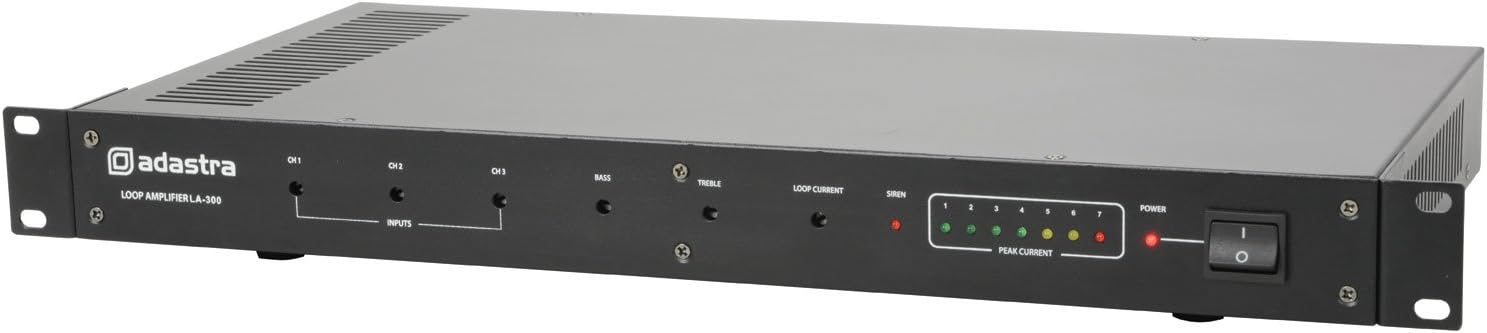
Image: Front panel of the Adastra LA-300 mkII amplifier, showing input level controls (CH1, CH2, CH3), Bass, Treble, Loop Current, Siren, Peak Current LEDs, and Power switch.
- CH1, CH2, CH3 Input Level Controls: Adjusts the input sensitivity for each channel. These are tamper-proof and require a screwdriver.
- Bass Control: Adjusts the low-frequency response. Tamper-proof.
- Treble Control: Adjusts the high-frequency response. Tamper-proof.
- Loop Current Control: Adjusts the output current to the induction loop. Tamper-proof.
- Siren LED: Indicates activation of the built-in siren (if connected to alarm contacts).
- Peak Current LEDs: A series of LEDs indicating the output current level to the loop, helping to prevent overload.
- Power Switch: Toggles the unit on/off.
Rear Panel

Image: Rear panel of the Adastra LA-300 mkII amplifier, showing the IEC power inlet, voltage selector, loop output/alarm contacts, and three input channels (XLR/RCA combo jacks) with associated switches, plus metal loss correction control.
- IEC Mains Inlet: Connects the amplifier to the mains power supply using the provided IEC cable.
- Voltage Selector: Switch to select between 110V and 240V operation. Ensure this is set correctly for your region.
- Loop Output / Alarm Contacts: Terminal block for connecting the induction loop cable and external alarm systems.
- CH1, CH2, CH3 Inputs: Combo XLR/RCA jacks for connecting audio sources. Each channel has associated switches for Mic/Line level and Phantom Power.
- Metal Loss Correction: Rotary control to compensate for signal loss caused by metal structures in the building.
Setup
1. Induction Loop Installation
The induction loop cable should be installed around the perimeter of the area where assisted listening is required. Ensure the loop forms a complete circuit. Consult a professional for optimal loop design and installation for larger or complex areas.
- Connect the ends of the induction loop cable to the "LOOP OUTPUT" terminals on the rear panel.
- Ensure correct polarity if specified by your loop cable manufacturer.
2. Audio Input Connections
Connect your audio sources (microphones, line-level devices) to the CH1, CH2, or CH3 inputs on the rear panel.
- Use XLR connectors for microphones or balanced line-level signals.
- Use RCA connectors for unbalanced line-level signals.
- Set the Mic/Line switch for each channel according to the connected device.
- Activate Phantom Power if using condenser microphones that require it.
3. Power Connection
- Before connecting power, verify the Voltage Selector switch on the rear panel is set to the correct voltage for your region (110V or 240V).
- Connect the supplied IEC mains power cable to the IEC inlet on the rear panel and then to a suitable mains power outlet.
Operating Instructions
1. Power On
Press the Power switch on the front panel to turn on the unit. The Power LED will illuminate.
2. Initial Level Setting
Using a small flat-head screwdriver, carefully adjust the tamper-proof controls on the front panel:
- Set the CH1, CH2, CH3 Input Level Controls to a low setting initially.
- Set the Bass and Treble controls to their center (flat) position.
- Set the Loop Current Control to a low setting.
3. Adjusting Audio Levels
Play an audio source through one of the connected inputs. Gradually increase the corresponding Input Level Control until the Peak Current LEDs begin to illuminate, indicating signal presence. Adjust the Loop Current Control to achieve the desired field strength within the loop area. The Peak Current LEDs should ideally fluctuate in the green/yellow range, occasionally touching red during peak audio levels.
Use the Bass and Treble controls to fine-tune the audio quality for clarity and intelligibility within the loop area.
4. Metal Loss Correction
If the installation environment contains significant metal structures (e.g., reinforced concrete, metal ceilings), these can cause frequency-dependent signal loss. Use the Metal Loss Correction control on the rear panel to compensate for this. Adjust it while monitoring the sound quality within the loop area to achieve a balanced frequency response.
5. Priority Function (Channel 1)
Channel 1 has a switchable priority function. When activated, audio on Channel 1 will automatically duck (reduce the volume of) audio on Channels 2 and 3, making Channel 1 the dominant source. This is useful for announcements or emergency messages.
Maintenance
- Cleaning: Disconnect the unit from the mains power. Use a soft, dry cloth to clean the exterior. Do not use abrasive cleaners or solvents.
- Ventilation: Periodically check that the ventilation grilles are free from dust and debris to ensure proper cooling.
- Inspection: Regularly inspect all cables and connections for any signs of wear or damage.
- Storage: If storing the unit for an extended period, ensure it is kept in a cool, dry place, away from direct sunlight and extreme temperatures.
Troubleshooting
| Problem | Possible Cause | Solution |
|---|---|---|
| No power / Unit does not turn on |
|
|
| No audio output from loop |
|
|
| Distorted audio / Peak LEDs constantly red |
|
|
| Uneven frequency response in loop area |
|
|
Specifications
| Parameter | Value |
|---|---|
| Power supply | 110/240Vac, 50/60Hz (IEC) |
| Frequency response | 50Hz - 5kHz (±3dB) |
| Input sensitivity : line | -6dBu/6k Ohms |
| Input sensitivity : mic | -56dBu/2k Ohms |
| Signal to noise ratio | 75dB (line), 60dB (mic) |
| THD | <1% |
| Rack height | 1U |
| Area coverage | 300m² max. |
| Dimensions | 483 x 235 x 44mm |
| Weight | 4.22kg |
| Item model number | 952.864UK |
Warranty and Support
Adastra products are designed and manufactured to the highest standards. For warranty information and technical support, please refer to the warranty card included with your product or visit the official Adastra website. Please retain your proof of purchase for any warranty claims.
For further assistance or troubleshooting not covered in this manual, please contact Adastra customer support or your local distributor.
Related documents952.864UK


Ask a question about this manual
Ask about setup, troubleshooting, compatibility, parts, safety, or missing instructions. Manuals+ will review the question and use this page’s manual context to help answer it.