
PARADOX MG5050-86
PARADOX MG5050-86 User Manual
Magellan Wireless Alarm Control Panel
1. Introduction
This manual provides comprehensive instructions for the installation, operation, and maintenance of the PARADOX MG5050-86 Magellan Wireless Alarm Control Panel. The MG5050-86 is a sophisticated security system designed to provide reliable protection for your premises. Please read this manual thoroughly before attempting any installation or operation to ensure proper functionality and safety.
2. Safety Information
- Always disconnect power before servicing or installing the unit.
- Installation should be performed by qualified personnel in accordance with local electrical codes and regulations.
- Do not expose the unit to moisture or extreme temperatures.
- Ensure proper grounding to prevent electrical shock.
- Use only specified power adapters and components.
3. Components Overview
The PARADOX MG5050-86 control panel is the central processing unit of your alarm system. It integrates various components to manage wireless and wired zones, user codes, and communication modules.
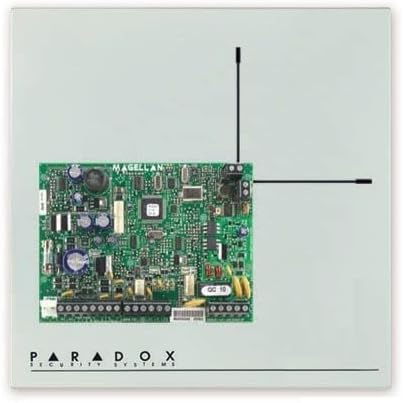
Figure 3.1: Internal view of the PARADOX MG5050-86 control panel circuit board. This image displays the main circuit board with various electronic components, connectors for wired zones, and two antennas for wireless communication. The board is labeled 'MAGELLAN' and 'PARADOX SECURITY SYSTEMS'.
Key Components:
- Main Circuit Board: The core of the system, housing the micro-processor and memory.
- Wireless Transceiver: For communication with wireless zones and devices (868 MHz).
- Wired Zone Terminals: Connectors for up to 5 wired zones.
- Programmable Outputs (PGMs): 4 built-in, expandable to 16, for controlling external devices.
- Relay Output: One dedicated relay output.
- Power Input: For 1.1A switching power supply.
- Communication Ports: For connecting to keypads, expansion modules (ZX8), and PC (307USB interface).
4. Setup and Installation
4.1 Mounting the Control Panel
- Select a secure, dry location, preferably in a central area of the premises.
- Mount the metal cabinet (280 x 280 x 76 mm) securely to a wall using appropriate fasteners.
- Ensure adequate space for wiring and ventilation.
4.2 Wiring Connections
- Power Supply: Connect the 1.1A switching power supply to the designated terminals.
- Wired Zones: Connect wired detectors to the 5 available wired zone terminals.
- Keypads: Connect compatible keypads (e.g., TM50, K32LCD) to the system's communication bus.
- PGM Outputs: Wire external devices to the programmable outputs as required.
- Telephone Line: Connect the integrated digital dialer to a telephone line for monitoring station communication.
4.3 Initial Programming
- Power on the unit after all connections are secure.
- Access the programming menu via a connected keypad.
- Follow the guided menu for initial setup, including zone assignment (up to 32 wireless zones), user code creation (up to 32), and remote control pairing (up to 32 REM2/REM3).
- Configure partition settings (2 independent partitions with common zone).
- Set up monitoring station numbers (3) and voice dialer numbers (5 with VDMP3).
- For advanced configuration, connect to a PC using the 307USB interface and WinLoad software (9.6 K baud direct connection).
- Utilize the programming reset button to revert to default values if needed.
5. Operating the System
5.1 Arming and Disarming
- Arming: Enter your user code on the keypad or press the arm button on a paired remote (REM2/REM3). The system supports total, night, perimeter, and disarmed modes for individual zones.
- Quick Arming: The system supports quick arming even with open zones.
- Disarming: Enter your user code on the keypad or press the disarm button on a paired remote.
- StayD Mode: Utilize the StayD operating mode for enhanced security while occupants are present.
5.2 Event Memory
The system stores up to 256 events in its memory. These events can be reviewed via the keypad to track system activity, including arming/disarming, alarms, and system faults.
5.3 Time Synchronization
The MG5050-86 features automatic adjustment for daylight saving time, ensuring the system's internal clock is always accurate.
6. Maintenance
- Battery Backup: Regularly check the status of the backup battery (if installed) and replace it as needed to ensure continuous operation during power outages.
- Cleaning: Clean the control panel and keypads with a soft, dry cloth. Do not use abrasive cleaners or solvents.
- Firmware Updates: Firmware can be updated locally via the 307USB interface and WinLoad software to ensure the system has the latest features and security enhancements.
- System Tests: Periodically test all zones, keypads, and communication paths to ensure proper functionality.
7. Troubleshooting
- System Not Arming: Check if any zones are open or bypassed. Ensure all doors and windows are closed. Review event memory for specific zone faults.
- Communication Failure: Verify telephone line connection or check the status of GSM/GPRS (PCS250) or Internet (IP100) modules.
- Keypad Not Responding: Check power supply to the keypad and its connection to the control panel bus.
- False Alarms: Identify the zone causing the false alarm from the event memory. Inspect the detector in that zone for proper installation, sensitivity, or environmental factors.
- System Reset: If experiencing persistent issues, use the programming reset button to restore default settings, then re-program the system.
8. Technical Specifications
| Feature | Specification |
|---|---|
| Model | MG5050-86 |
| Brand | PARADOX |
| Wireless Zones | 32 |
| Wired Zones | 5 (expandable to 32 with ZX8 modules) |
| Operating Frequency | 868 MHz |
| User Codes | 32 |
| Remote Controls | Up to 32 (REM2/REM3) |
| Event Memory | 256 events |
| Partitions | 2 independent + 1 common zone |
| Programmable Outputs (PGM) | 4 (expandable to 16) |
| Relay Output | 1 |
| Power Supply | 1.1A Switching |
| Cabinet Dimensions | 280 x 280 x 76 mm |
| Compatibility | TM50, K32LCD, K32I, K32, K10H, K10Ve, K636 Keypads; VDMP3, PCS250, IP100 Modules; RPT1 Repeaters; 2WPGM Modules |
| Compliance | EN50131 Grade 2 |
9. Warranty and Support
Information regarding specific warranty terms and support contacts for the PARADOX MG5050-86 is not available in this document. Please refer to the product packaging or contact your authorized Paradox dealer or installer for details on warranty coverage and technical support.
Ask a question about this manual
Ask about setup, troubleshooting, compatibility, parts, safety, or missing instructions. Manuals+ will review the question and use this page’s manual context to help answer it.