
DAB 60161182
DAB E.SYBOX 230V Water Booster System User Manual
Model: 60161182
1. Introduction
The DAB E.SYBOX is an integrated electronic water booster system designed for domestic and residential applications. This system provides constant water pressure while optimizing energy consumption. It is suitable for use with potable water in domestic plants, for gardening, and irrigation. The E.SYBOX can also be used to create groups of up to four pumps.
This manual provides essential information for the safe and efficient installation, operation, and maintenance of your E.SYBOX system. Please read it thoroughly before installation and keep it for future reference.
2. Safety Information
WARNING: Before performing any operation on the pump, disconnect it from the main power supply.
- Ensure the power supply voltage matches the specifications of the E.SYBOX (230V).
- Installation and maintenance should only be performed by qualified personnel.
- Do not operate the pump with flammable or explosive liquids.
- Protect the unit from freezing temperatures.
- Ensure proper ventilation around the unit to prevent overheating.
- The unit must be properly grounded.
3. Package Contents
Verify that all components are present and undamaged upon unpacking:
- DAB E.SYBOX Water Booster System Unit
- Power Cord
- Connection Pieces (e.g., 1" plastic unions)
- User Manual (this document)
4. Setup and Installation
The E.SYBOX is designed for straightforward installation and requires no additional components for basic setup. It can be installed either vertically or horizontally.
4.1. Choosing an Installation Location
Select a location that is:
- Protected from direct sunlight and extreme temperatures.
- In a closed space without a high level of air exchange, as the unit is water-cooled and quiet.
- Accessible for maintenance.
- Near the water source and the distribution system.
4.2. Physical Installation
- Positioning the Unit: Place the E.SYBOX on a stable, level surface. The anti-vibration feet help reduce noise. The unit can be positioned vertically or horizontally.
- Connecting Water Lines: Connect the inlet pipe from your water source to the suction port and the outlet pipe to your distribution system. Use the provided 1" plastic unions for secure connections. Ensure all connections are watertight.
- Electrical Connection: Connect the power cord to a grounded 230V AC outlet. Ensure the power supply is stable and protected from surges.
- Priming the Pump (if necessary): For initial startup or after maintenance, ensure the pump is filled with water before operation to prevent dry running. Refer to the display for priming instructions.
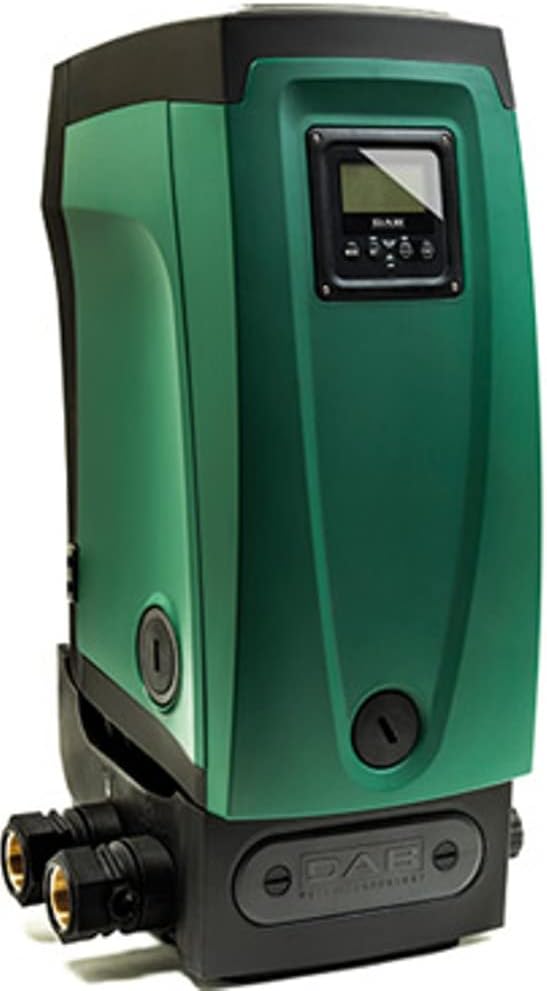
Figure 1: Front view of the DAB E.SYBOX unit, showing the display and general form factor.

Figure 2: Rear view of the E.SYBOX, highlighting the water inlet and outlet connections.
5. Operating Instructions
The E.SYBOX features an adjustable, high-resolution LCD display for easy operation and monitoring.
5.1. Initial Power-On
- Once connected to power, the LCD display will illuminate.
- Follow the on-screen prompts for initial setup, which may include language selection and basic pressure settings.
5.2. Setting Desired Pressure
The E.SYBOX allows you to set your desired water pressure. The system will then maintain this constant pressure by adjusting pump speed.
- Navigate through the LCD menu using the control buttons adjacent to the display.
- Locate the "Pressure Setting" option.
- Adjust the pressure value (e.g., in PSI or Bar) to your preference. The system can deliver up to 210 ft (approx. 90 PSI) of head.
- Confirm your selection. The system will automatically adjust to maintain this pressure.

Figure 3: E.SYBOX display showing operational parameters such as power consumption (360W), pressure (3 Bar / 43 PSI), and flow rate (3.2 GPM / 12 l/min).
5.3. Monitoring Performance
The LCD display provides real-time statistics:
- Pressure: Current system pressure.
- Flow Rate: Instantaneous water flow.
- Power Usage: Energy consumption of the unit.
- Alarms/Warnings: Notifications for any operational issues.
6. Maintenance
Regular maintenance ensures the longevity and optimal performance of your E.SYBOX system.
6.1. Routine Checks
- Visual Inspection: Periodically check for any leaks, unusual noises, or visible damage.
- Air Exchange: Ensure the area around the unit is not obstructed to allow for proper air circulation for the water-cooled motor.
6.2. Sensor Cleaning
Over time, sediment may accumulate and affect the flow sensors. The E.SYBOX comes with a tool for cleaning these sensors.
- Disconnect Power: Always disconnect the unit from the power supply before any maintenance.
- Locate Sensors: Refer to the detailed diagram in the full technical manual (if available) to locate the flow sensors.
- Clean: Use the provided tool to carefully clean any accumulated sediment from the sensors.
- Reconnect: Reassemble any removed parts and reconnect power.
6.3. Winterization
If the unit is installed in an area subject to freezing temperatures, it must be drained to prevent damage.
- Disconnect power.
- Drain all water from the pump and associated piping.
- Store in a frost-free environment if possible, or ensure complete drainage.
7. Troubleshooting
This section addresses common issues you might encounter with your E.SYBOX system.
| Problem | Possible Cause | Solution |
|---|---|---|
| No water flow / Pump not starting | No power; Air in pump; Clogged inlet; Low water level in source. | Check power connection; Prime the pump; Clean inlet filter; Ensure adequate water supply. |
| Low pressure | Incorrect pressure setting; Partially clogged filter/pipes; Air in system. | Adjust pressure setting on LCD; Inspect and clean filters/pipes; Bleed air from system. |
| Pump runs continuously / Frequent on/off cycling | Leak in system; Small continuous flow (e.g., dripping faucet); Faulty sensor. | Check for leaks in plumbing; Address small continuous flows; Contact support if sensor is suspected. |
| Unusual noise or vibration | Air in pump; Loose connections; Foreign object in pump. | Prime the pump; Check and tighten all connections; Disconnect power and inspect pump impeller (if safe and accessible). |
| LCD display error message | Specific system fault. | Note the error code and consult the full technical manual or contact customer support. |
If the problem persists after attempting these solutions, please contact customer support.
8. Specifications
| Feature | Detail |
|---|---|
| Model | 60161182 |
| Voltage | 230 Volts |
| Power Source | AC/DC |
| Maximum Flow Rate | 32 Gallons Per Minute (GPM) |
| Maximum Lifting Height (Head) | 210 Feet |
| Liquid Temperature Range | +32 to +95°F (domestic use), +32 to +102°F (other uses) |
| Maximum Suction Depth | 26 Feet |
| Item Weight | 57 Pounds |
| Product Dimensions (L x W x H) | 14.25 x 10.35 x 22.2 inches |
| Material | ABS |
| Integrated Expansion Tank | 0.5 Gallon |
9. Warranty and Support
9.1. Warranty Information
DAB provides a limited warranty for the E.SYBOX 230V Water Booster System against defects in materials and workmanship under normal use and service. The specific duration and terms of the warranty may vary by region and purchase date. Please retain your proof of purchase for warranty claims.
For detailed warranty terms and conditions, refer to the warranty card included with your product or visit the official DAB website.
9.2. Customer Support
If you require technical assistance, have questions about installation, operation, or maintenance, or need to report a problem, please contact DAB customer support.
- Online Support: Visit the official DAB Pumps website for FAQs, technical documents, and contact forms.
- Phone Support: Refer to the contact information provided on the DAB website or your product packaging for regional support numbers.
- When contacting support, please have your product model (60161182) and serial number (if applicable) ready.
Ask a question about this manual
Ask about setup, troubleshooting, compatibility, parts, safety, or missing instructions. Manuals+ will review the question and use this page’s manual context to help answer it.