
1. Introduction
This manual provides essential information for the safe and effective operation, maintenance, and troubleshooting of your JeKen 20L Professional Ultrasonic Cleaner, Model PS-G60A. Please read this manual thoroughly before using the appliance and retain it for future reference.
The JeKen PS-G60A is a professional-grade ultrasonic cleaner designed for various applications requiring thorough cleaning of items using ultrasonic waves. It features a digital timer and a heating function for enhanced cleaning performance.
2. Safety Precautions
WARNING: Failure to follow these safety instructions may result in electric shock, fire, or serious injury.
- Always ensure the unit is properly grounded.
- Do not operate the cleaner without liquid in the tank. This can damage the ultrasonic transducers.
- Do not immerse the main unit in water or other liquids.
- Keep the unit away from children and pets.
- Use only appropriate cleaning solutions. Avoid flammable, corrosive, or abrasive solutions.
- Always unplug the unit before cleaning, filling, or draining the tank.
- Do not touch the tank or solution during operation, especially when the heater is active, as temperatures can be high.
- Ensure adequate ventilation when using cleaning solutions that may emit fumes.
- If the unit is damaged, do not operate it. Contact customer support for assistance.
3. Product Overview
Familiarize yourself with the components of your JeKen 20L Professional Ultrasonic Cleaner.

Figure 3.1: Overall view of the JeKen 20L Professional Ultrasonic Cleaner. This image shows the stainless steel construction, the control panel, and the side handle with drainage valve.

Figure 3.2: Close-up of the digital control panel. The digital timer display allows for precise control over cleaning cycles.
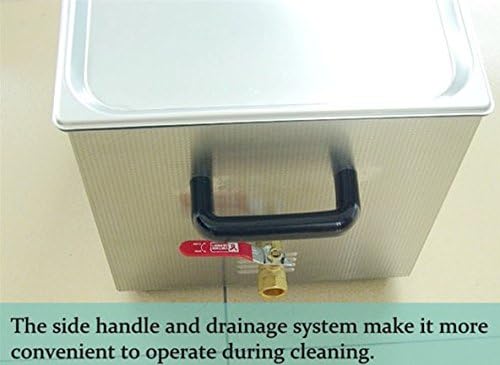
Figure 3.3: The side handle and integrated drainage system. This design facilitates convenient operation and easy liquid disposal after cleaning.
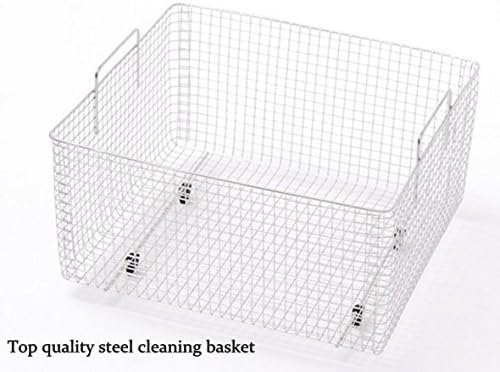
Figure 3.4: The included high-quality stainless steel cleaning basket. This basket is used to hold items during the ultrasonic cleaning process, keeping them suspended above the tank bottom.
4. Setup
- Unpacking: Carefully remove the ultrasonic cleaner and all accessories from the packaging. Inspect for any damage during transit. Keep packaging materials for future transport if needed.
- Placement: Place the unit on a stable, level, and dry surface. Ensure there is adequate space around the unit for ventilation and operation. Avoid placing it near heat sources or in direct sunlight.
- Power Connection: Ensure the power switch is in the 'OFF' position. Connect the power cord to a grounded electrical outlet matching the voltage specifications (AC 100-120V or AC 220-240V, 50/60Hz).
- Filling the Tank: Close the drainage valve securely. Fill the stainless steel tank with an appropriate cleaning solution. Ensure the liquid level is between the 'MIN' and 'MAX' marks (if present) or at least 2/3 full, covering the items to be cleaned. Do not overfill.
- Inserting the Basket: Place the cleaning basket into the tank.
5. Operating Instructions
- Prepare Items: Place the items to be cleaned into the cleaning basket. Ensure items are not touching each other and are fully submerged in the cleaning solution.
- Power On: Turn on the main power switch. The digital display will illuminate.
- Set Cleaning Time: Use the 'TIME+' and 'TIME-' buttons on the control panel to set the desired cleaning duration. The digital timer allows for settings from 1 to 30 minutes.
- Activate Heater (Optional): If heating is required, press the 'HEATER' button. The heater indicator will light up. The unit will heat the solution to the preset temperature. For optimal cleaning, allow the solution to reach the desired temperature before starting the ultrasonic cycle.
- Start Ultrasonic Cleaning: Press the 'ULTRASONIC' button to start the cleaning cycle. The ultrasonic indicator will light up, and you will hear a faint buzzing sound, indicating the ultrasonic waves are active.
- Monitor Progress: The digital display will count down the remaining cleaning time.
- End of Cycle: Once the set time expires, the ultrasonic function will automatically stop. The heater will remain active until manually turned off or the unit is powered down.
- Remove Items: Carefully remove the cleaning basket from the tank. Rinse the cleaned items with clean water and dry them thoroughly.
- Power Off: Turn off the 'HEATER' (if active) and then the main power switch. Unplug the unit from the power outlet.
6. Maintenance
- Draining the Tank: After each use, or when the cleaning solution becomes visibly dirty, open the drainage valve to empty the tank.
- Cleaning the Tank: Rinse the stainless steel tank with clean water. Wipe the interior and exterior of the unit with a soft, damp cloth. Do not use abrasive cleaners or immerse the unit in water.
- Solution Replacement: Regularly replace the cleaning solution to maintain optimal cleaning performance.
- Storage: Store the ultrasonic cleaner in a cool, dry place when not in use. Ensure the tank is empty and dry before storage.
7. Troubleshooting
| Problem | Possible Cause | Solution |
|---|---|---|
| Unit does not power on. | No power supply; power cord not connected; power switch off. | Check power outlet; ensure power cord is securely connected; turn power switch to 'ON'. |
| Ultrasonic function not working. | No liquid in tank; 'ULTRASONIC' button not pressed; timer not set. | Fill tank with liquid; press 'ULTRASONIC' button; set cleaning time. |
| Heating function not working. | 'HEATER' button not pressed. | Press 'HEATER' button. |
| Poor cleaning results. | Insufficient cleaning time; incorrect cleaning solution; solution too dirty; items overcrowded. | Increase cleaning time; use appropriate solution; replace dirty solution; clean fewer items at once. |
| Unusual noise or vibration. | Unit not on a level surface; tank empty or underfilled. | Ensure unit is on a stable, level surface; fill tank to appropriate level. |
If the problem persists after attempting these solutions, please contact customer support.
8. Specifications
The following table outlines the technical specifications for the JeKen 20L Professional Ultrasonic Cleaner PS-G60A.
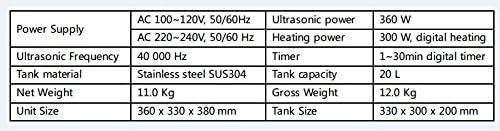
Figure 8.1: Visual representation of the technical specifications.
| Feature | Specification |
|---|---|
| Model | PS-G60A |
| Power Supply | AC 100-120V, 50/60Hz or AC 220-240V, 50/60Hz |
| Ultrasonic Power | 360 W |
| Heating Power | 300 W (Digital Heating) |
| Ultrasonic Frequency | 40,000 Hz |
| Timer | 1-30 minutes (Digital Timer) |
| Tank Material | Stainless Steel SUS304 |
| Tank Capacity | 20 Liters |
| Net Weight | 11.0 Kg |
| Gross Weight | 12.0 Kg |
| Unit Size (L x W x H) | 360 x 330 x 380 mm |
| Tank Size (L x W x H) | 330 x 300 x 200 mm |
| UPC | 607994026780 |
9. Warranty and Support
For warranty information, technical support, or service inquiries, please contact the manufacturer or your authorized dealer. Keep your purchase receipt as proof of purchase.
Please refer to the contact information provided at the time of purchase or on the product packaging for specific support details.
