
ART+SOUND AR3002
ART+SOUND AR3002 Bluetooth Speaker Vintage Retro Radio User Manual
Model: AR3002 (680079330026)
1. Introduction
This user manual provides detailed instructions for the ART+SOUND AR3002 Bluetooth Speaker Vintage Retro Radio. Please read this manual thoroughly before using the device to ensure proper operation and to maximize your listening experience. Keep this manual for future reference.
2. Product Overview
2.1 Features
- Bluetooth connectivity for wireless audio streaming.
- Integrated FM radio tuner.
- Auxiliary input for wired connections.
- Vintage retro design with functional knobs for volume and tuning.
- Portable design for use anywhere.
- Rechargeable battery for cordless operation.
2.2 What's in the Box
- ART+SOUND AR3002 Wireless Retro Speaker
- Charging Cable
- User Manual (this document)
2.3 Product Components
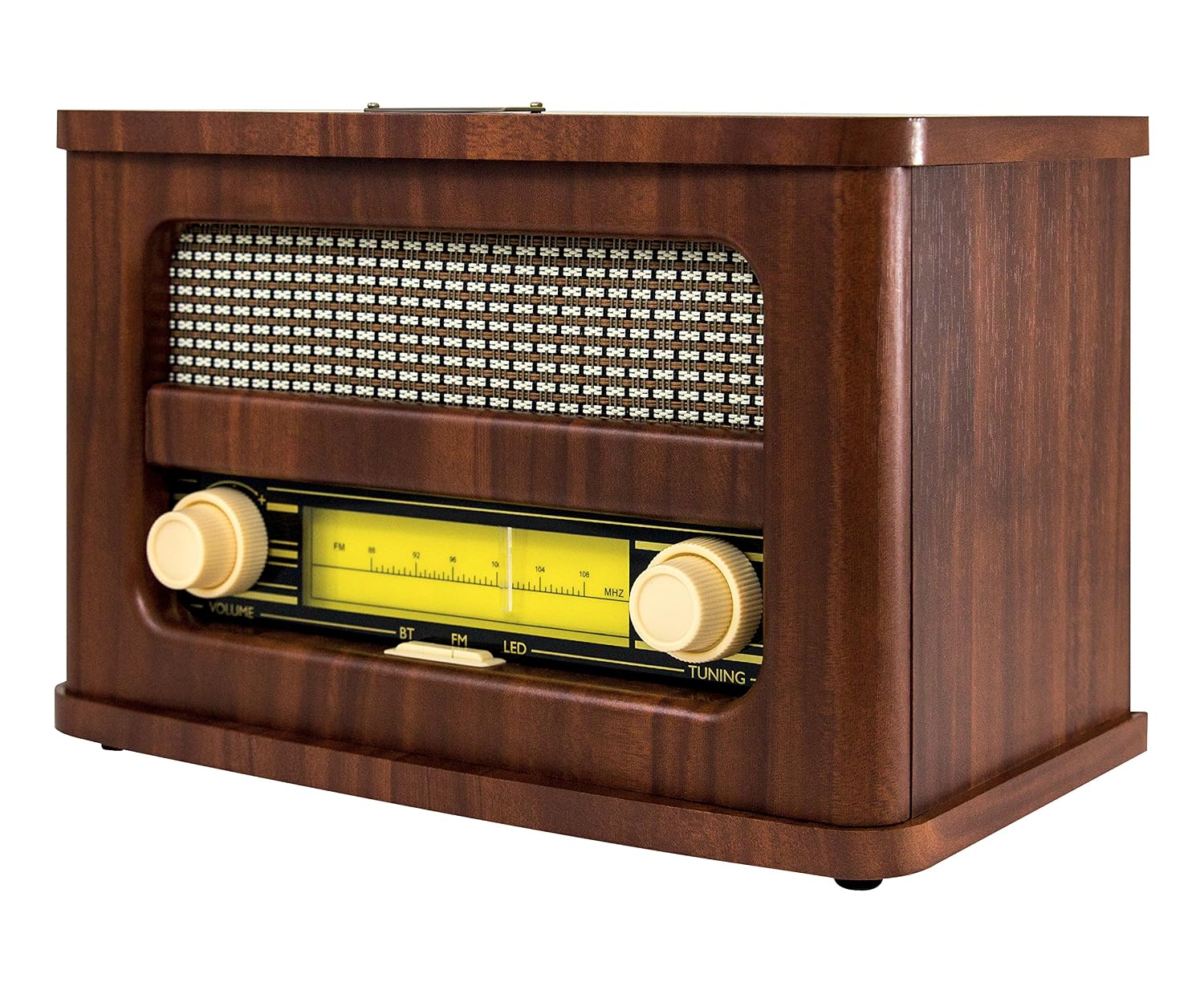
Figure 1: Front view of the ART+SOUND AR3002 Bluetooth Speaker. This image displays the speaker's vintage design, featuring a prominent speaker grille, two large rotary knobs for volume and tuning, and a horizontal illuminated display showing the FM frequency. Buttons for Bluetooth (BT), FM, and LED are visible below the display.

Figure 2: Angled front view of the ART+SOUND AR3002 Bluetooth Speaker. This perspective showcases the rich brown wooden cabinet finish and the detailed control panel, including the volume and tuning dials, and the frequency display.

Figure 3: Side view of the ART+SOUND AR3002 Bluetooth Speaker. This image illustrates the speaker's compact depth and the smooth, rounded edges of its wooden casing.

Figure 4: Rear view of the ART+SOUND AR3002 Bluetooth Speaker. This view highlights the connectivity panel, including the DC 5V power input, a USB port, and an AUX input jack. A product label with model information is also visible.
3. Setup
3.1 Charging the Speaker
- Locate the charging cable provided in the box.
- Connect the small end of the charging cable to the DC 5V input port on the rear of the speaker.
- Connect the USB end of the charging cable to a compatible USB power adapter (not included) or a powered USB port.
- The LED indicator on the speaker will illuminate to show charging status. Once fully charged, the indicator may change color or turn off.
- A full charge is recommended before first use.
3.2 Powering On/Off
- To power on the speaker, locate the power switch (often integrated with the volume knob or a separate switch) and turn it to the 'ON' position.
- To power off the speaker, turn the power switch to the 'OFF' position.
4. Operating Instructions
4.1 Bluetooth Mode
- Power on the speaker.
- Press the 'BT' button on the front panel to switch to Bluetooth mode. The speaker will emit an audible prompt and the Bluetooth indicator light will flash, indicating it is ready for pairing.
- On your Bluetooth-enabled device (smartphone, tablet, computer), go to the Bluetooth settings.
- Search for available devices and select "ART+SOUND AR3002" (or similar name) from the list.
- Once paired, the speaker will confirm with an audible prompt, and the Bluetooth indicator light will stop flashing and remain solid.
- You can now play audio wirelessly from your device through the speaker. Adjust volume using the 'VOLUME' knob on the speaker or your connected device.
4.2 FM Radio Mode
- Power on the speaker.
- Press the 'FM' button on the front panel to switch to FM radio mode.
- Use the 'TUNING' knob to scan for and select your desired FM radio station. The frequency will be displayed on the illuminated panel.
- Adjust the volume using the 'VOLUME' knob.
- For improved FM reception, ensure the speaker is placed in an open area and adjust its position if necessary.
4.3 AUX Input Mode
- Power on the speaker.
- Connect one end of a 3.5mm audio cable (not included) to the 'AUX' input port on the rear of the speaker.
- Connect the other end of the audio cable to the headphone jack or audio output of your external audio device (e.g., MP3 player, CD player).
- The speaker should automatically switch to AUX mode, or you may need to press a mode button if available.
- Play audio from your external device. Adjust volume using the 'VOLUME' knob on the speaker and/or your connected device.
5. Maintenance
- Cleaning: Use a soft, dry cloth to clean the exterior of the speaker. Do not use abrasive cleaners, waxes, or solvents.
- Storage: When not in use for extended periods, store the speaker in a cool, dry place away from direct sunlight and extreme temperatures.
- Battery Care: To prolong battery life, avoid fully discharging the battery frequently. Recharge the speaker regularly, even if not in constant use.
- Avoid Moisture: Keep the speaker away from water and high humidity.
- Ventilation: Ensure proper ventilation around the speaker to prevent overheating. Do not block any vents.
6. Troubleshooting
| Problem | Possible Cause | Solution |
|---|---|---|
| Speaker does not power on. | Battery is depleted. Power switch is off. | Charge the speaker fully. Ensure the power switch is in the 'ON' position. |
| No sound from speaker. | Volume is too low. Incorrect mode selected. Device not paired (Bluetooth). AUX cable not fully inserted. | Increase volume on speaker and connected device. Ensure correct mode (BT, FM, AUX) is selected. Re-pair Bluetooth device. Ensure AUX cable is securely connected. |
| Bluetooth device cannot pair. | Speaker is not in pairing mode. Device is too far. Interference. | Ensure speaker is in Bluetooth pairing mode (flashing LED). Move device closer to speaker (within 10 meters). Turn off other Bluetooth devices nearby. |
| Poor FM radio reception. | Weak signal. Interference. | Reposition the speaker for better reception. Avoid placing near electronic devices that may cause interference. |
7. Specifications
- Model Number: 680079330026
- Brand: ART+SOUND
- Connectivity: Bluetooth, Auxiliary
- Tuner Technology: FM
- Power Source: Battery Powered (Lithium Ion, included)
- Speakers Nominal Output Power: 150 Watts
- Speakers Maximum Output Power: 10 Watts
- Speaker Configuration: 2.1 Channel
- Product Dimensions (LxWxH): 27.94 x 15.24 x 17.78 cm (11 x 6 x 7 inches)
- Item Weight: 1.36 kg (3 lbs)
- Display Type: LED
8. Warranty and Support
For warranty information and customer support, please refer to the documentation provided at the time of purchase or contact ART+SOUND customer service directly. Details may vary by region and retailer.
Note: The product comes with a user manual and charging cable as part of the mounting hardware, as per product specifications.
Ask a question about this manual
Ask about setup, troubleshooting, compatibility, parts, safety, or missing instructions. Manuals+ will review the question and use this page’s manual context to help answer it.