
Introduction
This manual provides essential information for the safe and efficient installation, operation, and maintenance of your Xpelair Simply Silent Contour C6S Square 150mm Extractor Fan. Please read these instructions carefully before installation and retain them for future reference.
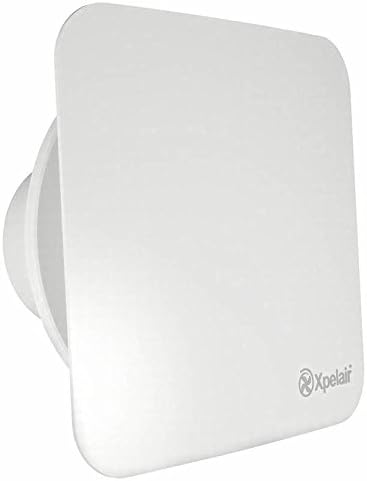
Image: Front view of the Xpelair Simply Silent Contour C6S Square 150mm Extractor Fan, showing its white, square design with rounded corners and the Xpelair logo in the bottom right.
Product Overview
The Xpelair Simply Silent Contour C6S is a two-speed 150mm extractor fan designed for wall, ceiling, and panel mounting. It features a square design and is equipped with a timer function (C6TS model). This fan is engineered to provide efficient ventilation while aiming for quiet operation, suitable for various domestic applications, particularly bathrooms.
- Model: C6S (Contour Square)
- Type: 150mm Extractor Fan
- Features: Two-speed operation, Timer function (C6TS variant), IPX4 rated.
- Compliance: Part F, L and ErP compliant.
Safety Information
Always disconnect the power supply before installation, maintenance, or servicing. Installation should only be carried out by a qualified electrician in accordance with current wiring regulations. Do not operate the fan if any part is damaged. Ensure proper earthing.
- Ensure the power supply matches the fan's voltage (220-240V).
- Do not obstruct the airflow.
- Keep children and pets away from the fan during operation.
Setup and Installation
This section outlines the general steps for installing the Xpelair Simply Silent Contour C6S fan. For detailed wiring diagrams and specific mounting instructions, refer to the separate installation guide provided with the product packaging.
- Preparation:
- Ensure the power supply is switched off at the mains.
- Select a suitable mounting location (wall, ceiling, or panel) that allows for adequate airflow and access for maintenance.
- Prepare the opening for the fan ducting (150mm diameter).
- Mounting:
- Secure the fan body to the chosen surface using appropriate fixings. Ensure it is level and stable.
- Connect the ducting to the fan's spigot, ensuring a tight seal to prevent air leakage.
- Electrical Connection:
- Connect the electrical wiring according to the wiring diagram provided in the full installation manual. This typically involves Live, Neutral, and Switched Live connections for the timer function.
- Ensure all connections are secure and insulated.
- Replace the terminal cover.
- Final Assembly:
- Attach the front cover of the fan.
- Restore power supply and test the fan's operation.
Operating Instructions
The Xpelair Simply Silent Contour C6S (C6TS timer model) operates based on the electrical connection and its integrated timer.
- Basic Operation: The fan will activate when the connected light switch (or other switched live source) is turned on.
- Timer Function (C6TS): After the light switch is turned off, the fan will continue to run for a pre-set period. This overrun timer is typically adjustable during installation. Refer to the installation guide for instructions on adjusting the timer setting.
- Speed Selection: The fan may have internal jumpers or switches to select between two speeds (e.g., 216m³/h and 248m³/h). This setting is usually configured during installation.
Maintenance
Regular cleaning and maintenance will ensure the longevity and optimal performance of your extractor fan.
- Disconnect Power: Always switch off the electricity supply to the fan at the mains before performing any cleaning or maintenance.
- Clean Exterior: Wipe the exterior surface of the fan with a soft, damp cloth. Do not use abrasive cleaners or solvents.
- Clean Interior (if accessible): If safe and accessible, carefully remove the front cover and gently clean any dust or debris from the fan blades and internal surfaces using a soft brush or vacuum cleaner. Do not use water directly on electrical components.
- Reassemble: Ensure all parts are dry before reassembling the fan cover.
- Restore Power: Once reassembled, restore the power supply.
Frequency: It is recommended to clean the fan every 3-6 months, depending on usage and environmental conditions.
Troubleshooting
If you experience issues with your Xpelair Simply Silent Contour C6S fan, consult the table below. For problems not listed or if solutions do not resolve the issue, contact qualified personnel.
| Problem | Possible Cause | Solution |
|---|---|---|
| Fan does not operate. | No power supply; Loose wiring; Faulty switch; Motor failure. | Check mains power and circuit breaker. Verify wiring connections (consult electrician). Test switch. If motor failure, professional repair or replacement may be needed. |
| Fan is excessively noisy. | Loose mounting; Obstruction in fan blades/ducting; Motor bearing wear; Backdraft flap noise. | Ensure fan is securely mounted. Check for and remove any obstructions. If motor noise persists, professional inspection is advised. For backdraft flap noise, ensure it moves freely and consider adding soft material to contact points if applicable. |
| Poor extraction performance. | Blocked ducting; Dirty fan blades; Incorrect fan speed setting. | Check ducting for blockages. Clean fan blades. Verify fan speed setting (if adjustable). |
| Timer function not working correctly. | Incorrect timer setting; Wiring issue with switched live. | Adjust timer setting as per installation manual. Verify switched live connection (consult electrician). |
Specifications
Key technical specifications for the Xpelair Simply Silent Contour C6S Extractor Fan:
- Model Number: C6S
- Voltage: 220-240V
- Wattage: 12.9W (low speed) / 28.4W (high speed)
- Airflow Capacity: 216 m³/h (60 L/s) / 248 m³/h (69 L/s)
- Sound Level: 42.3 dBA (low speed) / 44.6 dBA (high speed) at 3m
- SFP (Specific Fan Power): 0.22 W/L/s (low speed) / 0.41 W/L/s (high speed)
- IP Rating: IPX4
- Dimensions: Approximately 25.4 x 25 x 17.9 cm (Package Dimensions)
- Weight: 1.37 kg
- Colour: White
- Certification: ErP compliant
Warranty Information
Xpelair products are manufactured to high standards and are covered by a manufacturer's warranty against defects in materials or workmanship. The specific terms and duration of the warranty may vary. Please refer to the warranty card included with your product or visit the official Xpelair website for detailed warranty information and registration procedures.
Support and Contact
For technical assistance, spare parts, or further inquiries regarding your Xpelair Simply Silent Contour C6S fan, please contact Xpelair customer support.
- Manufacturer: Xpelair
- Website: Visit the Xpelair Store on Amazon (for general product information)
- For direct support, please refer to the contact details provided in your product packaging or on the official Xpelair corporate website.


