
Introduction
This manual provides detailed instructions for the proper use and care of your Ricoh KR-10x SLR Camera. Please read this manual thoroughly before operating the camera to ensure optimal performance and longevity.
The Ricoh KR-10x is a 35mm SLR camera body designed for use with compatible lenses (not included). It features automatic exposure control, making it suitable for various photographic conditions.
Camera Overview

Figure 1: Front view of the Ricoh KR-10x SLR camera body. This image displays the camera's front, highlighting the lens mount, the "RICOH" brand name, and the "KR-10x" model designation. The camera body is black with a silver lens mount ring.

Figure 2: Top view of the Ricoh KR-10x SLR camera. This perspective shows the camera's top plate, including the shutter speed dial, film speed (ASA) dial, and the hot shoe for external flash units. The self-timer lever is also visible.

Figure 3: Rear view of the Ricoh KR-10x SLR camera. This image displays the back of the camera, featuring the viewfinder eyepiece and the film compartment door. The textured grip on the film door is also visible.
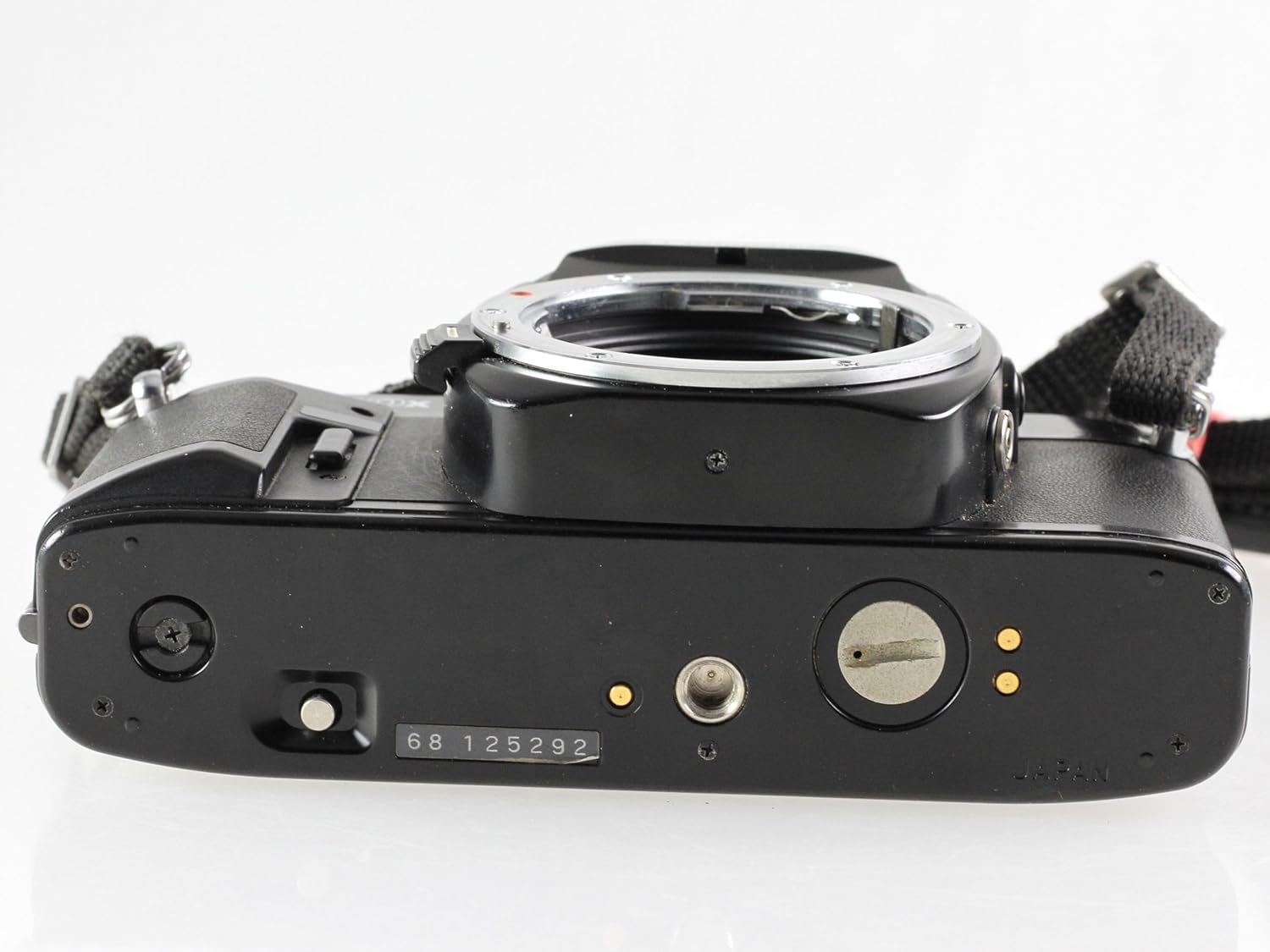
Figure 4: Bottom view of the Ricoh KR-10x SLR camera. This view shows the base of the camera, including the battery compartment cover, the tripod mount socket, and the film rewind release button.
Setup
1. Battery Installation
The Ricoh KR-10x requires two 1.5V LR44 or SR44 batteries for its light meter and automatic exposure functions. The battery compartment is located on the bottom of the camera body.
- Locate the battery compartment cover on the camera's bottom plate.
- Use a coin to turn the cover counter-clockwise and remove it.
- Insert two LR44/SR44 batteries with the positive (+) side facing up, following the polarity indicators inside the compartment.
- Replace the cover and turn it clockwise to secure.
2. Film Loading
The KR-10x uses standard 35mm film cartridges.
- Open the camera back by pulling up the film rewind knob until the back pops open.
- Place the film cartridge into the film chamber on the left side.
- Pull the film leader across to the take-up spool on the right side and insert it into one of the slots.
- Advance the film slightly using the film advance lever to ensure it catches on the take-up spool's teeth.
- Close the camera back firmly until it clicks shut.
- Advance the film two or three times, pressing the shutter button each time, until the frame counter shows "1". The film rewind knob should rotate as you advance the film, indicating proper loading.
3. Lens Attachment (Lens Not Included)
The Ricoh KR-10x uses the Pentax K-mount (PK) lens system. To attach a compatible lens:
- Remove the body cap from the camera and the rear cap from the lens.
- Align the red dot on the lens barrel with the red dot on the camera's lens mount.
- Insert the lens into the mount and turn it clockwise until it clicks into place.
- To remove the lens, press the lens release button on the camera body and turn the lens counter-clockwise.
Operating the Camera
1. Setting Film Speed (ASA/ISO)
Rotate the ASA/ISO dial on the top plate to match the speed of the film loaded in the camera. This is crucial for accurate exposure.
2. Exposure Modes
The KR-10x offers automatic exposure control. Set the shutter speed dial to "AUTO" for aperture-priority automatic exposure. In this mode, you select the aperture on the lens, and the camera automatically sets the correct shutter speed.
Manual shutter speeds are also available for full manual control.
3. Focusing
Look through the viewfinder and rotate the focusing ring on your attached lens until the subject appears sharp. The KR-10x typically features a split-image or microprism focusing screen for precise focusing.
4. Taking a Picture
- Frame your shot through the viewfinder.
- Focus the lens.
- Ensure the correct exposure mode and settings are selected.
- Gently press the shutter button all the way down to take the picture.
- Advance the film using the film advance lever for the next shot.
5. Rewinding Film
Once all frames on the film roll have been exposed:
- Press the film rewind release button on the bottom of the camera.
- Fold out the crank on the film rewind knob and turn it clockwise until you feel the tension release, indicating the film is fully rewound into its cartridge.
- Open the camera back and remove the film cartridge.
Maintenance
1. Cleaning
- Camera Body: Wipe the camera body with a soft, dry, lint-free cloth. For stubborn marks, slightly dampen the cloth with water. Avoid harsh chemicals.
- Lens Mount: Keep the lens mount clean and free of dust. Use a blower brush to remove loose particles. Do not touch the internal mirror or focusing screen.
- Viewfinder: Use a soft brush or air blower to clean the viewfinder eyepiece.
2. Storage
When not in use, store the camera in a cool, dry place away from direct sunlight and extreme temperatures. It is advisable to remove the batteries if the camera will not be used for an extended period to prevent leakage.
Troubleshooting
| Problem | Possible Cause | Solution |
|---|---|---|
| Camera does not power on / Light meter not working | Dead or incorrectly installed batteries. | Check battery polarity. Replace batteries with fresh LR44/SR44 cells. |
| Shutter does not fire | Film not advanced; camera not cocked; battery issue. | Advance film lever fully. Check batteries. Ensure lens is properly attached. |
| Film advance lever is stuck | Film is at the end of the roll; film is jammed. | If at end of roll, rewind film. If jammed, open camera back in a darkroom to inspect. |
| Images are consistently over/underexposed | Incorrect ASA/ISO setting; faulty light meter. | Verify ASA/ISO setting matches film. If problem persists, light meter may require service. |
Specifications
| Feature | Detail |
|---|---|
| Model Name | Ricoh KR-10x |
| Brand | Pentax (Manufactured by Ricoh) |
| Film Format Type | 35mm |
| Included Components | Camera Body Only |
| Special Feature | Auto Exposure |
| Exposure Control Type | Automatic |
| Compatible Devices | Camera (Pentax K-mount lenses) |
| ASIN | B071XBLLBH |
| Date First Available | June 24, 2023 |
Warranty and Support
Information regarding warranty coverage and customer support for the Ricoh KR-10x SLR Camera is not available in the provided product data. Please refer to the original purchase documentation or contact the seller/manufacturer directly for details on warranty terms and support options.
For general inquiries or technical assistance, you may be able to find resources on the official Ricoh or Pentax websites, or through authorized service centers.