
Introduction
This manual provides essential instructions for the safe and effective use of the Accessory USA 4-Pin AC DC Adapter. This power supply is specifically designed to provide stable 5V and 12V DC power to compatible iomega HDD1H4 31718800 External Hard Disk Drives. Please read this manual thoroughly before use to ensure proper operation and to prevent damage to your device.
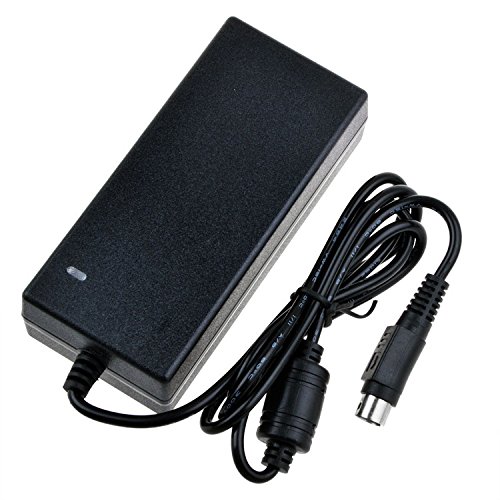
Image showing the Accessory USA 4-Pin AC DC Adapter, highlighting its barrel connector and power cord.
Safety Information
- Our products are CE / FCC / RoHS certified, tested by the manufacturer to meet or exceed OEM specifications, ensuring high safety standards.
- The adapter features OVP (Over Voltage output Protection), OCP (Over Current output Protection), and SCP (Short Circuit output Protection) to safeguard your devices.
- Always ensure the adapter's voltage and current ratings match your device's requirements before connecting.
- Do not expose the adapter to moisture, rain, or extreme temperatures. Use indoors only.
- Disconnect the adapter from the power outlet when not in use for extended periods.
- Avoid placing the adapter in poorly ventilated areas or covering it, as this can lead to overheating.
- Do not attempt to disassemble or repair the adapter. Refer all servicing to qualified personnel.
Setup
- Identify the Power Port: Locate the 4-pin power input port on your iomega HDD1H4 31718800 External Hard Disk Drive.
- Connect the Adapter: Carefully connect the 4-pin barrel connector of the Accessory USA AC DC Adapter to the hard drive's power input port. Ensure the connection is firm and secure.
- Plug into Outlet: Insert the AC power cord of the adapter into a standard electrical wall outlet (100-240V AC, 50/60Hz).
- Verify Power: Confirm that your hard drive receives power. This is often indicated by a power LED on the hard drive itself.
Important Note: Always verify the compatibility of this adapter with your specific iomega external hard drive model (HDD1H4 31718800) to prevent potential damage.
Operating Instructions
Once properly connected, the Accessory USA 4-Pin AC DC Adapter will continuously supply the necessary 5V and 12V DC power to your iomega external hard drive, allowing it to function normally.
- The adapter is designed for continuous operation within its specified voltage and current limits.
- To disconnect, first safely eject or power off your external hard drive through your computer's operating system.
- Then, unplug the adapter from the electrical outlet.
- Finally, disconnect the 4-pin connector from the hard drive.
Maintenance
- Cleaning: Keep the adapter clean and free from dust. Use a dry, soft cloth for cleaning. Do not use liquid cleaners.
- Cable Care: Avoid bending, twisting, or kinking the power cord excessively, as this can damage the internal wires.
- Storage: When not in use, store the adapter in a cool, dry place, away from direct sunlight and moisture.
- Inspection: Periodically inspect the adapter and its cables for any signs of damage, such as frayed wires or cracked casing. If damage is found, discontinue use immediately.
Troubleshooting
No Power to Hard Drive
- Check Connections: Ensure the adapter is securely plugged into both the wall outlet and the iomega hard drive.
- Verify Outlet: Test the wall outlet by plugging in another functional device to confirm it is supplying power.
- Hard Drive Power Switch: If your hard drive has a physical power switch, ensure it is in the 'ON' position.
- Compatibility: Double-check that this specific adapter model is correct for your iomega HDD1H4 31718800.
Intermittent Power
- Loose Connections: Inspect all connections for any looseness. Re-seat the plugs firmly.
- Cable Damage: Examine the power cord for any visible damage or fraying. A damaged cord can cause intermittent power.
Adapter Overheating
- Normal Warmth: It is normal for power adapters to become slightly warm during operation.
- Excessive Heat: If the adapter becomes excessively hot to the touch, disconnect it immediately.
- Ventilation: Ensure the adapter is in a well-ventilated area and not covered by anything that could trap heat.
- Load Check: Verify that the connected device (iomega hard drive) is not drawing more power than the adapter's rated output.
Specifications
| Brand | Accessory USA |
| Model Compatibility | iomega HDD1H4 31718800 External Hard Disk Drive |
| Connector Type | 4-Pin Barrel Connector |
| Input Voltage | 100-240V AC |
| Output Voltage | 5V DC, 12V DC |
| Frequency Range | 50/60 Hz |
| Safety Certifications | CE, RoHS, OVP, OCP, SCP |
| Main Power Connector Type | 2 Pin (US Standard) |
| Special Feature | Travel-friendly design |
| ASIN | B071WTQK9C |
| GTIN/UPC | 617957733181 |
Warranty and Support
Warranty Information
This Accessory USA product comes with the following warranty:
- 30 Days Money Back Guarantee: If you are not satisfied, you may return the product within 30 days for a full refund.
- 60 Days Free Exchange: Enjoy a free exchange with a paid return label within 60 days of purchase.
- 365 Days Worry-Free Warranty: A comprehensive 365-day warranty covers manufacturing defects and ensures product reliability.
Customer Support
For any questions, technical assistance, or warranty claims, please contact the seller, Accessory USA, directly through the platform where you purchased this product. Please have your order details and product model number (HDD1H4 31718800) ready when contacting support.