1. Introduction
This manual provides essential instructions for the safe and efficient use of your Kechaoda K116 basic mobile phone. Please read this manual thoroughly before operating your device to ensure proper functionality and to understand its features.
2. Package Contents
Upon opening the package, please verify that all items listed below are present and in good condition:
- Kechaoda K116 Handset
- USB Cable
If any item is missing or damaged, please contact your retailer immediately.
3. Device Overview
Familiarize yourself with the physical components of your Kechaoda K116 mobile phone.
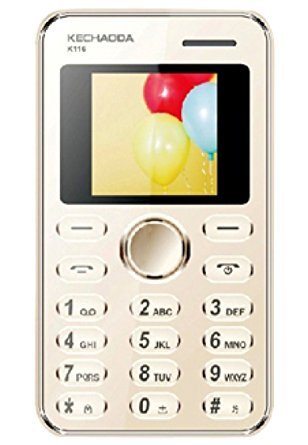
Figure 3.1: Front view of the Kechaoda K116, displaying the screen and numeric keypad.

Figure 3.2: Front, side, and rear views of the Kechaoda K116, highlighting its compact design and rear panel.
Key Components:
- Display Screen: 1.44-inch LED display for viewing information.
- Numeric Keypad: For dialing numbers and text input.
- Navigation Key: Central button for menu navigation.
- Call/End Keys: For initiating and ending calls.
- Rear Camera: 0.3MP camera located on the back.
- Charging Port: Located at the bottom for connecting the USB cable.
4. Setup
4.1. Installing the SIM Card
- Ensure the phone is powered off.
- Gently remove the back cover of the phone.
- Remove the battery if it is already inserted.
- Locate the SIM card slot. Insert your SIM card with the gold contacts facing down and the cut corner aligned with the slot's orientation.
- Press the SIM card gently until it clicks into place.
4.2. Installing the Battery
- After installing the SIM card, align the battery's gold contacts with the terminals in the battery compartment.
- Gently press the battery down until it is securely seated.
- Replace the back cover, ensuring it snaps firmly into place.
4.3. Charging the Battery
- Connect the small end of the USB cable to the charging port on your phone.
- Connect the other end of the USB cable to a compatible USB power adapter (not included) or a computer's USB port.
- The battery indicator on the screen will show the charging status.
- Disconnect the charger once the battery is fully charged.
5. Operating Instructions
5.1. Powering On/Off
- To Power On: Press and hold the End/Power key (red button) until the screen lights up.
- To Power Off: Press and hold the End/Power key until the power off options appear, then select 'Power Off'.
5.2. Making a Call
- From the home screen, use the numeric keypad to enter the phone number.
- Press the Call key (green button) to initiate the call.
- To end the call, press the End/Power key.
5.3. Receiving a Call
- When an incoming call rings, press the Call key (green button) to answer.
- To reject a call, press the End/Power key.
5.4. Sending and Receiving SMS
- To Send SMS: Navigate to 'Menu' > 'Messages' > 'Write Message'. Enter your text and the recipient's number, then send.
- To Receive SMS: New messages will typically display a notification. Navigate to 'Menu' > 'Messages' > 'Inbox' to read.
6. Camera Usage
The Kechaoda K116 features a 0.3MP rear camera for basic photography.
- From the main menu, select 'Camera'.
- Frame your subject using the display screen.
- Press the central navigation key or the designated camera button (if available) to capture the photo.
- Photos are saved to the phone's internal memory.
7. Maintenance
- Cleaning: Use a soft, dry cloth to clean the phone's surface. Avoid liquid cleaners.
- Storage: Store the phone in a cool, dry place away from direct sunlight and extreme temperatures.
- Battery Care: Do not expose the battery to high temperatures or puncture it. Use only approved chargers.
- Water Exposure: This phone is not waterproof. Avoid contact with liquids.
8. Troubleshooting
If you encounter issues with your Kechaoda K116, refer to the following common problems and solutions:
- Phone does not power on:
- Ensure the battery is correctly inserted and charged.
- Press and hold the power key for several seconds.
- No network signal:
- Check if the SIM card is properly inserted.
- Move to an area with better network coverage.
- Restart the phone.
- Battery not charging:
- Verify the USB cable and charger are securely connected.
- Ensure the power outlet is functional.
- Try a different USB cable or charger if available.
- Cannot make or receive calls:
- Check your network signal strength.
- Ensure your SIM card is active and has sufficient balance/plan.
- Verify that call barring or flight mode is not enabled.
9. Specifications
| Feature | Description |
|---|---|
| Model | K116 |
| Display | 1.44-inch LED, 128 x 160 pixels resolution |
| Camera | 0.3MP Rear Camera |
| Internal Memory | 32MB |
| SIM Support | Single SIM |
| Battery | 800mAH Lithium-ion |
| Connectivity | GSM (900/1800 MHz), Bluetooth |
| Form Factor | Bar |
| Dimensions | 27.9 x 12.7 x 15.2 cm |
| Weight | 150 g |
| Manufacturer | Prema Sai Electronics |
10. Warranty and Support
Your Kechaoda K116 mobile phone comes with a manufacturer's warranty:
- Device Warranty: 1 year from the date of purchase.
- In-box Accessories Warranty: 6 months for accessories, including batteries, from the date of purchase.
Please retain your purchase receipt as proof of purchase for warranty claims. For technical support or warranty service, please contact your retailer or the manufacturer's authorized service center.


