
1. Introduction
Thank you for choosing the REMAX RB-M13 Portable Bluetooth Speaker. This manual provides essential information for the proper setup, operation, and maintenance of your device. Please read it thoroughly before use to ensure optimal performance and longevity of your speaker.
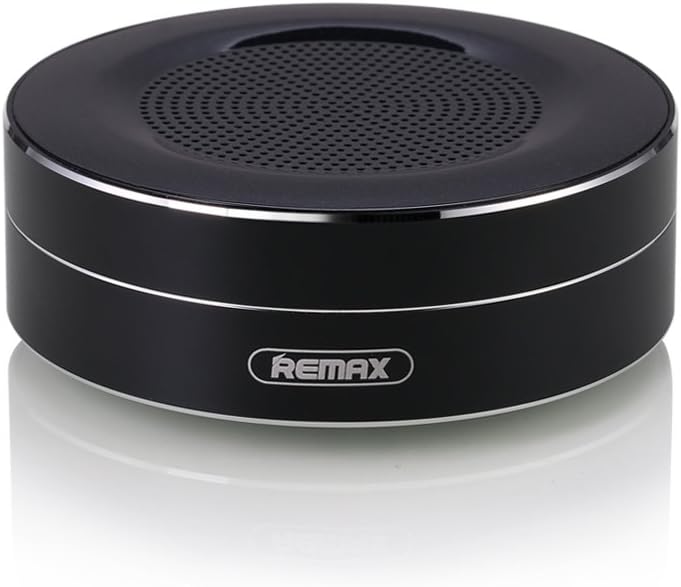
Figure 1: REMAX RB-M13 Portable Bluetooth Speaker. This image displays the compact, circular design of the speaker with its top grille and the REMAX logo on the side.
2. Product Overview
The REMAX RB-M13 is a compact and portable wireless Bluetooth speaker designed for high-quality audio playback and hands-free calling. It features a full-range speaker with a bass passive radiator for enhanced sound. The speaker supports multiple input methods including Bluetooth, TF card, and AUX.
2.1 Component Identification

Figure 2: Side view of the REMAX RB-M13 speaker showing the TF card slot, AUX input, and Micro USB charging port.
- TF Player Slot: Insert a TF (Micro SD) card for direct music playback.
- AUX Input: Connect external audio devices using a 3.5mm audio cable.
- Micro Charging Port: Connect the Micro USB cable for charging the speaker.

Figure 3: Top view of the REMAX RB-M13 speaker showing the control buttons, anti-slip mat, and lanyard slot.
- Function Button (M): Press to switch between playback modes (Bluetooth, TF Card, AUX).
- Backward / Volume Down (-): Press briefly for previous track; press and hold to decrease volume.
- Play / Pause: Press to play or pause music. During a call, press to answer/end a call. Press and hold to reject a call.
- Forward / Volume Up (+): Press briefly for next track; press and hold to increase volume.
- Lanyard Slot: For attaching a lanyard for portability.
- Voice Reminder: Provides audio prompts for speaker status.
3. Setup
3.1 Charging the Speaker
Before first use, fully charge the speaker. Connect the provided Micro USB cable to the speaker's Micro Charging Port and the other end to a USB power source (e.g., computer USB port, USB wall adapter). The charging voltage is DC5V. A full charge typically takes approximately 2.5 hours. The indicator light will change to show charging status (e.g., red for charging, off when fully charged).
3.2 Power On/Off
- Power On: Press and hold the Play/Pause button for a few seconds until you hear a power-on prompt or see an indicator light.
- Power Off: Press and hold the Play/Pause button again for a few seconds until you hear a power-off prompt or the indicator light turns off.
4. Operating Instructions
4.1 Bluetooth Pairing
- Ensure the speaker is powered on and in Bluetooth pairing mode (indicated by a flashing blue light or voice prompt).
- On your mobile device, enable Bluetooth and search for available devices.
- Select "RB-M13" from the list of devices.
- Once paired, the speaker will provide an audio confirmation, and the indicator light will typically turn solid blue.
4.2 TF Card Playback
- Insert a TF (Micro SD) card with MP3 audio files into the TF Player Slot.
- The speaker will automatically switch to TF card mode and begin playing music. If not, press the Function (M) button to cycle through modes until TF card mode is activated.
4.3 AUX Mode
- Connect one end of a 3.5mm audio cable to the speaker's AUX Input and the other end to the audio output of your external device.
- The speaker will automatically switch to AUX mode. If not, press the Function (M) button to cycle through modes until AUX mode is activated.
4.4 Call Function
When connected via Bluetooth to a smartphone, the built-in HD microphone allows for hands-free calling.

Figure 4: The REMAX RB-M13 speaker is shown next to a smartphone, illustrating its capability for hands-free calls with its built-in HD microphone.
- Answer Call: Press the Play/Pause button once when an incoming call rings.
- End Call: Press the Play/Pause button once during a call.
- Reject Call: Press and hold the Play/Pause button for 2 seconds when an incoming call rings.
4.5 Volume and Track Control
- Volume Up: Press and hold the Forward / Volume Up (+) button.
- Volume Down: Press and hold the Backward / Volume Down (-) button.
- Next Track: Press the Forward / Volume Up (+) button briefly.
- Previous Track: Press the Backward / Volume Down (-) button briefly.
5. Maintenance
- Cleaning: Use a soft, dry cloth to clean the speaker's surface. Do not use abrasive cleaners or solvents.
- Storage: Store the speaker in a cool, dry place away from direct sunlight and extreme temperatures.
- Water Exposure: This speaker is not waterproof. Avoid exposing it to water or excessive moisture.
- Battery Care: To prolong battery life, charge the speaker regularly, even if not in use for extended periods. Avoid fully discharging the battery frequently.
6. Troubleshooting
| Problem | Possible Cause | Solution |
|---|---|---|
| Speaker does not power on | Low battery | Charge the speaker fully. |
| Cannot pair via Bluetooth | Speaker not in pairing mode; device Bluetooth off; too far apart | Ensure speaker is in pairing mode. Turn on Bluetooth on your device. Move speaker closer to device (within 10 meters). |
| No sound | Volume too low; incorrect mode; faulty cable (AUX) | Increase speaker and device volume. Press 'M' button to select correct mode. Check AUX cable connection. |
| Poor sound quality | Interference; low quality audio source | Move away from other wireless devices. Use a higher quality audio file or source. |
| TF card not playing | Card not inserted correctly; unsupported file format; card corrupted | Reinsert TF card. Ensure files are MP3 format. Try a different TF card. |
7. Specifications
| Feature | Detail |
|---|---|
| Model Name | RB-M13 |
| Connectivity Technology | Bluetooth, Auxiliary |
| Speaker Power | 3W (Rated), 10 Watts (Max Output) |
| Impedance | 4 Ohms |
| S/N Ratio | >80dB |
| Distortion Rate | <1% |
| Charging Voltage | DC5V ± 0.25V |
| Charging Time | Approx. 2.5 hours |
| Music Playback Time | >=5 hours |
| Talking Time | >=14 hours |
| Standby Time | >=60 days |
| Microphone Sensitivity | -42dB ± 3dB |
| Product Dimensions | 11 x 11 x 11 cm |
| Item Weight | 328 g |
| Compatible Devices | Smartphone, Tablet, PC, etc. |
8. Safety Information
- Do not disassemble, repair, or modify the product.
- Keep the speaker away from extreme temperatures, direct sunlight, and open flames.
- Avoid dropping or subjecting the speaker to strong impacts.
- Do not expose the speaker to water or other liquids.
- Keep out of reach of children.
- Dispose of the product and its battery responsibly according to local regulations.
9. Warranty and Support
REMAX products are designed and manufactured to the highest quality standards. For warranty information and technical support, please refer to the warranty card included with your product or visit the official REMAX website. Please retain your proof of purchase for warranty claims.


