
Introduction
This manual provides detailed instructions for the installation, operation, maintenance, and troubleshooting of the Vintage Electronics Complete Belt Kit for the Marantz SD-800 cassette deck. This kit includes all three necessary replacement belts, manufactured to OEM specifications to ensure optimal performance of your audio equipment.
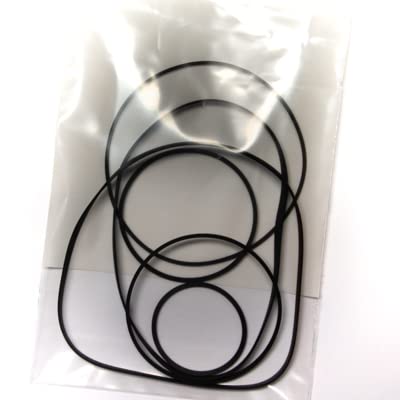
This image displays the complete belt kit, which includes three replacement belts designed for the Marantz SD-800 cassette deck.
Installation Guide: Belt Replacement Procedure
Replacing the belts in your Marantz SD-800 cassette deck requires careful attention to detail. It is recommended to have basic technical skills and appropriate tools for this procedure. If you are unsure, consult a qualified technician.
Required Tools:
- Small Phillips head screwdriver
- Flathead screwdriver (optional, for prying)
- Tweezers or small pliers
- Isopropyl alcohol and cotton swabs (for cleaning)
- Clean, lint-free cloth
Step-by-Step Procedure:
- Power Disconnection: Ensure the Marantz SD-800 cassette deck is completely unplugged from the power source before beginning any work.
- Accessing the Mechanism: Carefully remove the outer casing of the cassette deck. This typically involves unscrewing several screws on the back and sides. Note the location of each screw for reassembly.
- Locate Old Belts: Identify the existing belts within the tape transport mechanism. The Marantz SD-800 uses three belts. Observe their routing paths and connections to various pulleys and motors.
- Remove Old Belts: Gently remove the old belts. They may be stretched, brittle, or melted. Use tweezers or small pliers if necessary.
- Clean Pulleys and Flywheels: Using isopropyl alcohol and cotton swabs, thoroughly clean all pulleys, flywheels, and motor shafts where the belts make contact. Remove any residue from the old belts to ensure proper grip and prevent slippage.
- Install New Belts: Carefully install the three new belts from the kit. Refer to diagrams or photos taken during disassembly if available, or carefully route them according to the original path. Ensure the belts are not twisted and sit correctly in their grooves.
- Verify Belt Tension: Once installed, gently rotate the flywheels by hand to ensure the belts move freely and have appropriate tension. They should be snug but not overly tight, allowing smooth movement without excessive strain on the motor.
- Initial Test (Optional): Before reassembling the casing, you may perform a brief functional test. Connect the power, insert a cassette, and test basic functions like play, fast forward, and rewind. Immediately disconnect power if any issues arise.
- Reassembly: Carefully reattach the outer casing, ensuring all screws are tightened securely. Do not overtighten.
Post-Installation Operation Check
After successful belt replacement and reassembly, perform a comprehensive operational check:
- Insert a known good cassette tape.
- Test playback function, ensuring stable tape speed and clear audio.
- Test fast forward and rewind functions, verifying smooth and consistent tape movement.
- If your deck has recording capabilities, perform a short recording test to ensure proper tape transport during recording.
Maintenance
To ensure the longevity of your new belts and the optimal performance of your Marantz SD-800:
- Regular Cleaning: Periodically clean the tape path, including the heads, capstan, and pinch roller, using appropriate cleaning solutions and cotton swabs.
- Environmental Conditions: Store and operate your cassette deck in a clean, dry environment, away from extreme temperatures, direct sunlight, and excessive dust.
- Avoid Prolonged Idleness: Occasionally operate the deck to keep the belts and mechanism moving, which can help prevent belts from developing flat spots or becoming stiff.
Troubleshooting
If you encounter issues after installing the new belt kit, consider the following:
- Tape Speed Issues (Too Fast/Slow, Wow/Flutter):
- Verify all three belts are correctly routed and seated in their respective grooves.
- Ensure pulleys and flywheels are clean and free of old belt residue.
- Check for any obstructions preventing smooth belt movement.
- Tape Not Moving (Fast Forward/Rewind/Play):
- Confirm all belts are installed and have proper tension.
- Check if the motor is receiving power and attempting to spin.
- Inspect for any mechanical binding in the tape transport mechanism.
- Unusual Noises:
- Ensure belts are not rubbing against other components.
- Check for any loose parts within the mechanism.
If troubleshooting steps do not resolve the issue, please contact customer support.
Product Specifications
| Brand | Vintage Electronics |
| Model Compatibility | Marantz SD-800 |
| Kit Contents | 3 Replacement Belts |
| Manufacturing Standard | OEM Specifications |
| UPC | 710827788677 |
| ASIN | B071V8D2DR |
Warranty Information
The Vintage Electronics Complete Belt Kit for Marantz SD-800 comes with a Lifetime Warranty on all included belts. This warranty covers manufacturing defects and premature failure under normal operating conditions. For warranty claims, please retain your proof of purchase and contact customer support.
Customer Support
Vintage Electronics offers outstanding technical support with over 45 years of experience in the field. If you have questions regarding the installation, operation, or troubleshooting of your belt kit, or for warranty inquiries, please contact Vintage Electronics customer support. Specific contact details can typically be found on the product packaging or the Vintage Electronics official website.

