
Orbit SGM-1-MC
Orbit SGM-1-MC 1-Gang Gangable S/G Old-Work Box User Manual
Model: SGM-1-MC
1. Introduction
This manual provides detailed instructions for the safe and proper installation and use of the Orbit SGM-1-MC 1-Gang Gangable S/G Old-Work Box, 2-3/4" Deep. This electrical box is designed for use in existing walls or ceilings where new wiring is being installed without tearing out large sections of drywall. Please read this manual thoroughly before beginning any installation.
2. Safety Information
WARNING: Risk of electric shock. Improper installation can lead to serious injury or death. Always consult a qualified electrician if you are unsure about any part of the installation process.
- Always turn off power at the circuit breaker or fuse box before installing, servicing, or removing the electrical box.
- Verify that power is off using a voltage tester before touching any wires.
- All wiring must comply with national and local electrical codes.
- Use only approved electrical connectors and tools.
- Do not overload circuits.
- Ensure proper grounding of the electrical system.
3. Product Overview and Components
The Orbit SGM-1-MC is a single-gang, gangable, old-work electrical box. Its design allows for easy installation in existing walls and provides a secure enclosure for electrical connections. The "gangable" feature means multiple boxes can be joined together to create a multi-gang opening.
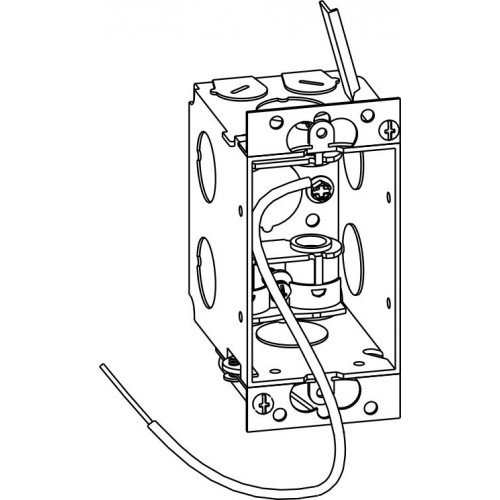
Figure 1: Illustration of the SGM-1-MC Old-Work Box. This image shows the internal structure, knockouts for wiring, and the mounting tabs designed for securing the box in an existing wall opening. A ground wire is visible inside the box.
Key Features:
- Gangable Design: Allows for easy creation of multi-gang configurations.
- Old-Work Application: Designed for installation in existing walls.
- 2-3/4" Deep: Provides ample space for wiring.
- Integrated Mounting Tabs: Securely fastens the box to drywall.
4. Setup and Installation
Follow these steps for proper installation of the SGM-1-MC Old-Work Box:
- Turn Off Power: Locate the circuit breaker or fuse controlling the area where you will be working and turn off the power. Verify with a voltage tester.
- Mark and Cut Opening: Place the electrical box against the wall and trace its outline. Carefully cut the opening in the drywall using a drywall saw. Ensure the opening is snug but allows the box to fit.
- Prepare Wiring: Pull the electrical cable through one of the knockouts on the box. Ensure sufficient wire length (typically 6-8 inches) extends beyond the front of the box for connections.
- Insert Box: Insert the electrical box into the cut opening. The mounting tabs (ears) should rest on the outside of the drywall.
- Secure Box: Tighten the screws on the mounting tabs. As you tighten, the tabs will pivot and clamp against the inside of the drywall, securing the box in place. Do not overtighten.
- Grounding: Connect the bare copper ground wire from the electrical cable to the grounding screw inside the box.
- Wire Connections: Proceed with making your electrical connections (e.g., to an outlet or switch) according to local electrical codes and device instructions.
- Install Device and Cover Plate: Mount the electrical device (outlet, switch) to the box using the provided screws. Install the cover plate.
- Restore Power: Once all connections are secure and the device/cover plate is installed, turn the power back on at the circuit breaker.
Note: For gangable applications, remove the side knockouts between boxes before installation and join them together.
5. Usage and Functionality
The SGM-1-MC electrical box serves as a protective enclosure for electrical wiring connections and devices such as outlets, switches, or light fixtures. Its primary function is to provide a safe and compliant housing for electrical components within a wall or ceiling structure. The gangable feature allows for flexible configurations, enabling the installation of multiple devices side-by-side by connecting additional SGM-1-MC boxes.
6. Maintenance
The Orbit SGM-1-MC electrical box is designed for long-term, maintenance-free operation once properly installed. No routine maintenance is required for the box itself. However, it is recommended to periodically inspect electrical connections and devices for signs of wear, damage, or loose connections. If any issues are observed, turn off power immediately and consult a qualified electrician.
7. Troubleshooting
As a passive electrical enclosure, the SGM-1-MC box itself does not typically experience "trouble." Most issues arise from improper installation or wiring of the devices within the box.
| Problem | Possible Cause | Solution |
|---|---|---|
| Device (outlet/switch) is loose in the wall. | Mounting tabs not fully tightened or drywall opening is too large. | Turn off power. Carefully tighten mounting tab screws. If opening is too large, consider using a repair plate or patching the drywall. |
| No power to device after installation. | Power not restored, tripped breaker, or incorrect wiring. | Check circuit breaker. Verify all wire connections are secure and correct according to device instructions and electrical codes. Consult an electrician if unsure. |
| Box does not fit into opening. | Opening cut too small. | Carefully enlarge the opening using a drywall saw. |
8. Specifications
| Attribute | Detail |
|---|---|
| Model Number | SGM-1-MC |
| Type | 1-Gang Gangable S/G Old-Work Box |
| Depth | 2-3/4 inches |
| Manufacturer | Orbit Industries |
| ASIN | B071V5D1WK |
| First Available Date | March 20, 2017 |
9. Warranty and Support
Specific warranty information for the Orbit SGM-1-MC is not provided in the product details. For warranty claims or technical support, please contact Orbit Industries directly through their official website or customer service channels. Always retain your proof of purchase.
For additional support or to view other products, visit the Orbit Store on Amazon.
Related documentsSGM-1-MC


Ask a question about this manual
Ask about setup, troubleshooting, compatibility, parts, safety, or missing instructions. Manuals+ will review the question and use this page’s manual context to help answer it.