
Introduction
This manual provides comprehensive instructions for the operation and maintenance of your Lenco XEMIO-280SI MP4 player. Please read this manual thoroughly before using the device to ensure proper functionality and to maximize your user experience. The Lenco XEMIO-280SI is a versatile portable media player featuring a 1.8-inch TFT LCD screen, 8GB internal memory, Bluetooth connectivity, and support for various audio, video, and image formats, along with an e-book function and voice recording capability.
What's in the Box
Upon unboxing your Lenco XEMIO-280SI, please verify that all the following components are included:
- Lenco XEMIO-280SI MP4 Player
- USB Cable
- Earphones
Product Overview
Familiarize yourself with the physical components and controls of your Lenco XEMIO-280SI.
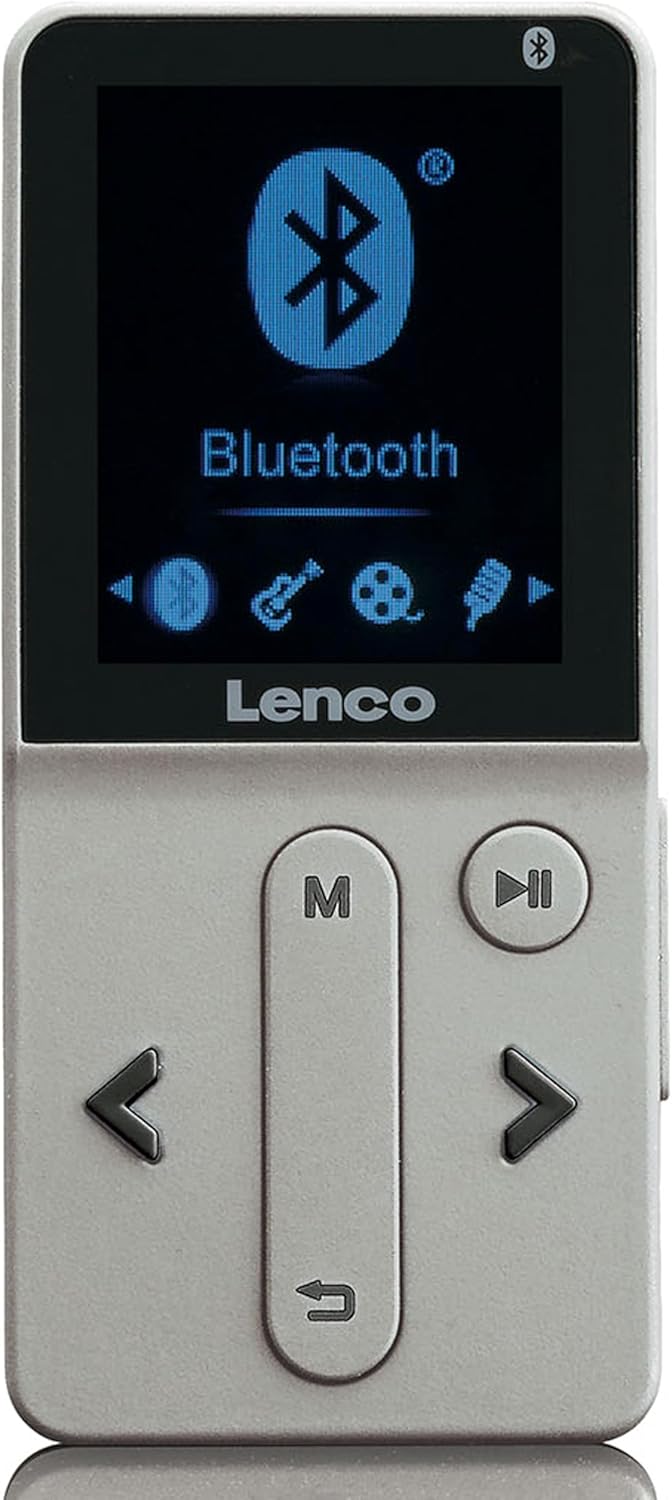
Figure 1: Front view of the Lenco XEMIO-280SI MP4 player. The device is silver-colored with a black screen at the top displaying a blue Bluetooth icon and text. Below the screen are physical buttons: a long vertical button labeled 'M' at the top and a 'return' arrow at the bottom, a circular play/pause button to its right, and left/right arrow buttons below these, flanking the vertical button.
Key Components:
- 1.8" TFT LCD Screen: Displays menus, media content, and device status.
- Navigation Buttons: Used to move through menus and control playback. Includes left/right arrows, a menu button ('M'), and a play/pause button.
- Micro USB Port: For charging the device and transferring files to/from a computer.
- Micro SD Card Reader: Supports memory cards up to 32GB for expanded storage.
- 3.5mm Headphone Jack: For connecting earphones or headphones.
- Built-in Microphone: For voice recording functionality.
Setup
1. Initial Charging
Before first use, fully charge the device. Connect the supplied USB cable to the Micro USB port on the player and the other end to a USB power adapter (not included) or a computer's USB port. The charging indicator will show the charging status. A full charge typically takes approximately 2-3 hours.
2. Powering On/Off
- To Power On: Press and hold the Play/Pause button for a few seconds until the screen illuminates.
- To Power Off: Press and hold the Play/Pause button again until the screen turns off.
3. Inserting a Micro SD Card (Optional)
If you wish to expand the storage, gently insert a Micro SD card (up to 32GB) into the Micro SD card slot until it clicks into place. Ensure the card is inserted in the correct orientation.
4. Connecting Earphones
Plug the supplied earphones into the 3.5mm headphone jack on the device.
Operating Instructions
1. Menu Navigation
Use the left and right arrow buttons to navigate through menu options. Press the 'M' (Menu) button to enter a selected option or confirm a selection. Press the 'return' arrow button (below 'M') to go back to the previous menu.
2. Audio Playback
From the main menu, select "Music" or "Audio". Browse your files using the navigation buttons. Press the Play/Pause button to start or pause playback. Supported formats include MP3, APE, FLAC, and WAV.
3. Video Playback
Select "Video" from the main menu. Navigate to your desired video file. Press the Play/Pause button to begin playback. Supported formats include AMV and AVI. Ensure videos are in compatible formats for optimal performance.
4. Image Viewing
Select "Pictures" or "Photos" from the main menu. Browse your image files. Press the 'M' button to view an image. Supported formats include JPG, BMP, and GIF.
5. E-book Function
Select "E-book" from the main menu. The device supports TXT format e-books. Navigate to your text file and press 'M' to open and read.
6. Voice Recording
Select "Recorder" or "Voice Record" from the main menu. Press 'M' to start recording. Press 'M' again to stop and save the recording. Recordings are saved in a dedicated folder on the device.
7. Bluetooth Connectivity
From the main menu, select "Bluetooth". Turn Bluetooth ON. The device will scan for available Bluetooth devices. Select your desired device from the list and pair. Once paired, you can stream audio wirelessly to compatible Bluetooth headphones or speakers.
8. File Transfer (USB)
Connect the device to your computer using the supplied USB cable. The player will appear as a removable disk drive. You can then drag and drop files (audio, video, images, e-books) to and from the device's internal memory or inserted Micro SD card.
Maintenance
Cleaning
Wipe the device with a soft, dry cloth. Do not use abrasive cleaners or solvents. Avoid exposing the device to excessive moisture.
Battery Care
To prolong battery life, avoid fully discharging the battery frequently. Charge the device regularly, even if not in use for extended periods.
Troubleshooting
- Device does not power on:
Ensure the battery is charged. Connect the device to a power source and try again. If the issue persists, perform a hard reset by pressing and holding the power button for an extended period (e.g., 10-15 seconds).
- No sound from earphones:
Check if the earphones are properly plugged into the 3.5mm jack. Ensure the volume is not set to zero or muted. Test with another pair of earphones to rule out faulty earphones.
- Cannot transfer files to/from computer:
Ensure the USB cable is securely connected to both the device and the computer. Try a different USB port on your computer. Verify that the device is recognized as a removable disk drive by your operating system.
- Bluetooth pairing issues:
Ensure Bluetooth is enabled on both the MP4 player and the target device. Place the devices close to each other. Try unpairing and re-pairing the devices. Ensure the target device is in pairing mode.
- Screen is frozen or unresponsive:
Press and hold the power button for approximately 10 seconds to force a restart. If the issue persists, allow the battery to fully drain and then recharge it.
Specifications
| Feature | Detail |
|---|---|
| Brand | Lenco |
| Model Number | XEMIO-280SI |
| Screen Size | 1.8 Inches (4.5 cm) |
| Display Technology | TFT LCD |
| Internal Memory | 8 GB |
| Expandable Memory | Micro SD card up to 32GB |
| Audio Formats | MP3, APE, FLAC, WAV |
| Video Formats | AMV, AVI |
| Image Formats | JPG, BMP, GIF |
| E-book Format | TXT |
| Connectivity | Bluetooth, Micro USB |
| Battery | Built-in rechargeable (3.7V, 170mAh) |
| Special Features | Voice Recorder, Built-in microphone |
| Product Dimensions | 2 x 2 x 2 cm; 199.58 g |
| Included Components | USB Cable, Earphone |
Warranty and Support
For warranty information and technical support, please refer to the warranty card included with your product or visit the official Lenco website. Keep your proof of purchase for warranty claims.
Lenco Official Website: www.lenco.com