
PAC RPK4-HD1101
PAC Honda Accord (2003-2007) Integrated Installation Kit
Model: RPK4-HD1101
Brand: PAC
Product Overview
The PAC RPK4-HD1101 Integrated Installation Kit is designed to provide a seamless radio replacement solution for 2003-2007 Honda Accord vehicles. This kit integrates essential vehicle features such as steering wheel controls and climate controls with your new aftermarket radio, ensuring full functionality and a factory-like appearance. It supports both single and double-DIN radios and offers configurable options for left and right-hand drive vehicles, along with Fahrenheit and Celsius temperature display.
What's in the Box
- Radio Replacement Kit
- Hardware
- Instruction Manual
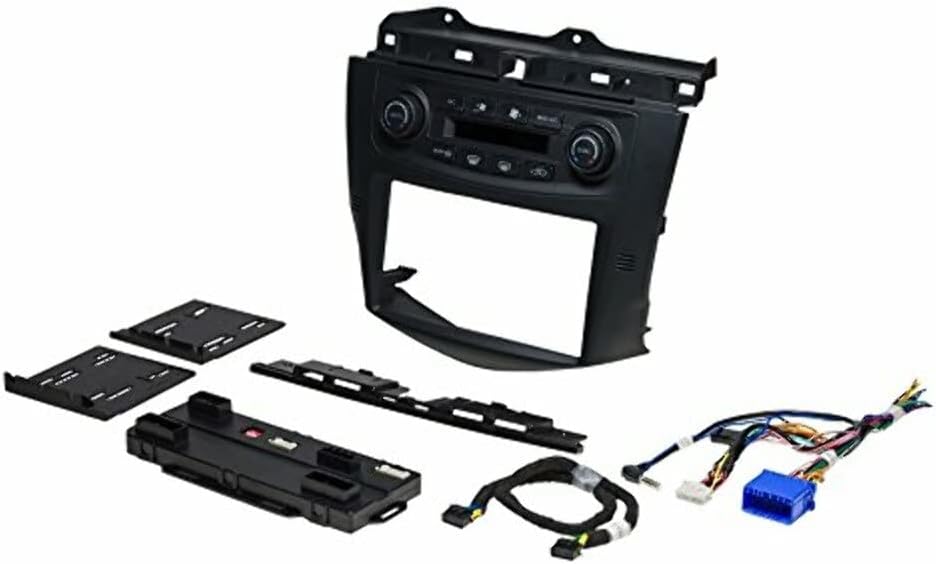
Image: Components of the PAC RPK4-HD1101 kit, showing the integrated dash panel with climate controls, the interface module, wiring harnesses, and mounting hardware.
Setup and Installation
The PAC RPK4-HD1101 kit is designed for professional installation to ensure proper integration and functionality. It provides all necessary components for a complete radio replacement, including the dash kit, wiring harnesses, and an interface module that retains factory features.
Key Installation Considerations:
- Radio Compatibility: This kit accommodates both single-DIN and double-DIN aftermarket radios. Ensure your chosen radio fits within these dimensions.
- Vehicle Compatibility: Specifically designed for Honda Accord models from 2003 to 2007.
- Wiring: The included wiring harnesses connect the new radio to the vehicle's electrical system and the PAC interface module. Follow the wiring diagram provided in the detailed manual for correct connections.
- Climate Control Integration: The kit's integrated climate controls replace the factory controls and connect to the vehicle's HVAC system via the interface module.
- Steering Wheel Control Retention: The interface module allows for the retention of factory steering wheel audio controls with most aftermarket radios. Programming may be required as per the detailed manual.
- Firmware Update: It is highly recommended to check for and install the latest firmware for the control unit from the PAC website (PAC-Audio.com) using the RadioPro application and a micro USB cable before installation. This ensures optimal performance and compatibility.
For detailed step-by-step instructions, refer to the comprehensive installation manual included with your kit. Professional installation is recommended to ensure correct functionality and to avoid damage to vehicle components.
Operating Instructions
Once installed, the PAC RPK4-HD1101 kit provides full control over your vehicle's climate system and integrates with your aftermarket radio. The new dash panel features controls that mimic the original factory layout for ease of use.
Climate Control Operation:
- Temperature Adjustment: Use the temperature control knobs to set the desired temperature. The display will show the current temperature setting.
- Dual Zone Control: If your vehicle supports dual zone climate control, the kit retains this functionality, allowing separate temperature settings for the driver and passenger sides.
- Fan Speed: Adjust the fan speed using the dedicated fan control buttons or knob.
- Mode Selection: Select airflow direction (e.g., face, feet, defrost) using the mode buttons.
- A/C On/Off: Activate or deactivate the air conditioning system.
- Recirculation/Fresh Air: Toggle between recirculated cabin air and fresh outside air.
- Temperature Display Units: The display can show temperature in either Fahrenheit or Celsius. Refer to the detailed manual for instructions on how to switch between these units.
- Control Knob Button Insets: The kit includes interchangeable insets for single and dual zone control knobs, allowing customization based on your vehicle's specific HVAC system.
Steering Wheel Control Operation:
After proper installation and programming, your factory steering wheel controls will operate your new aftermarket radio. Functions typically include volume up/down, track/station change, and mode selection. Specific functionality may vary depending on your aftermarket radio model and the programming steps followed during installation.
Maintenance
The PAC RPK4-HD1101 kit is designed for long-term reliability with minimal maintenance. Keep the dash panel clean using a soft, dry cloth. Avoid using harsh chemicals or abrasive cleaners, which can damage the surface or electronic components. Ensure all connections remain secure, especially after any vehicle maintenance that might involve the dashboard area.
Troubleshooting
If you experience issues with your PAC RPK4-HD1101 kit, consider the following troubleshooting steps:
- No Power to Radio/Kit: Check the vehicle's fuse box for blown fuses. Verify all power and ground connections to the PAC interface module and the aftermarket radio.
- Climate Controls Not Responding: Ensure all climate control wiring harnesses are securely connected to the PAC module and the vehicle's HVAC system. Verify the module has power. A firmware update may resolve some communication issues.
- Steering Wheel Controls Not Working: Confirm that the steering wheel control output from the PAC module is correctly connected to your aftermarket radio's steering wheel input. Re-program the steering wheel controls as per the instructions in the detailed manual. Ensure your radio supports external steering wheel control interfaces.
- Incorrect Temperature Display: Check the settings for Fahrenheit/Celsius display in the kit's configuration. Refer to the manual for adjustment procedures.
- Intermittent Functionality: Loose connections are a common cause of intermittent issues. Re-check all wiring connections.
For persistent issues, consult the detailed installation and operation manual. Technical support may also be available from the manufacturer's website.
Specifications
| Product Dimensions | 14 x 11 x 7.5 inches |
| Item Weight | 3 pounds |
| Model Number | RPK4-HD1101 |
| ASIN | B071R21R6F |
| Color | Black |
| Manufacturer | PAC |
| First Available Date | February 20, 2017 |
Warranty and Support
This PAC product is covered by a manufacturer's warranty. For specific warranty terms, registration, and technical support, please visit the official PAC website or contact their customer service department. Keep your purchase receipt as proof of purchase for warranty claims.
Official Website: www.pac-audio.com
Related documentsRPK4-HD1101


Ask a question about this manual
Ask about setup, troubleshooting, compatibility, parts, safety, or missing instructions. Manuals+ will review the question and use this page’s manual context to help answer it.