
ABLEGRID ABLEGRID-170413103
ABLEGRID AC Adapter Instruction Manual
Model: ABLEGRID-170413103
Introduction
This manual provides essential instructions for the safe and efficient use of your ABLEGRID AC Adapter. Please read this manual thoroughly before use and retain it for future reference.
The ABLEGRID AC Adapter is designed to provide reliable power to compatible devices, such as the AOpen Digital Engine DE45-HG 91.ADE01.I540. It features a wide input voltage range for global compatibility and built-in protection mechanisms.
Safety Information
- Ensure the adapter's voltage and current ratings match your device's requirements.
- Do not expose the adapter to water, moisture, or extreme temperatures.
- Avoid dropping or subjecting the adapter to strong impacts.
- Do not disassemble or attempt to repair the adapter. Refer to qualified service personnel.
- Unplug the adapter from the power outlet when not in use for extended periods.
- This adapter features Over Voltage Protection (OVP), Over Current Protection (OCP), and Short Circuit Protection (SCP) to ensure safe operation.
Package Contents
- 1 x ABLEGRID AC Adapter (Model: ABLEGRID-170413103)
- 1 x Power Cord (integrated or separate, depending on region/model)
Setup
Inspect the Adapter: Before first use, visually inspect the AC adapter and its cables for any signs of damage. Do not use if damaged.
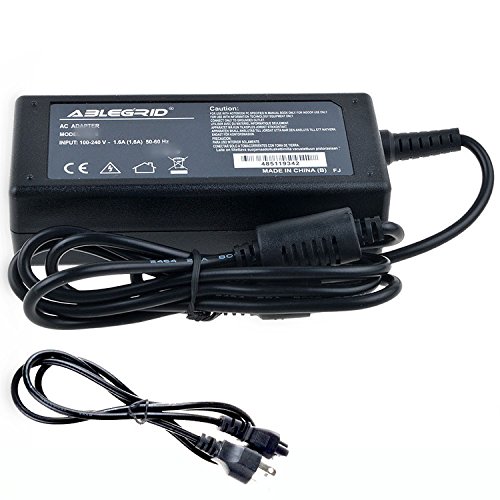
Image: Top-down view of the ABLEGRID AC Adapter, highlighting the brand logo, model information, and safety certifications printed on the label. The input and output cables are visible.
Connect to Device: Plug the barrel connector end of the AC adapter's output cable into the power input port of your compatible device (e.g., AOpen Digital Engine DE45-HG 91.ADE01.I540).

Image: Angled view of the ABLEGRID AC Adapter, showing the barrel connector at the end of the output cable, ready for connection to a device. The main power cord is also visible.
Connect to Power Outlet: Plug the 2-pin main power connector into a standard wall outlet (100-240VAC, 50/60Hz). Ensure the connection is secure.
Operating Instructions
Once properly connected, the ABLEGRID AC Adapter will automatically supply power to your device. No additional user interaction is typically required for basic operation.
- The adapter is designed for continuous operation within its specified voltage and current limits.
- Monitor your device to ensure it is receiving power and functioning correctly.
- If your device has a charging indicator, observe it to confirm charging status.
Maintenance
- Cleaning: Disconnect the adapter from both the power outlet and your device before cleaning. Use a soft, dry cloth to wipe the exterior. Do not use liquid cleaners or solvents.
- Storage: When not in use, store the adapter in a cool, dry place, away from direct sunlight and extreme temperatures. Avoid tightly winding the cables to prevent damage.
- Cable Care: Regularly check the power cord and output cable for fraying, cuts, or bends. Replace the adapter if any damage is observed.
Troubleshooting
| Problem | Possible Cause | Solution |
|---|---|---|
| Device not receiving power. |
|
|
| Adapter feels excessively hot. |
|
|
Specifications
| Model Number | ABLEGRID-170413103 |
| Input Voltage | 100-240VAC |
| Frequency Range | 50/60Hz |
| Connector Type | Barrel Connector |
| Main Power Connector Type | 2 Pin |
| Protection Features | OVP (Over Voltage Protection), OCP (Over Current Protection), SCP (Short Circuit Protection) |
| Special Feature | Travel-friendly design |
Warranty Information
Specific warranty details for this ABLEGRID product are not provided in this manual. Please refer to the manufacturer's official website or contact their customer support for current warranty terms and conditions.
Customer Support
For technical assistance, troubleshooting beyond this guide, or inquiries regarding your ABLEGRID AC Adapter, please visit the official ABLEGRID website or contact their customer service department. Contact information is typically available on the product packaging or the manufacturer's website.
Note: Always provide your product model number (ABLEGRID-170413103) and ASIN (B071QX96LP) when contacting support.
Related documentsABLEGRID-170413103

Ask a question about this manual
Ask about setup, troubleshooting, compatibility, parts, safety, or missing instructions. Manuals+ will review the question and use this page’s manual context to help answer it.