
1. Introduction
This manual provides comprehensive instructions for the installation and maintenance of the Vintage Electronics Complete Belt Kit, specifically designed for the Marantz SD-3510 cassette deck. Adhering to these guidelines will ensure proper function and longevity of your audio equipment.
2. Product Overview
The Vintage Electronics Complete Belt Kit for the Marantz SD-3510 includes all four necessary belts required for the cassette deck mechanism. These belts are manufactured to meet original equipment manufacturer (OEM) specifications, ensuring optimal performance and compatibility with your Marantz SD-3510.
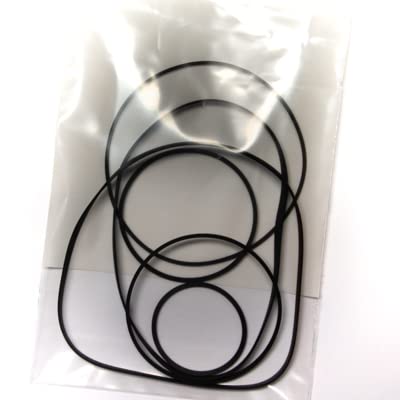
Figure 1: Contents of the Complete Belt Kit. The kit includes four precision-engineered belts designed for the Marantz SD-3510 cassette deck.
3. Setup & Installation
Proper installation of the new belts is crucial for the correct operation of your Marantz SD-3510 cassette deck. Please follow these steps carefully.
3.1. Safety Precautions
- Disconnect Power: Always unplug the cassette deck from the electrical outlet before beginning any service or installation.
- Static Discharge: Take precautions against static electricity.
- Handle with Care: Electronic components can be delicate. Handle them gently.
3.2. Accessing the Mechanism
- Carefully remove the outer casing of the Marantz SD-3510 cassette deck. Refer to your deck's service manual for specific instructions on casing removal.
- Locate the cassette mechanism assembly. This typically involves removing the front panel or top cover.
- Identify the existing belts and their routing paths. It is recommended to take a photograph before removal for reference.
3.3. Belt Replacement
- Gently remove the old, worn belts from their pulleys and motor shafts. Note their positions and sizes.
- Clean all pulley surfaces, motor shafts, and capstans with isopropyl alcohol and a lint-free cloth. This removes old belt residue and ensures optimal grip for the new belts.
- Refer to your previously taken photograph or the Marantz SD-3510 service manual for the correct routing of each belt.
- Install the new belts one by one, ensuring they are seated correctly on their respective pulleys and shafts without twists or excessive tension. The kit contains four belts of specific sizes for different functions (e.g., capstan, counter, reel drive).
- Once all new belts are in place, manually rotate the capstan flywheel a few times to ensure smooth movement and proper belt seating.
Figure 2: Example of belt routing within a cassette deck mechanism. (Actual Marantz SD-3510 routing may vary; consult your device's service manual.)
3.4. Reassembly and Testing
- Carefully reassemble the cassette deck's casing, ensuring all screws are tightened appropriately.
- Reconnect the power cord and power on the unit.
- Insert a test cassette tape and check all functions: Play, Fast Forward, Rewind, and Record (if applicable). Listen for consistent speed and smooth operation.
4. Maintenance
To ensure the longevity of your new belts and the optimal performance of your Marantz SD-3510, periodic maintenance is recommended.
- Cleanliness: Keep the interior of the cassette deck free from dust and debris. Dust can accumulate on belts and pulleys, leading to slippage and wear.
- Pinch Rollers and Capstan: Regularly clean the pinch rollers and capstan with isopropyl alcohol to remove tape residue, which can affect tape speed and belt performance.
- Storage: Store the cassette deck in a clean, dry environment away from extreme temperatures and direct sunlight.
5. Troubleshooting
If you encounter issues after installing the new belt kit, refer to the following common problems and solutions.
| Problem | Possible Cause | Solution |
|---|---|---|
| Tape speed is inconsistent or too slow/fast. | Belts incorrectly routed, dirty pulleys, or motor issues. | Re-check belt routing. Clean all pulley surfaces and motor shafts. Ensure belts are not twisted. |
| Tape does not move or stops abruptly. | Belt slipped off, incorrect belt size, or mechanical obstruction. | Verify all belts are properly seated. Check for any obstructions in the tape path or mechanism. |
| Squeaking or grinding noises. | Dry bearings, misaligned parts, or foreign debris. | Inspect for debris. Lubricate appropriate moving parts with a suitable lubricant (consult service manual). |
If problems persist after attempting these solutions, please contact Vintage Electronics technical support.
6. Specifications
- Product: Complete Belt Kit
- Brand: Vintage Electronics
- Model Compatibility: Marantz SD-3510 Cassette Deck
- Kit Contents: 4 Belts (various sizes for specific functions)
- Manufacturing Standard: OEM Specifications
- Material: High-quality rubber compounds
- UPC: 710827788714
- ASIN: B071NHX2P7
7. Warranty & Support
7.1. Lifetime Warranty
All belt kits from Vintage Electronics come with a Lifetime Warranty. This warranty covers manufacturing defects and premature wear under normal operating conditions. For warranty claims, please retain your proof of purchase and contact our support team.
7.2. Technical Support
Vintage Electronics offers outstanding technical support with over 45 years of experience in vintage audio equipment. If you have questions regarding installation, troubleshooting, or general maintenance, please do not hesitate to contact us.
Contact Information: Please refer to the Vintage Electronics website or your purchase documentation for the most current contact details for technical support.


