
Introduction
This manual provides essential instructions for the safe and effective use of your Accessory USA AC Adapter Charger. Please read this manual thoroughly before using the product and retain it for future reference. This adapter is designed to provide power to compatible jWIN Portable DVD Player models.
Safety Information
Observe the following safety guidelines to prevent damage to the product or injury to yourself.
- Certifications: Our products are CE, FCC, and RoHS certified, ensuring compliance with safety and environmental standards.
- Protection Features: The adapter includes OVP (Over Voltage output Protection), OCP (Over Current output Protection), and SCP (Short Circuit output Protection) to safeguard your device.
- Compatibility: Ensure the adapter is compatible with your specific jWIN Portable DVD Player model before use. Refer to the list of compatible models on the packaging or product description.
- Indoor Use Only: This adapter is intended for indoor use in dry locations. Do not expose to water or excessive moisture.
- Ventilation: Ensure adequate ventilation around the adapter during use. Do not cover the adapter or place it in an enclosed space.
- Damage: Do not use the adapter if the cord or plug is damaged. Contact customer support for assistance.
Package Contents
Verify that all items are present in your package:
- 2 x Power Adapter
Setup
Connecting the AC Adapter
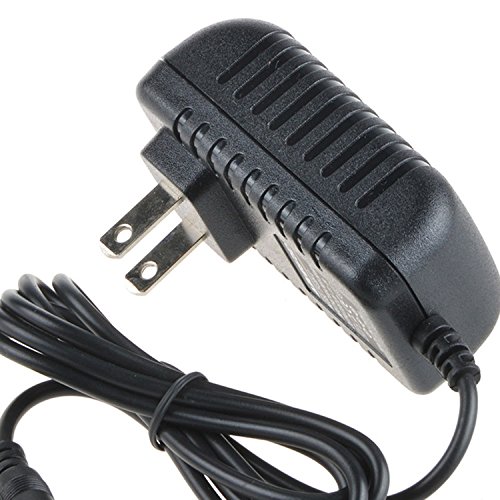
Image: The Accessory USA AC Adapter Charger, featuring a black casing and a power cord with a connector suitable for jWIN Portable DVD Players.
- Verify Compatibility: Before connecting, confirm that your jWIN Portable DVD Player model is listed as compatible with this adapter.
- Connect to Device: Insert the adapter's output connector firmly into the DC input port of your jWIN Portable DVD Player.
- Connect to Power Outlet: Plug the adapter's AC input plug into a standard wall power outlet (Type A - 2 pin, North American). Ensure the outlet provides the correct voltage (100-240 volts AC).
- Power On: Once connected, your DVD player should receive power. Refer to your DVD player's manual for specific power-on procedures.
Operating Instructions
The AC adapter functions as a power supply for your jWIN Portable DVD Player. Once properly connected, it will provide continuous power, allowing you to operate the DVD player without relying on its internal battery. It also charges the DVD player's battery if the player supports charging via the DC input.
- Ensure the adapter is securely plugged into both the DVD player and the wall outlet during operation.
- Disconnect the adapter from the wall outlet when not in use for extended periods.
Maintenance
Proper maintenance ensures the longevity and safe operation of your AC adapter.
- Cleaning: Disconnect the adapter from all power sources before cleaning. Use a soft, dry cloth to wipe the adapter. Do not use liquid cleaners or solvents.
- Storage: Store the adapter in a cool, dry place away from direct sunlight and extreme temperatures when not in use. Avoid tightly winding the cable to prevent damage.
- Inspection: Periodically inspect the adapter's cable and plug for any signs of damage, such as cuts, fraying, or bent pins. If damage is found, discontinue use and replace the adapter.
Troubleshooting
If you encounter issues with your AC adapter, consider the following:
- No Power to DVD Player:
- Ensure both ends of the adapter are securely connected.
- Try plugging the adapter into a different wall outlet to rule out a faulty outlet.
- Verify that the DVD player itself is functioning correctly with its original power source (if available).
- Adapter Overheating:
- Unplug the adapter immediately.
- Ensure it is not covered and has adequate ventilation.
- If overheating persists, discontinue use and contact support.
- Loose Connection: If the connection feels loose, ensure the connector is fully inserted into the DVD player's port. Avoid putting strain on the cable.
Specifications
| Brand | Accessory USA |
| Compatible Devices | DVD Players (jWIN Portable DVD Player models JD-VD740, JD-VD742, JD-VD749, JD-VD760, JD-VD762, JD-VD766) |
| Connector Type | MagSafe (Note: This may be a generic term; refer to product image for actual connector shape) |
| Input Voltage | 240 volts (compatible with 100-240V AC) |
| Output Voltage | 12 volts DC |
| Wattage | 15 watts |
| Frequency Range | 60 hertz (compatible with 50/60Hz) |
| Power Source | Corded Electric |
| Power Plug | Type A - 2 pin (North American) |
| Specification Met | CE, FCC, RoHS |
| Special Feature | Travel |
Warranty and Support
Your Accessory USA AC Adapter Charger is covered by the following warranty:
- 30 Days Money Back Guarantee: If you are not satisfied with your purchase, you may return it within 30 days for a full refund.
- 60 Days Free Exchange: Within 60 days of purchase, you are eligible for a free exchange with a paid return label if the product is defective.
- 365 Days Worry-Free Warranty: Enjoy a 365-day warranty against manufacturing defects.
For technical support or warranty claims, please refer to the contact information provided with your purchase or visit the Accessory USA official website.