
1. Product Overview
The Timex Expedition Field Chronograph is a robust analog watch designed for durability and functionality. It features a 43mm brass case, a black dial with a date window, and an adjustable genuine leather strap. Key features include INDIGLO backlight and a 30-minute chronograph function.
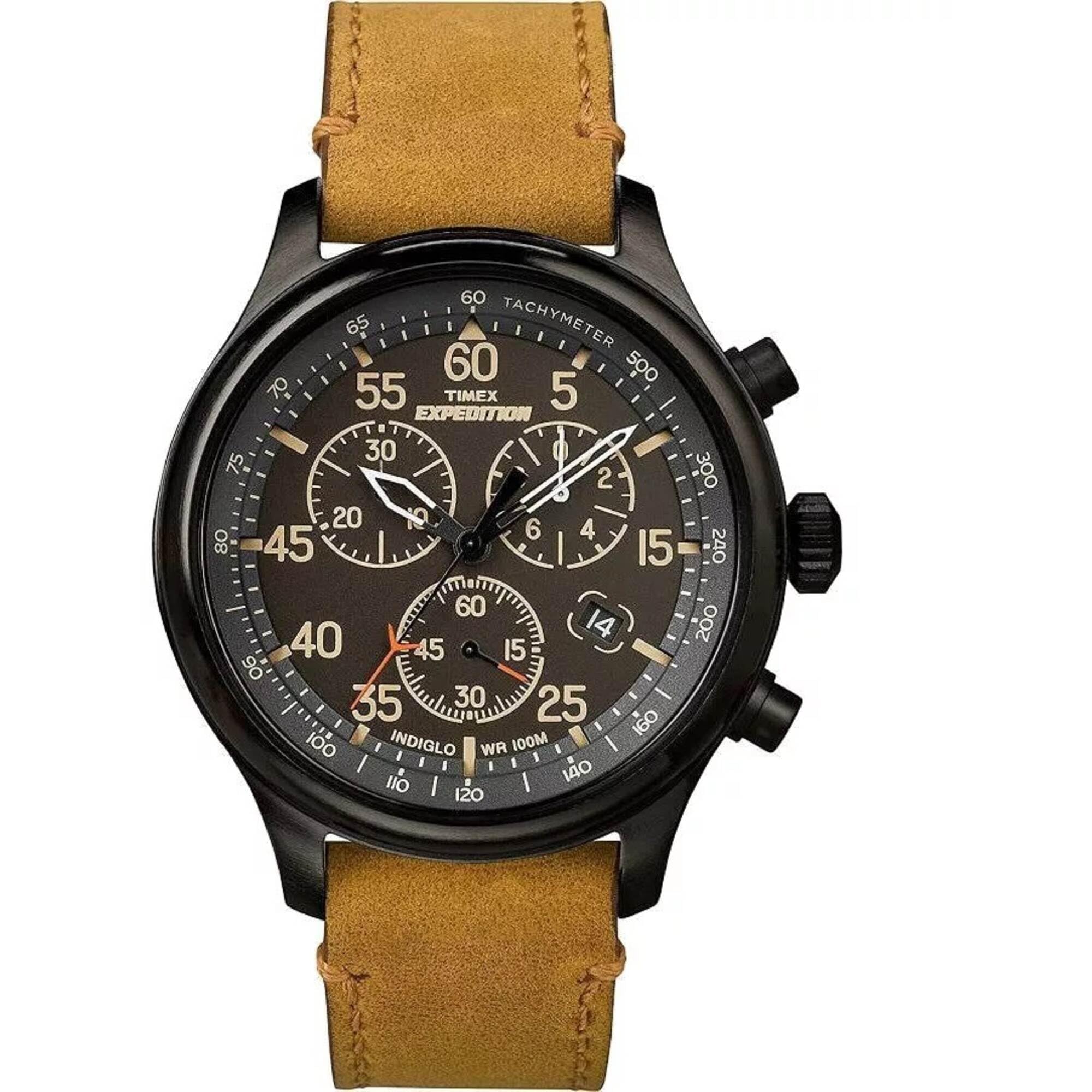
Image: Front view of the Timex Expedition Field Chronograph watch with a tan leather strap on a wrist.
Key Features:
- Adjustable tan 20mm genuine leather strap, fitting up to an 8-inch wrist circumference.
- Black dial with a date window at the 4 o'clock position and Arabic numerals in increments of 5 up to 60.
- 30-minute chronograph that measures to 1/20th second.
- Black 43mm brass case with a mineral glass crystal.
- INDIGLO light-up watch dial for low-light conditions.
- Water-resistant to 100 meters (330 ft), suitable for snorkeling and swimming, but not diving.
2. Initial Setup
Before using your Timex Expedition watch, follow these steps to activate it and set the time and date.
2.1 Activating the Watch
- Remove Crown Guard: To save battery life, your watch arrives with a plastic crown guard. Gently pull and remove this guard from under the crown.
- Push Crown In: Once the guard is removed, push the crown fully into the watch case. The watch hands will begin to move, indicating the watch is active.
Video: Instructions on how to remove the crown guard and activate the watch.
Video: Detailed guide on setting up the Timex Expedition Chronograph watch, including time, date, and chronograph calibration.
2.2 Setting Time and Date
- Set Time: Pull the crown out to the second position (farthest out). Turn the crown clockwise or counter-clockwise to set the hour and minute hands to the correct time. Ensure to account for AM/PM by observing when the date changes (it changes at midnight).
- Set Date: Push the crown in one click to the first position. Turn the crown to adjust the date. If the date changes at noon, advance it by 12 hours.
- Finalize: Push the crown back to its original position to start the watch.
3. Operating Instructions
3.1 Chronograph Function
The chronograph allows for precise timing of events. It features three sub-dials:
- Seconds Sub-dial: Located at the 6 o'clock position, this displays the running seconds for the main timekeeping.
- Minutes Elapsed Sub-dial: Located at the 10 o'clock position, this tracks minutes during chronograph operation (up to 30 minutes).
- 1/20th Second Sub-dial: Located at the 2 o'clock position, this shows fractions of a second when the chronograph is stopped or split times are reviewed.

Image: Close-up view of the watch dial, highlighting the chronograph sub-dials and main hands.
3.1.1 Chronograph Calibration
If the chronograph hands are not aligned to the zero position when reset, they can be calibrated:
- Pull Crown: Pull the crown out to the middle position (first click).
- Reset Minute Hand: Press the lower right button repeatedly until the chronograph minute hand (10 o'clock sub-dial) points to the 30 position.
- Reset Second Hand: Pull the crown out to the outermost position (second click). Press the upper right button repeatedly until the chronograph second hand (large sweep hand) points to the 12 o'clock position.
- Reset 1/20th Second Hand: While the crown is still in the outermost position, press the lower right button repeatedly until the 1/20th second hand (2 o'clock sub-dial) points to the zero position.
- Finalize: Push the crown back to its original position.
3.1.2 Standard Measurement
- Start: Press the upper right button to start the chronograph. The large second hand will begin to move.
- Stop: Press the upper right button again to stop the chronograph. The elapsed time will be displayed.
- Resume: Press the upper right button again to resume timing from where it stopped.
- Reset: After stopping the chronograph, press the lower right button to reset all chronograph hands to zero.
3.1.3 Split Time Measurement
- Start: Press the upper right button to start the chronograph.
- Split: While the chronograph is running, press the lower right button to take a split time. The chronograph hands will freeze, displaying the split time, while internal timing continues.
- Resume: Press the lower right button again to release the split. The chronograph hands will quickly advance to catch up with the ongoing elapsed time.
- Stop: Press the upper right button to stop the chronograph.
- Reset: Press the lower right button to reset all chronograph hands to zero.
3.2 INDIGLO Night-Light
The INDIGLO night-light illuminates the watch dial for easy reading in low-light conditions.
- Activate: Press the crown (center button) to activate the INDIGLO night-light. It will remain lit for a few seconds.
- Night-Mode: For extended illumination, press and hold the crown for approximately 4 seconds. The dial will flash, indicating that Night-Mode is activated for the next 4 hours. During Night-Mode, the INDIGLO light will activate for several seconds each time any button (crown or pushers) is pressed.
- Deactivate Night-Mode: To turn off Night-Mode, press and hold the crown for approximately 4 seconds again.
4. Maintenance
Proper care ensures the longevity and performance of your Timex watch.
- Cleaning: Wipe the watch case and crystal with a soft, damp cloth. For the leather strap, avoid excessive moisture and harsh chemicals.
- Water Resistance: This watch is water-resistant to 100 meters (330 ft). It is suitable for swimming and snorkeling. Avoid hot water, steam, or prolonged submersion, which can compromise the seals. Do not operate the crown or pushers while the watch is wet or submerged.
- Battery Replacement: The watch uses 1 Lithium Metal battery. Battery replacement should ideally be performed by a qualified watch technician to ensure water resistance is maintained.
- Strap Care: The genuine leather strap may require occasional conditioning to prevent drying and cracking.

Image: Side view of the watch, showing the crown and two pushers used for operation.

Image: Rear view of the watch case, showing the stainless steel back.
5. Troubleshooting
- Watch Not Running: Ensure the plastic crown guard has been removed and the crown is fully pushed into the watch case. If the watch still does not run, the battery may need replacement.
- Chronograph Hands Not Resetting to Zero: Perform the chronograph calibration steps outlined in Section 3.1.1.
- INDIGLO Not Working: Check if the crown is fully pushed in. If the battery is low, the INDIGLO function may weaken or stop working before the main timekeeping.
- Water Inside Watch: If moisture appears inside the watch, have it inspected by a professional watch repair service immediately to prevent damage.
6. Specifications
| Model Name: | Expedition Field Chrono |
| Model Number: | TW4B123009J |
| Case Material: | Brass |
| Case Diameter: | 43 Millimeters |
| Case Thickness: | 12.5 Millimeters |
| Band Material: | Leather |
| Band Width: | 20 Millimeters |
| Band Length: | 8 Inches |
| Dial Color: | Black |
| Crystal Type: | Mineral |
| Movement Type: | Quartz |
| Water Resistance Depth: | 100 Meters (330 Feet) |
| Power Source: | Battery Powered (1 Lithium Metal battery included) |
| Item Weight: | 0.17 Pounds (2.72 ounces) |
7. Warranty and Support
Your Timex Expedition Field Chronograph watch is covered by a manufacturer's warranty. For specific details regarding your warranty coverage or to seek support, please refer to the official Timex website or contact Timex customer service.
You can also visit the Timex Store on Amazon for additional product information and support resources.


