
Introduction
Thank you for choosing ILC Color Changing LED Light Bulbs. This manual provides essential information for the safe and efficient use of your new light bulbs. Please read these instructions carefully before installation and operation, and retain them for future reference.

Image: Two ILC color changing LED light bulbs and their accompanying infrared remote controls. The bulbs are A19 shape with E26 bases.
Product Overview
The ILC Color Changing LED Light Bulb (Model US-RGBW10W*2) combines daily illumination with dynamic color options. Each bulb features bright 2700K warm white lighting, a Color Rendering Index (CRI) greater than 85, and an 800 lumen output, equivalent to a 70-watt incandescent bulb. It offers 12 distinct color choices and adjustable brightness levels, all controllable via an included infrared remote.

Image: A visual summary of the ILC LED bulb's features, including its 10-watt power consumption, 70-watt incandescent equivalency, dimmability, 2700K warm white color temperature, CRI of 85, and 900 lumens brightness.
Features
- RGBW Lighting: Combines daily warm white light (2700K, 800 lumens) with 12 vibrant color options.
- Dimmable Brightness: Three preset brightness levels (100%, 30%, 1%) for various needs, including a dedicated night light function.
- Dynamic Modes: Includes Flash Mode for energetic atmospheres and Smooth Mode for gradual color transitions and relaxation.
- Memory Function: Remembers the last used color or mode upon power cycle.
- Synchronization: Multiple bulbs can be controlled by a single remote, maintaining consistent color changes in dynamic modes.
- Timing Function: Set the bulb to automatically turn off after a few hours or utilize a 24-hour cycle timer for daily automation.
- Infrared Remote Control: Easy-to-use remote for all functions.


Images: Icons representing 12 color options and various brightness levels for the ILC LED bulbs.
Setup
- Unpack: Carefully remove the LED light bulbs and remote controls from their packaging.
- Installation: Screw the ILC LED light bulb into a standard E26 light socket. Ensure the power is off before installation.
- Power On: Turn on the power to the light fixture. The bulb should illuminate in its default warm white setting.
- Remote Preparation: Ensure the remote control has working batteries. If not, insert two AAA batteries (not included).
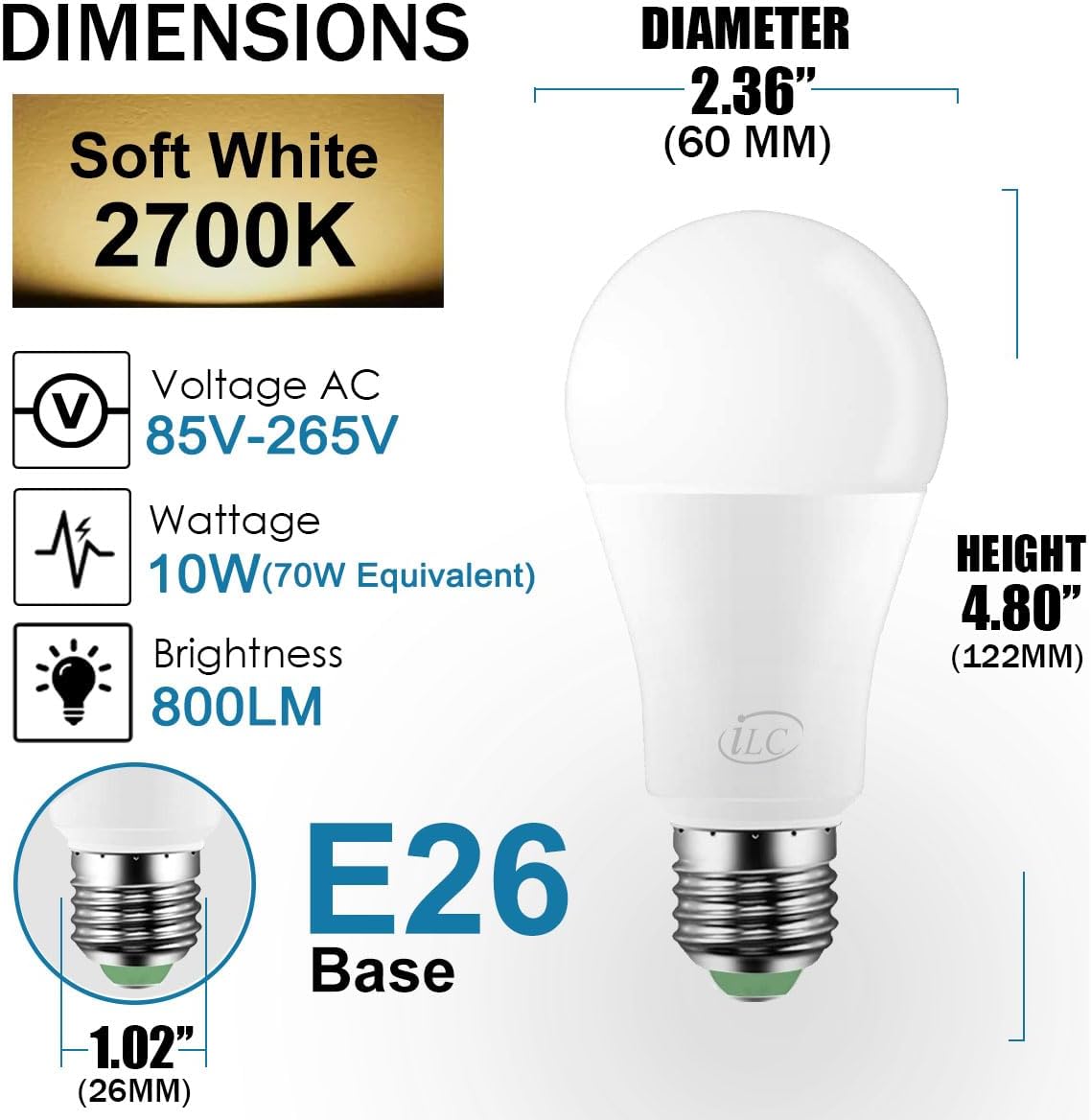
Image: Detailed dimensions and electrical specifications for the ILC A19 E26 LED bulb, confirming compatibility with standard fixtures.
Operating Instructions
Remote Control Functions
The included infrared remote control allows full command over your ILC LED light bulb. Point the remote directly at the bulb for optimal response.

Image: A detailed layout of the ILC remote control, highlighting buttons for power, brightness adjustment, dynamic modes (Flash, Smooth), timing functions, and 12 direct color selection buttons.
- On/Off: Press the ON button to turn the bulb on, and OFF to turn it off.
- Brightness Adjustment: Use the Sun Up button to increase brightness and the Sun Down button to decrease brightness.
- Color Selection: Press any of the 12 colored buttons (e.g., R for Red, G for Green, B for Blue) to instantly change the bulb's color.
- Warm White Light: Press the Lighting Mode button (sun icon) to switch to 2700K warm white light.
- Night Light: The 1% brightness setting (often accessed via dimming or a dedicated night light button if present) provides minimal illumination for sleep.
Dynamic Modes
- Flash Mode (C button): Activates a rapid, rhythmic color-changing sequence, suitable for party or energetic environments.
- Smooth Mode (S button): Initiates a gradual, continuous cycle through various colors, ideal for relaxation or creating a romantic ambiance.


Images: Examples of various room settings and activities enhanced by the color-changing capabilities of the ILC LED bulbs, including party, relaxation, work, and gaming environments, as well as a DIY light show setup.
Timing Functions
- Auto-Off Timer (1H button): Press this button to set the bulb to automatically turn off after one hour.
- 24-Hour Cycle Timer (24H button): Activates a daily cycle where the bulb will turn on and off at the same time each day. This is useful for automating lighting in areas like courtyards or hallways.
Video: Demonstration of ILC Color Changing Light Bulbs, showcasing 12 colors and 2 dynamic modes, including dimming, color selection, and timing functions. This video illustrates the remote control's capabilities in a living room setting.
Maintenance
- Cleaning: Ensure the bulb is off and cool before cleaning. Wipe with a soft, dry cloth. Do not use liquid cleaners.
- Storage: If storing the bulbs, keep them in their original packaging in a cool, dry place.
- Battery Replacement: Replace remote control batteries when the remote's range or responsiveness decreases. Use AAA batteries.
Troubleshooting
| Problem | Possible Cause | Solution |
|---|---|---|
| Bulb does not light up. | No power to the socket; bulb not screwed in properly; bulb is faulty. | Check power supply and wall switch. Ensure bulb is securely screwed in. Test bulb in another working socket. |
| Remote control not working. | Dead batteries; remote not pointed at bulb; obstruction between remote and bulb. | Replace batteries. Ensure direct line of sight to the bulb. Reduce distance to the bulb. |
| Colors are inconsistent across multiple bulbs. | Synchronization issue. | Ensure all bulbs are within range of the remote. Turn all bulbs off and then on simultaneously, then try to synchronize using the remote. |
| Timing function not working. | Incorrect setting; power interruption. | Re-set the timer. Ensure continuous power supply to the bulb. |
Specifications
| Specification | Detail |
|---|---|
| Brand | ILC |
| Model Number | US-RGBW10W*2 |
| Light Type | LED |
| Wattage | 10 Watts |
| Incandescent Equivalent | 70 Watts |
| Bulb Shape Size | A19 |
| Bulb Base | E26 |
| Light Color | RGBW, Warm White (2700K) |
| Brightness | 800 Lumens |
| Voltage | 120 Volts (Accepted: 100 to 240 Volts) |
| Control Method | Infrared Remote Control |
| Color Rendering Index (CRI) | 80+ |
| Indoor/Outdoor Usage | Indoor |
| Material | Iron (Base) |
| Item Weight | 6.6 ounces (0.19 Kilograms) |
| Included Components | Bulb, Remote control, User Manual |

Image: A visual comparison illustrating the impact of a high Color Rendering Index (CRI) on the vibrancy and accuracy of colors, using a plate of fruits as an example.
Warranty and Support
ILC provides a 2-year warranty for this product. For warranty claims, technical support, or any inquiries, please contact ILC customer service through the retailer's platform or the official ILC website.
Please refer to your purchase documentation for specific contact details.