
1. Introduction
This manual provides essential information for the safe and effective operation of your U`King Moving Head Stage Light. This compact and versatile lighting fixture features RGBW 4-in-1 LED technology, offering a wide range of colors and dynamic lighting effects. It supports multiple control modes, making it suitable for various applications from small events to professional stage setups. Please read this manual thoroughly before use and retain it for future reference.
2. What's in the Box
- Stage Light *1
- Power Cord *1
- Install Hanger *1
- Mounting Screws *2
- Manual *1

Image: Components included with the U`King Moving Head Stage Light.
3. Product Features
- Moving DJ Lights: Features a 50W RGBW LED with single color and mixing color capabilities (4 separate LED colors, no gobo). Includes various internal programming options.
- Modern Design: Portable and lightweight construction with high-quality stepper motors for fast, smooth, and accurate movements.
- Scanning Angle: Offers 540° Pan and 270° Tilt movement. The scanning speed is adjustable. Provides smooth electronic dimming from 0% to 100%.
- Multiple Control Modes: Supports DMX512, Sound Activated, Self-propelled (Auto), and Master-Slave control. Available DMX channels are 11/13CH.
- Application: This moving head light is suitable for indoor use in various settings such as bars, KTVs, dance halls, nightclubs, shows, weddings, and other entertainment events. Remote Control NOT Included.
4. Product Overview
The U`King Moving Head Stage Light is designed for ease of use and dynamic performance. Below are key visual references for its features and controls.

Image: Overview of available control modes.
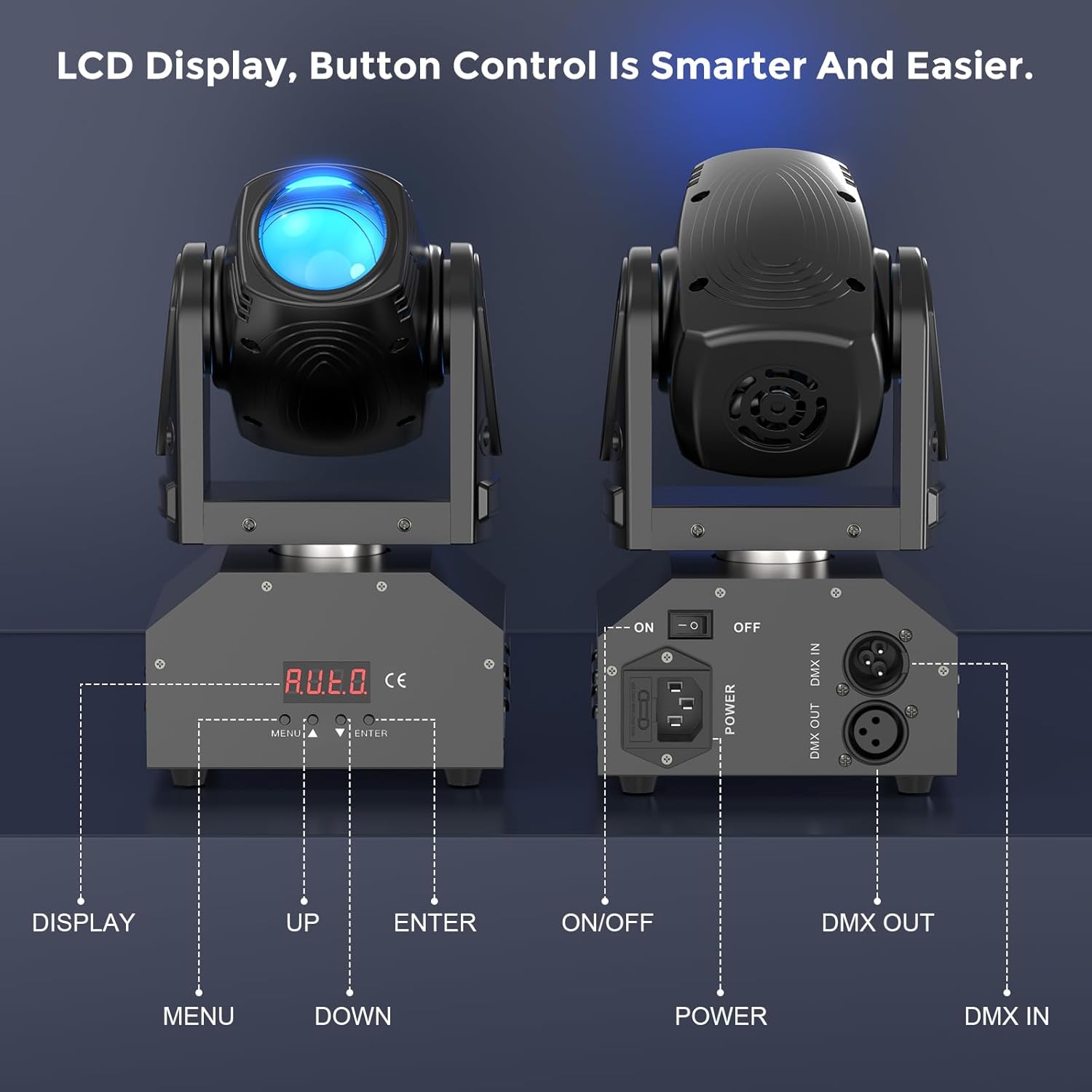
Image: Detailed view of the LCD display, control buttons, and rear panel connections.

Image: Product dimensions and movement range.
5. Setup
5.1 Mounting
The U`King Moving Head Stage Light can be mounted in various positions using the included hanger and screws. Ensure the mounting surface or truss system can safely support the weight of the fixture (approximately 4.7 pounds or 2.15 kg). Always secure the fixture with a safety cable (not included) to prevent accidental drops.
5.2 Power Connection
Connect the provided power cord to the power input on the rear of the fixture and then to a suitable power outlet. Ensure the power switch is in the OFF position before connecting to power.
5.3 DMX Connection (Optional)
For DMX control, connect a DMX cable from your DMX controller's output to the DMX IN port on the fixture. If linking multiple fixtures, connect the DMX OUT of the first fixture to the DMX IN of the next, and so on. Ensure the last fixture in the chain has a DMX terminator (not included) for optimal signal integrity.
6. Operating Modes
The U`King Moving Head Stage Light offers several operating modes to suit different event requirements.
6.1 DMX512 Control
This mode allows precise control over the fixture's functions using a DMX controller. The fixture supports 11 or 13 DMX channels. Refer to the DMX channel chart in the included manual for specific functions and values. Use the LCD display and buttons to set the DMX address.
6.2 Sound Activated Mode
In this mode, the light reacts to ambient sound, creating dynamic effects synchronized with music. Use the control panel to select this mode. Adjust sensitivity if needed.
6.3 Self-Propelled (Auto) Mode
The fixture runs through pre-programmed internal shows automatically. This mode is ideal for quick setup without external control. Various auto programs can be selected via the control panel.
6.4 Master-Slave Mode
Link multiple fixtures together where one acts as the master and others as slaves. The master unit controls all linked slave units, ensuring synchronized lighting effects. Connect DMX cables between units (Master OUT to Slave IN). Set the master unit to an auto or sound-activated mode, and slave units to slave mode.
Video: Demonstration of the U`King RGBW Moving Head Stage Light in various operational modes, showcasing color changes and movement patterns.
Video: An official overview of the U`King Moving Head Stage Light RGBW (4 in 1) DMX512, highlighting its features and effects.
7. Maintenance
Regular maintenance ensures optimal performance and longevity of your stage light.
- Cleaning: Periodically clean the lens and exterior with a soft, lint-free cloth. Avoid abrasive cleaners. Ensure the fixture is unplugged before cleaning.
- Inspection: Regularly check power cables, DMX cables, and mounting hardware for any signs of wear or damage. Replace damaged components immediately.
- Ventilation: Ensure the ventilation openings are clear of dust and debris to prevent overheating.
8. Troubleshooting
If you encounter issues with your U`King Moving Head Stage Light, refer to the following common troubleshooting steps:
- No Power: Check the power cable connection, power outlet, and the fixture's ON/OFF switch.
- No Light Output: Verify the fixture is receiving power and is not in blackout mode. Check DMX settings if using a controller.
- Incorrect Movement/Colors: Ensure the correct DMX mode and address are set on the fixture and controller. In Master-Slave mode, confirm the master unit is correctly configured and slave units are set to slave mode.
- Fixture Not Responding to Sound: Check if Sound Activated mode is enabled and adjust the microphone sensitivity.
For persistent issues, contact U`King customer support.
9. Specifications
| Feature | Specification |
|---|---|
| Model Number | ZQ02040 |
| Light Source Type | Light Emitting Diode (LED) |
| Light Source Wattage | 50 Watts |
| Color | RGBW (4 in 1) |
| Pan Angle | 540 Degrees |
| Tilt Angle | 270 Degrees |
| Control Modes | DMX512, Sound Activated, Self-propelled, Master-Slave |
| DMX Channels | 11/13CH |
| Dimming | 0 - 100% Electronic Dimming |
| Material | Acrylonitrile Butadiene Styrene (ABS) |
| Product Dimensions | 6.3"L x 6.3"W x 8.7"H |
| Item Weight | 4.74 pounds |
| Power Source | Corded Electric |
| Connector Type | XLR (for DMX) |
10. Warranty and Support
For warranty information, technical support, or service inquiries, please refer to the contact details provided with your purchase or visit the official U`King website. Keep your proof of purchase for warranty claims.


