
Total Control WM1451
Total Control WM1451 TV Wall Mount User Manual
Model: WM1451
Introduction
This user manual provides detailed instructions for the installation, operation, and maintenance of your Total Control WM1451 TV Wall Mount. Please read this manual thoroughly before installation and keep it for future reference.
The Total Control WM1451 is designed for TV units ranging from 32 to 55 inches and supports VESA mounting patterns from 100x100mm to 400x400mm. It offers a tilt angle of up to 30 degrees and a swivel angle of up to 180 degrees, providing optimal viewing flexibility.
Safety Information
Important Safety Instructions:
- Ensure the wall structure can support the combined weight of the mount and the TV.
- Use appropriate tools and follow all installation steps carefully.
- Do not overtighten screws to avoid damage.
- If you are unsure about any part of the installation, consult a qualified professional.
- Keep children and pets away during installation.
Package Contents
The WM1451 package includes all necessary mounting hardware. Please verify that all components are present before beginning installation.
- TV Wall Mount Assembly
- Wall Mounting Screws and Anchors
- TV Mounting Screws (various sizes)
- Spacers and Washers
- Instruction Manual

Image: The retail packaging for the Total Control WM1451 TV Wall Mount, displaying the mount itself and key specifications like screen size compatibility (32-65 inches), max weight (30 kg), distance to wall, and VESA sizes. The box indicates "TURN / LCD / LED" and highlights TILT 30° and TURN 180° capabilities.
Setup and Installation
Follow these steps carefully to install your TV wall mount.
Step 1: Prepare the Wall and TV
- Determine the desired height for your TV.
- Locate wall studs if mounting on a drywall with wood studs. Use a stud finder for accuracy.
- Identify the VESA mounting holes on the back of your TV.

Image: A direct front view of the Total Control WM1451 TV Wall Mount, showing the central mounting plate with various screw holes and the four adjustable arms extending outwards, ready to attach to a television. The arms have multiple slots for VESA compatibility.
Step 2: Attach Wall Plate to Wall
- Hold the wall plate against the wall at the desired height and mark the drilling locations.
- Drill pilot holes according to the recommended drill bit size for your wall type (wood stud, concrete, brick).
- Insert wall anchors if required (for concrete/brick walls).
- Secure the wall plate to the wall using the provided screws. Ensure it is level.
Step 3: Attach TV Brackets to TV
- Attach the TV brackets to the back of your TV using the appropriate VESA screws and spacers.
- Ensure the brackets are securely fastened and evenly spaced.
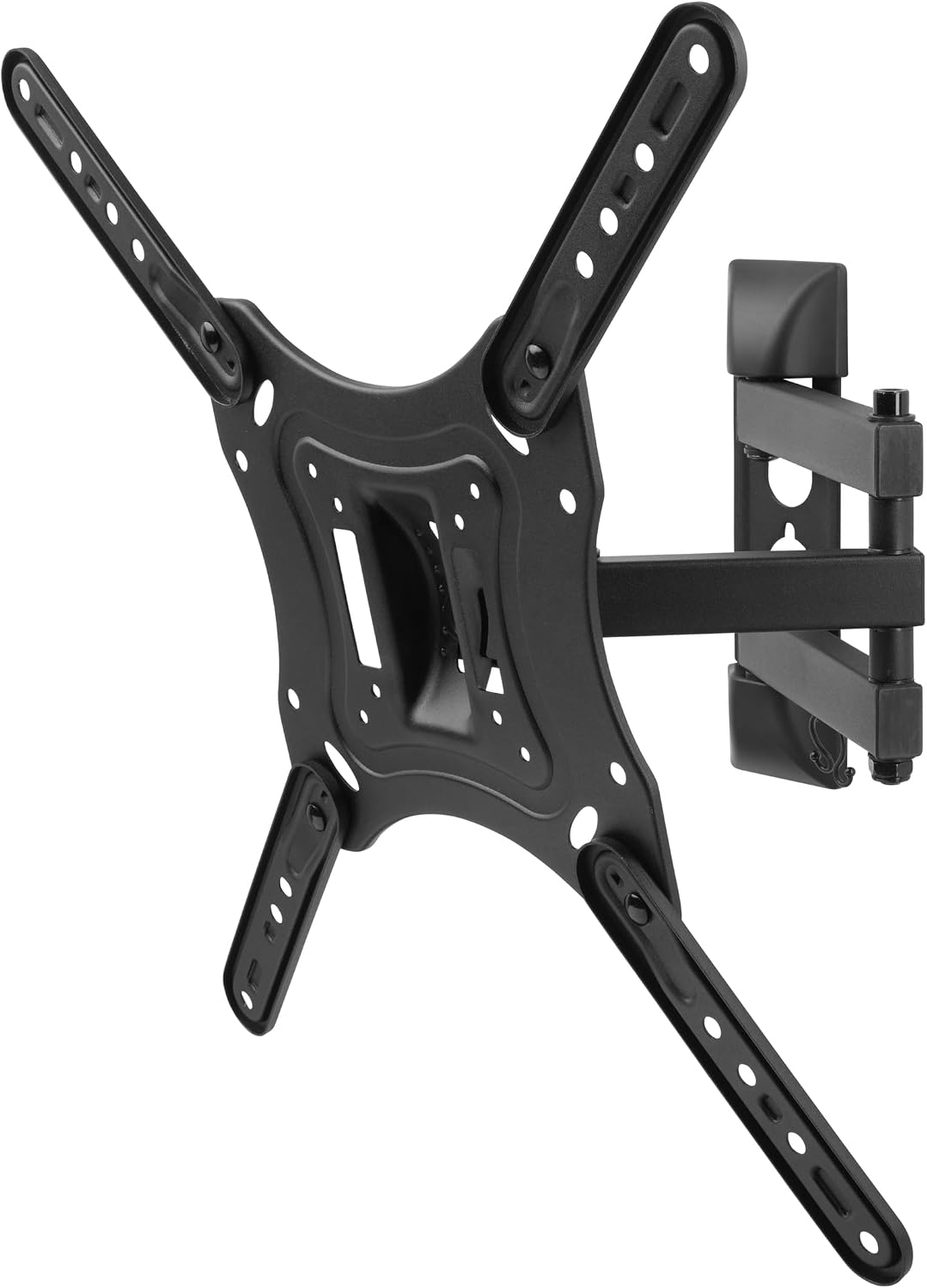
Image: A side view of the Total Control WM1451 TV Wall Mount, showing its articulated arm fully extended. This view highlights the swivel mechanism and the robust construction of the mount, ready to hold a television away from the wall for flexible viewing angles.
Step 4: Mount TV to Wall Plate
- Carefully lift the TV with the attached brackets and hook them onto the wall plate.
- Ensure the TV is securely seated on the wall plate.
- Engage any safety locks or screws to prevent accidental dislodgement.
Operating Instructions
Once installed, your Total Control WM1451 TV Wall Mount allows for flexible TV positioning.
Adjusting Swivel Angle
Gently push or pull the TV to the desired left or right angle. The mount supports up to 180 degrees of swivel, depending on TV size and wall clearance.
Adjusting Tilt Angle
To adjust the vertical tilt, loosen the tilt adjustment knobs (if present) on the TV brackets, tilt the TV to the desired angle (up to 30 degrees), and then re-tighten the knobs to secure the position.
Maintenance
The Total Control WM1451 TV Wall Mount requires minimal maintenance.
- Periodically check all screws and bolts to ensure they remain tight and secure.
- Clean the mount with a soft, dry cloth. Avoid abrasive cleaners or solvents.
- Do not lubricate moving parts unless specifically instructed by the manufacturer.
Troubleshooting
If you encounter issues with your TV wall mount, refer to the following common problems and solutions:
| Problem | Possible Cause | Solution |
|---|---|---|
| TV is not level after installation. | Wall plate or TV brackets were not installed level. | Carefully remove the TV, re-level the wall plate or TV brackets, and re-mount the TV. |
| Mount feels loose or unstable. | Screws are not fully tightened or wall anchors are insufficient. | Check and tighten all screws. Ensure appropriate wall anchors were used for your wall type. If unsure, consult a professional. |
| Difficulty adjusting swivel or tilt. | Adjustment mechanisms are too tight or obstructed. | Ensure no cables are obstructing movement. For tilt, loosen adjustment knobs before tilting and re-tighten after. |
Specifications
- Model: WM1451
- Compatible TV Sizes: 32 - 55 inches
- VESA Compatibility: 100x100mm, 200x100mm, 200x200mm, 300x200mm, 300x300mm, 400x200mm, 400x300mm, 400x400mm
- Maximum Weight Capacity: 30 kg (66 lbs)
- Tilt Angle: Up to 30 degrees
- Swivel Angle: Up to 180 degrees (depending on TV size)
- Material: Metal
- Product Dimensions: Approximately 42.8 x 6.2 x 42.8 cm
- Product Weight: 2.27 kg

Image: The retail packaging for the Total Control WM1451 TV Wall Mount, providing a clear overview of its features and specifications. It highlights screen size compatibility (32-65 inches), maximum weight capacity (30 kg / 66 lbs), distance to wall (1.9-15.6 inches / 49-395 mm), and various VESA mounting patterns from 100x100 to 400x400. The box also prominently displays the TILT 30° and TURN 180° capabilities.
Warranty and Support
This product comes with a manufacturer's warranty. Please refer to the warranty card included in your package for specific terms and conditions. For technical support or further assistance, please contact Total Control customer service.
Note: The provided JSON data does not contain specific warranty duration or direct support contact information. Please refer to the physical product packaging or manufacturer's website for the most up-to-date details.
Related documentsWM1451


Ask a question about this manual
Ask about setup, troubleshooting, compatibility, parts, safety, or missing instructions. Manuals+ will review the question and use this page’s manual context to help answer it.