
Important Safety Information
Read all instructions carefully before using this product. Failure to follow safety instructions may result in fire, electric shock, or other injury.
- This adapter is designed for indoor use only.
- Do not expose the adapter to rain, moisture, or extreme temperatures.
- Ensure the adapter is connected to a properly grounded power outlet.
- Disconnect the adapter from the power source before cleaning or if it will not be used for an extended period.
- Do not attempt to disassemble or repair the adapter. Refer all servicing to qualified personnel.
- Verify that the voltage and current ratings of your device match the adapter's specifications (18.5V, 6.5A, 120W).
- Keep out of reach of children.
This product is CE / FCC / RoHS certified and includes Over Voltage Protection (OVP), Over Current Protection (OCP), and Short Circuit Protection (SCP) to ensure safe operation.
Package Contents
- 1 x Accessory USA 18.5V 6.5A 120W AC DC Adapter
- 1 x AC Power Cord
Product Overview
The Accessory USA 18.5V 6.5A 120W AC DC Adapter is designed to provide reliable power to compatible HP Omni Desktop PCs. It features a barrel connector for secure attachment.
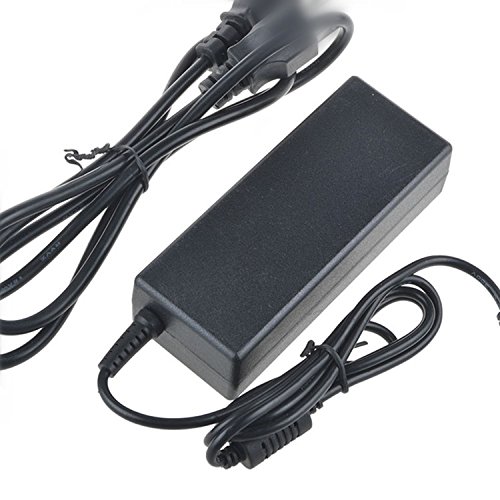
Image Description: A black AC DC power adapter with a power cord and a barrel connector. The adapter unit is rectangular with rounded edges.
Setup Instructions
- Verify Compatibility: Before connecting, ensure your HP Omni Desktop PC model is listed as compatible and requires an 18.5V 6.5A 120W power supply with a barrel connector. Refer to your computer's documentation for power requirements.
- Connect AC Power Cord: Plug one end of the AC power cord into the adapter's AC input port.
- Connect to Wall Outlet: Plug the other end of the AC power cord into a standard electrical wall outlet (100-240V AC, 50/60Hz).
- Connect to Device: Carefully insert the barrel connector of the adapter's DC output cable into the power input port of your HP Omni Desktop PC. Ensure a snug fit.
- Power On: Once all connections are secure, you may power on your desktop PC.
Operating Instructions
This AC DC adapter operates automatically once connected.
- The adapter converts AC wall power to the required DC voltage and current for your HP Omni Desktop PC.
- It is designed for continuous operation within its specified limits.
- If your device is not powering on or charging, refer to the Troubleshooting section.
Maintenance
- Cleaning: Disconnect the adapter from the power outlet and your device before cleaning. Use a soft, dry cloth to wipe the exterior of the adapter. Do not use liquid cleaners or aerosols.
- Storage: When not in use, store the adapter in a cool, dry place, away from direct sunlight and moisture. Avoid wrapping the cables too tightly.
- Inspection: Periodically inspect the power cord and adapter for any signs of damage, such as frayed wires, bent pins, or cracks in the casing. If damage is found, discontinue use immediately and replace the adapter.
Troubleshooting
| Problem | Possible Cause | Solution |
|---|---|---|
| Device not powering on. | Adapter not receiving power. | Ensure the AC power cord is securely plugged into both the wall outlet and the adapter. Try a different wall outlet. |
| Device not powering on. | Adapter not connected to device. | Ensure the barrel connector is fully inserted into the device's power port. |
| Device not powering on. | Incorrect adapter specifications. | Verify that the adapter's voltage (18.5V) and current (6.5A) match your device's requirements. |
| Adapter feels hot. | Normal operation or insufficient ventilation. | It is normal for the adapter to feel warm during operation. Ensure it is placed in a well-ventilated area and not covered. If it becomes excessively hot, disconnect it and contact support. |
| Sparking when plugging in. | Normal inrush current or loose connection. | A small spark is normal due to inrush current. If sparking is excessive or continuous, ensure connections are secure and contact support. |
Specifications
- Input Voltage: 100-240V AC, 50/60Hz
- Output Voltage: 18.5V DC
- Output Current: 6.5A
- Output Wattage: 120W
- Connector Type: Barrel Connector
- Safety Certifications: CE, FCC, RoHS
- Protection Features: Over Voltage Protection (OVP), Over Current Protection (OCP), Short Circuit Protection (SCP)
- Compatible Devices: HP Omni 120-1045l, 120-1048hk, 120-1050xt CTO, 120-1060in, 120-1068hk, 120-1100ef, 120-1100ek, 120-1100eo Desktop PC models.
Warranty and Support
This Accessory USA product comes with the following warranty:
- Money Back Guarantee: 30 Days
- Free Exchange: 60 Days (with paid return label)
- Worry-Free Warranty: 365 Days
For technical support or warranty claims, please contact Accessory USA customer service. Refer to your purchase documentation for contact details.