
Introduction
The Explore Scientific Discovery Adventure Scope is a versatile exploration tool featuring a 27-inch flexible video camera with integrated LED lights. It connects to a 2.31-inch LCD screen, allowing users to view and record images or videos from inaccessible locations. This device is designed for observing areas over, under, in, and around obstacles, making it suitable for various exploratory tasks. It is water resistant but not submersible.
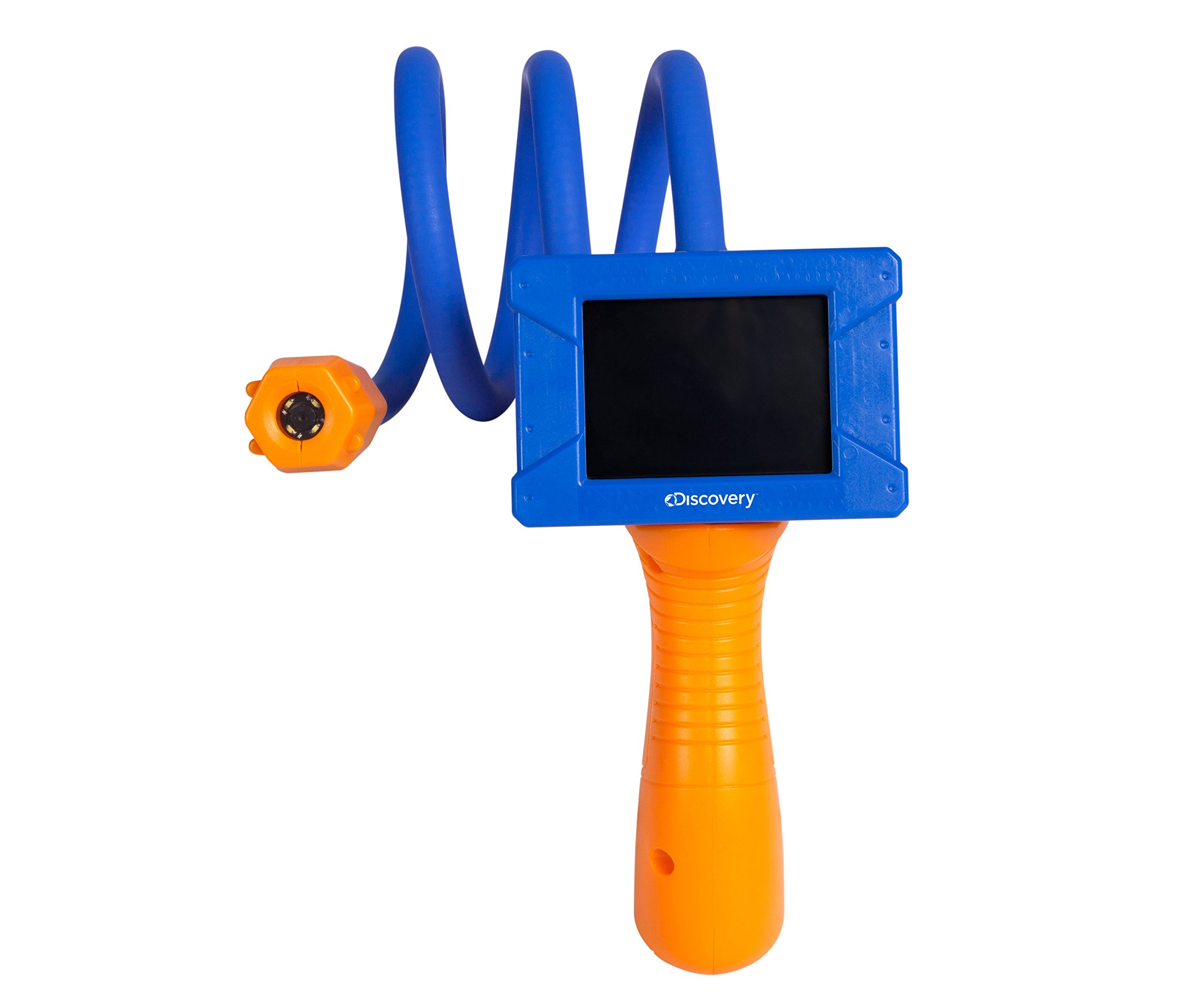
Figure 1: The Explore Scientific Discovery Adventure Scope, showing the main unit with LCD screen and the flexible camera probe.
Package Contents
- (1) Discovery Adventure Scope Camera Unit
Setup
1. Battery Installation
The Discovery Adventure Scope requires batteries for operation (batteries not included). Locate the battery compartment, typically on the handle of the device. Open the compartment cover and insert the required batteries, ensuring correct polarity as indicated inside the compartment. Close the cover securely.
2. Powering On
Press and hold the power button, usually located on the handle, until the LCD screen illuminates. The device is now ready for use.

Figure 2: Front view of the Discovery Adventure Scope, illustrating the flexible camera and LCD screen.
Operating Instructions
1. Positioning the Flexible Camera
Gently bend and maneuver the 27-inch flexible camera coil to direct the camera lens to your desired viewing area. The camera maintains its shape once positioned, allowing for stable observation.
2. Activating LED Lights
The camera features integrated LED lights for illumination in dark or low-light conditions. Locate the LED control button (refer to device diagram if available) and press it to turn the lights on or adjust their brightness. This enhances visibility for clearer images and videos.
3. Viewing on the LCD Screen
The 2.31-inch LCD screen displays the live feed from the camera. Adjust the angle of the screen for optimal viewing. The screen is designed to be large enough for multiple people to view simultaneously.
4. Capturing Images and Videos
To capture still images (JPEG) or record videos (MP4), insert an SD card (not included) into the designated slot. Use the capture/record button on the device to initiate and stop recording or to take a photo. The device supports 1080p video capture resolution.
5. Manual Focus
The Adventure Scope features manual focus. Adjust the focus ring on the camera head to achieve a clear image of your subject. There is no autofocus function.

Figure 3: Back view of the Discovery Adventure Scope, highlighting the ergonomic handle and the flexible camera's attachment point.
Maintenance
1. Cleaning
- Screen: Use a soft, lint-free cloth to gently wipe the LCD screen. Avoid abrasive materials or harsh chemicals.
- Camera Lens: Carefully clean the camera lens with a lens cleaning cloth or a cotton swab lightly dampened with lens cleaning solution.
- Body: Wipe the main body and flexible camera with a dry or slightly damp cloth. Do not immerse the device in water.
2. Storage
Store the Adventure Scope in a cool, dry place away from direct sunlight and extreme temperatures. If storing for extended periods, remove the batteries to prevent leakage.
3. Water Resistance
The camera probe is water resistant, allowing for use in damp environments. However, the main unit (handle and screen) is not waterproof. Do not submerge any part of the device in water.
Troubleshooting
| Problem | Possible Cause | Solution |
|---|---|---|
| Device does not power on. | Dead or incorrectly installed batteries. | Replace batteries with fresh ones, ensuring correct polarity. |
| No image on screen. | Camera cable not fully connected; device malfunction. | Ensure all connections are secure. If problem persists, contact support. |
| Image is blurry. | Incorrect focus; dirty lens. | Adjust the manual focus ring on the camera head. Clean the camera lens. |
| LED lights not working. | LED function not activated; low battery. | Press the LED control button. Replace batteries if low. |
| Cannot record or save files. | No SD card inserted; SD card full or corrupted. | Insert a compatible SD card. Check if the SD card has free space or try a different card. |
Specifications
| Model Name | Discovery |
| Flexible Camera Length | 27 inches |
| Screen Size | 2.31 inches (LCD) |
| Video Capture Resolution | 1080p |
| Media Type | SD Card (for recording) |
| File Format | JPEG (images), MP4 (videos) |
| Focus Type | Manual Focus |
| Water Resistance Level | Water Resistant (camera probe only, not submersible) |
| Built-In Illumination | Bright LED light |
| Item Weight | 1.32 Pounds |
| UPC | 812257014217 |
Warranty Information
According to product information, this item is sold with no warranty. Please refer to your retailer's return policy for details on product returns or exchanges.
Customer Support
For further assistance, technical support, or inquiries regarding your Explore Scientific Discovery Adventure Scope, please contact the manufacturer directly through their official website or customer service channels. Keep your purchase receipt and product model information handy when contacting support.


