
Barkan E400+.B
Barkan TV Wall Mount Instruction Manual
Model: E400+.B | Brand: Barkan
1. Introduction
This manual provides detailed instructions for the safe and proper installation, operation, and maintenance of your Barkan Fixed TV Wall Mount (Model E400+.B). Please read this manual thoroughly before beginning installation and retain it for future reference. This mount is designed for 13-90 inch flat or curved screens, supporting up to 132 lbs (60 kg).
Key features include a very low profile design, an auto-locking patented mechanism for enhanced safety, and robust metal construction ensuring extra stability.
2. Package Contents
Before installation, verify that all components are present and undamaged. The package typically includes:
- Barkan E400+.B TV Wall Mount bracket
- Assembly instructions
- Wall screws and anchors (suitable for various wall types)
- Mounting hardware (various TV screws, washers, spacers)

Figure 2.1: Included hardware kit with labeled components.
3. Setup and Installation
Proper installation is crucial for safety and performance. Follow these steps carefully. For a visual guide, please refer to the official installation video below.
3.1. Wall Compatibility and Required Tools
Ensure your wall type is compatible with the mount. This mount is suitable for drywall with wood studs and concrete blocks/concrete walls. It is not suitable for drywall/gypsum/plaster without studs.

Figure 3.1: Wall compatibility types and necessary tools for installation.
Required Tools: Drill (1/4" - 6mm or 3/8" - 10mm), Level, Safety glasses, Stud finder.
3.2. Assembly Steps
- Attach the adapters to the rear side of the TV: Secure the vertical rails to the VESA mounting holes on the back of your television using the appropriate screws and spacers from the hardware kit. Ensure a snug fit.
- Install the bracket on the wall: Locate the wall studs (for drywall) or mark the drilling points (for concrete). Drill pilot holes and securely attach the wall plate to the wall using the provided wall screws and anchors. Use a level to ensure the wall plate is perfectly horizontal.
- Snap the TV onto the bracket: Carefully lift the television with the attached adapters and hook it onto the wall plate. The patented auto-locking mechanism will engage, securing the TV in place with an audible 'click'.

Figure 3.2: Visual representation of the three easy assembly steps.
3.3. Backscreen Connection Positioning
The vertical rails offer various positioning options for optimal backscreen connection. Refer to the diagram for common configurations.

Figure 3.3: Different backscreen connection positioning options for the vertical rails.
3.4. Official Installation Video
Video 3.1: Official Barkan Fixed TV Mounts installation guide. This video demonstrates the installation process and highlights key features of the mount.
4. Operating the Mount
The Barkan E400+.B is a fixed TV wall mount, meaning it holds your television securely in a stationary position close to the wall. It does not offer tilt, swivel, or extension capabilities.
4.1. Auto-Locking Safety Mechanism
This mount features a patented auto-locking mechanism that automatically prevents the disengagement of the screen from the wall. Unlike screw-locking mechanisms, there are no cords or springs that might break. It includes two hanging points on each side for enhanced security.

Figure 4.1: Diagram illustrating the auto-locking safety mechanism, showing angled and horizontal latches.
4.2. Low Profile Design
The mount is designed for a very low profile, positioning your TV just 1.1 inches (2.8 cm) from the wall, providing a sleek and clean appearance.
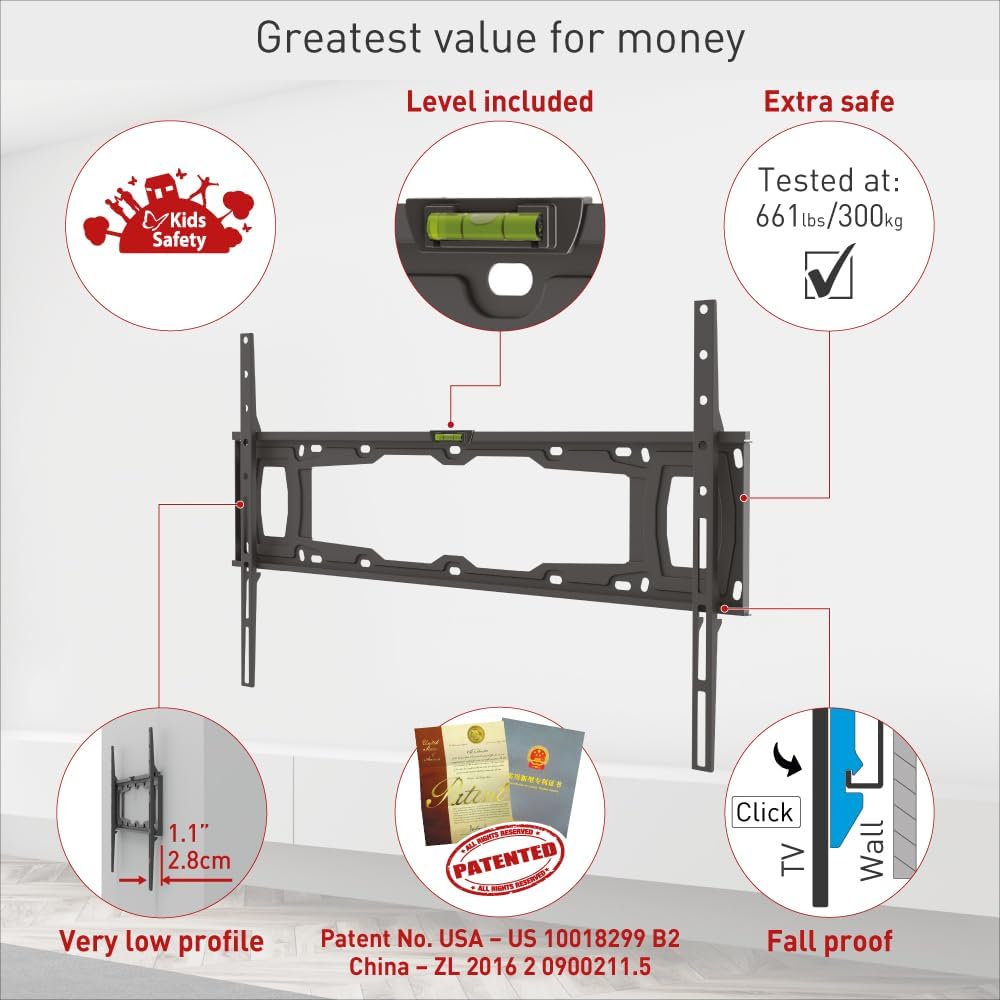
Figure 4.2: Visual representation of the mount's low profile and patented features.
5. Maintenance
To ensure the longevity and continued safe operation of your Barkan TV Wall Mount, periodic maintenance is recommended:
- Cleaning: Wipe the mount with a soft, dry cloth to remove dust. Avoid using abrasive cleaners or solvents.
- Inspection: Periodically check all screws and connections to ensure they remain tight and secure. Over time, vibrations or minor shifts can loosen fasteners.
- Weight Check: Always ensure that the weight of your television does not exceed the maximum load capacity of 132 lbs (60 kg).
6. Troubleshooting
If you encounter any issues during or after installation, please review the following common points:
- TV not level: Ensure the wall plate was installed level. The mount includes a built-in level for assistance during installation.
- Screws not fitting/long enough: The mount comes with a variety of screws to fit most TVs. If your TV requires different screen-connection screws, please purchase them from a local hardware store or contact Barkan support.
- TV not securely attached: Ensure the auto-locking mechanism has fully engaged. You should hear a 'click' when the TV is properly seated. Verify that the horizontal latch prevents disengagement.
For further assistance, please contact Barkan customer service or visit their website for FAQs and video demonstrations.
7. Specifications
Detailed specifications for the Barkan E400+.B TV Wall Mount:
| Feature | Specification |
|---|---|
| Product Dimensions | 26.65 x 6.69 x 1.18 inches |
| Item Weight | 3.03 pounds |
| Model Number | E400+.B |
| Mounting Type | Wall Mount |
| Movement Type | Fixed |
| Brand | Barkan |
| Material | Metal |
| Maximum Compatible Size | 100 Inches |
| Minimum Compatible Size | 13 Inches |
| Maximum Load Capacity | 132 lbs (60 kg) - Tested with 465 lbs |
| VESA Compatibility | 75x75, 100x100, 100x200, 200x100, 200x200, 200x300, 300x200, 300x300, 300x400, 400x200, 400x300, 400x400, 600x200, 600x300, 600x400 mm and non-VESA up to 600x400 mm. |

Figure 7.1: Detailed specifications and backscreen connection dimensions.
8. Warranty and Support
Barkan Mounts stands behind the quality of its products.
8.1. Lifetime Limited Warranty
This Barkan TV Wall Mount comes with a Lifetime Limited Warranty. All Barkan products undergo strict quality tests, and this mount has been tested with 465 lbs, significantly exceeding its declared weight limit of 132 lbs (60 kg).
8.2. Customer Support and Resources
For any questions, assistance, or to download additional resources such as manuals and FAQs, please visit the official Barkan website or contact their customer service experts, available every day of the week.
- Official Website: www.barkanmounts.com
- Installation Manual (PDF): Download PDF
- Safety Information (PDF): Download PDF
Related documentsE400+.B


Ask a question about this manual
Ask about setup, troubleshooting, compatibility, parts, safety, or missing instructions. Manuals+ will review the question and use this page’s manual context to help answer it.