
1. Introduction
This manual provides essential information for the safe and effective operation, maintenance, and troubleshooting of your Hyper Tough HT031701C 0.5-Gallon Inflator. Please read all instructions carefully before use and retain this manual for future reference.
The Hyper Tough HT031701C inflator is designed for both high-volume and high-pressure inflation and deflation applications. It features easy-to-use controls, an automatic shutoff for safety, and an integrated storage compartment for accessories.
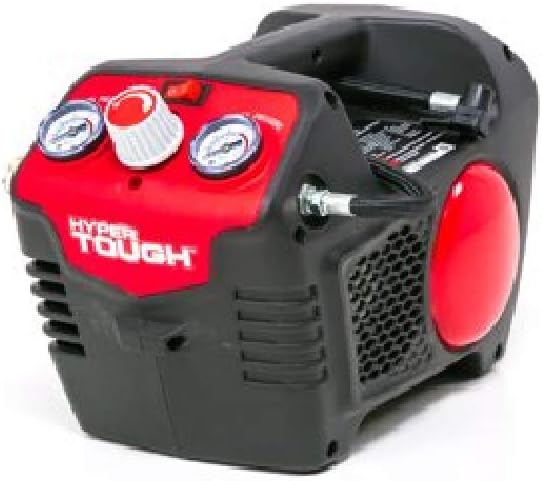
Figure 1: Hyper Tough HT031701C 0.5-Gallon Inflator
2. Safety Information
Always observe basic safety precautions when using electrical appliances to reduce the risk of fire, electric shock, and personal injury.
- Read All Instructions: Familiarize yourself with the inflator's operation and potential hazards.
- Electrical Safety: Ensure the power source matches the inflator's voltage (120 Volts). Do not operate in wet conditions.
- Personal Protection: Wear safety glasses to protect against air-blown debris.
- Pressure Hazard: Do not exceed the recommended pressure for any item being inflated. Over-inflation can cause items to burst, leading to injury.
- Supervision: Do not leave the inflator unattended while in operation.
- Maintenance: Disconnect from power before performing any maintenance or cleaning.
- Children and Pets: Keep the inflator out of reach of children and pets.
3. Package Contents
Verify that all items are present upon unpacking:
- Hyper Tough HT031701C 0.5-Gallon Inflator Unit
- Air Hose
- Nozzle (various types for different applications)
- Power Cord (integrated)

Figure 2: Included Nozzles and Adapters
4. Product Overview
Familiarize yourself with the components of your inflator:
- Control Panel: Located on the top surface, includes power switch, pressure adjustment dial, and pressure gauges.
- High-Pressure Hose Connection: For standard inflation tasks.
- High-Volume Deflation Port: For quick deflation of large items.
- Accessory Storage: Integrated compartment for nozzles and adapters.
- Power Cord Storage: Wrap-around storage for the power cord on the back of the unit.
- Carry Handle: For easy transport.

Figure 3: Control Panel Detail

Figure 4: Power Cord Storage
5. Setup
- Unpack: Remove the inflator and all accessories from the packaging.
- Inspect: Check the unit for any signs of damage. Do not operate if damaged.
- Connect Air Hose: Securely attach the air hose to the appropriate inflation port on the unit.
- Power Connection: Plug the power cord into a standard 120-Volt wall outlet.
6. Operating Instructions
6.1. Inflation
- Select Nozzle: Choose the correct nozzle or adapter for the item you wish to inflate. Attach it securely to the end of the air hose.
- Connect to Item: Connect the nozzle to the valve stem or inflation port of the item.
- Set Desired Pressure: Use the pressure adjustment dial on the control panel to set the target pressure. Refer to the item's manufacturer recommendations for appropriate pressure levels.
- Power On: Flip the power switch to the 'ON' position. The inflator will begin to operate.
- Monitor Pressure: The inflator will automatically shut off once the preset pressure is reached. Monitor the pressure gauges during operation.
- Disconnect: Once inflation is complete and the unit has shut off, disconnect the nozzle from the item and turn off the power switch.
6.2. Deflation
The inflator includes a deflation feature for quick removal of air from large inflatable items.
- Connect Hose: Attach the air hose to the high-volume deflation port on the inflator.
- Connect to Item: Connect the appropriate nozzle to the item's deflation port.
- Power On: Turn the inflator on. The unit will draw air out of the item.
- Monitor: Observe the item deflating.
- Disconnect: Once deflation is complete, turn off the inflator and disconnect the hose.
7. Maintenance
Regular maintenance ensures optimal performance and extends the life of your inflator.
- Cleaning: Wipe the exterior of the inflator with a damp cloth. Do not use harsh chemicals or abrasive cleaners. Ensure vents are clear of debris.
- Storage: Store the inflator in a clean, dry place, away from extreme temperatures. Utilize the integrated power cord and accessory storage to keep components organized.
- Hose Inspection: Periodically check the air hose for cracks, kinks, or damage. Replace if necessary.
8. Troubleshooting
If you encounter issues with your Hyper Tough HT031701C inflator, refer to the following common problems and solutions:
| Problem | Possible Cause | Solution |
|---|---|---|
| Inflator does not turn on | No power supply; Power switch off; Damaged power cord | Check power outlet; Ensure power switch is ON; Inspect power cord for damage. |
| Inflator runs but no air comes out | Hose not connected properly; Nozzle blocked; Internal issue | Ensure hose is securely attached; Clear any blockages in nozzle; Contact customer support if issue persists. |
| Inflator does not reach desired pressure | Air leak in hose/nozzle connection; Item being inflated is too large for capacity; Pressure setting too low | Check all connections for leaks; Ensure the item is within the inflator's capacity; Adjust pressure setting higher. |
| Automatic shut-off not working | Faulty sensor; Incorrect pressure setting | Verify pressure setting; If issue persists, discontinue use and contact customer support. |
9. Specifications
- Model: HT031701C
- Brand: Hyper Tough
- Capacity: 0.5 Gallons
- Power Source: Wall Outlet
- Voltage: 120 Volts
- Special Feature: Automatic Shut-Off
- Included Components: Air hose, Nozzle, Power cord
- Product Dimensions: 38.1 x 23.88 x 19.05 cm
- Item Weight: 6.4 kg
10. Warranty and Support
For warranty information or technical support, please refer to the documentation provided with your purchase or contact Hyper Tough customer service. Keep your proof of purchase for warranty claims.