
Beninca BULL424R
Beninca Bull 424R Slide Gate Opener User Manual
Model: BULL 424R | Brand: Beninca
1. Introduction
The Beninca Bull 424R is a robust and efficient 24 VDC motor designed for intensive use with sliding gates. It is capable of handling gates up to 20 feet in length or weighing up to 400 pounds, with a suggested optimal use for gates around 16 feet and 400 pounds. This unit features an internal control panel with an integrated LCD display for straightforward programming and a built-in radio-receiver for remote control operation. Engineered for silent and smooth performance, the Bull 424R incorporates advanced electronic settings including torque control, stroke adjustment, an anti-crushing reverse sensor, soft-start, soft-stop, working time management, and cycle counting, ensuring reliable and safe gate automation.

Figure 1: The Beninca Bull 424R slide gate opener unit. This image shows the compact and durable design of the main motor unit.
2. Safety Information
Important Safety Instructions:
- Always disconnect power to the gate opener before performing any maintenance, adjustments, or repairs.
- Keep hands, feet, and clothing clear of the gate and moving parts of the opener at all times.
- Ensure proper grounding of the electrical system to prevent electric shock.
- Installation and wiring should only be performed by qualified and certified personnel in accordance with all local electrical codes and safety regulations.
- Do not allow children to operate the gate opener or play near the gate area. Keep remote controls out of reach of children.
- Regularly inspect safety devices such as photocells and safety edges to ensure they are functioning correctly.
- Never attempt to force the gate open or closed manually when the opener is engaged.
3. Package Contents
Verify that all components are present in the package:
- 1 x Beninca Bull 424R Slide Gate Opener Unit
- 2 x Beninca Long-Range 2-Button ARC 128 Remote Controls
- Installation Hardware (e.g., mounting plate, screws) - (Specific hardware may vary, refer to packing list)
- User Manual / Installation Guide
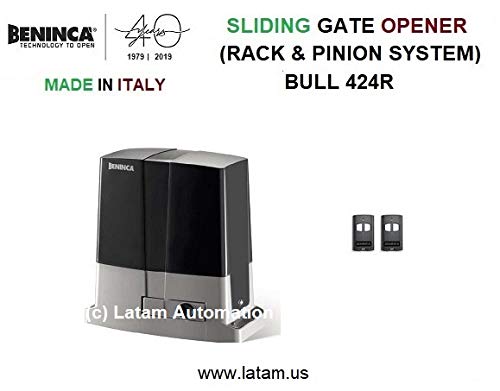
Figure 2: The Beninca Bull 424R unit shown alongside the two included long-range remote controls.
4. Setup and Installation
Installation of the Beninca Bull 424R requires technical expertise and should be performed by a qualified installer. The following steps provide a general overview:
- Site Preparation: Ensure the installation area is level, stable, and provides adequate drainage.
- Mounting the Unit: Securely mount the Bull 424R unit on a concrete pad or suitable foundation adjacent to the sliding gate. Use the provided mounting plate and hardware.
- Rack Installation: Install the gate rack (not included in this kit, typically sold separately) along the length of the gate, ensuring it aligns perfectly with the opener's pinion gear.
- Electrical Connections: Connect the 24 VDC power supply to the internal control panel. Ensure all wiring is done according to local electrical codes and the provided wiring diagram in the detailed installation manual. Proper grounding is essential.
- Safety Device Wiring: Connect any external safety devices such as photocells, safety edges, or flashing lights to the control panel as per the wiring diagram.
- Initial Programming: Power on the unit. Use the integrated LCD display and control buttons to perform initial programming. This includes setting the gate's open and close limits (stroke), adjusting motor torque, and configuring the anti-crushing sensitivity.
- Remote Control Pairing: Pair the included remote controls with the built-in radio-receiver following the instructions in the detailed manual.
- Testing: Thoroughly test the gate's operation, including opening, closing, and the functionality of all safety devices. Ensure the gate stops and reverses if an obstruction is detected.

Figure 3: An example of the Beninca Bull 424R slide gate opener installed alongside a residential sliding gate.

Figure 4: Close-up view of the robust gear mechanism within the Beninca Bull 424R, designed for reliable gate movement.
5. Operating Instructions
The Beninca Bull 424R is designed for user-friendly operation primarily through its remote controls.
5.1. Using the Remote Control
- Ensure the gate area is clear of obstructions before operating.
- Press one of the buttons on your Beninca long-range remote control to activate the gate.
- A single press typically initiates the gate's movement (open or close). If the gate is already moving, a second press may stop it, and a third press may reverse its direction, depending on the programmed logic.
- The system features soft-start and soft-stop functions, ensuring the gate begins and ends its movement smoothly, reducing wear and tear.
- The integrated anti-crushing reverse sensor will automatically stop and reverse the gate's direction if an obstruction is detected during its closing cycle, enhancing safety.

Figure 5: The Beninca TO.GO2A long-range 2-button remote control used to operate the gate opener.
5.2. Manual Release
In case of power failure or malfunction, the gate opener can be manually disengaged. Refer to the detailed installation manual for instructions on how to use the manual release key to unlock the motor and move the gate by hand.
6. Maintenance
Regular maintenance ensures the longevity and optimal performance of your Beninca Bull 424R gate opener.
- Monthly Inspection: Visually inspect the gate and opener for any signs of wear, damage, or loose components. Check the gate's wheels, hinges, and tracks for smooth movement.
- Cleanliness: Keep the gate rack and the opener's pinion gear clean and free of dirt, leaves, and other debris that could impede movement.
- Lubrication: Lubricate the gate's moving parts (wheels, bearings) and the opener's gear mechanism with appropriate grease as recommended in the full technical manual.
- Electrical Connections: Periodically check all electrical connections for tightness and ensure there are no frayed wires or signs of corrosion.
- Safety Sensor Check: Test the functionality of photocells and other safety sensors regularly. Ensure they are clean and properly aligned.
- Remote Control Batteries: Replace remote control batteries as needed to ensure reliable operation.
For any complex maintenance or repairs, it is highly recommended to contact a qualified Beninca service technician.
7. Troubleshooting
This section addresses common issues you might encounter with your gate opener.
| Problem | Possible Cause | Solution |
|---|---|---|
| Gate not responding to remote control. | No power to opener; remote battery low/dead; remote not paired; safety sensors obstructed. | Check power supply to the unit. Replace remote battery. Re-pair remote control. Clear safety sensor path. |
| Gate stops unexpectedly during operation. | Obstruction detected by safety sensor; motor overload; mechanical resistance. | Clear any obstructions. Check gate for free movement. Consult technical manual for motor overload reset. |
| Gate opens/closes partially. | Limit switch misadjustment; mechanical binding; low voltage. | Re-program gate limits via LCD display. Inspect gate for binding. Verify power supply voltage. |
| Gate makes unusual noises. | Lack of lubrication; worn gears; foreign objects in rack. | Lubricate moving parts. Inspect gears for wear. Remove any debris from the rack. |
If the problem persists after attempting these solutions, please contact a qualified technician.
8. Specifications
Key technical specifications for the Beninca Bull 424R Slide Gate Opener:
- Model: BULL 424R
- Power Supply: 24 VDC
- Max Gate Weight: Up to 400 lb (180 kg)
- Max Gate Length: Up to 20 ft (6 meters)
- Suggested Use: For 16 ft / 400 lb gates
- Operation Type: Intensive use, silent operation
- Motor: Powerful 24 VDC motor, energy efficient
- Control Panel: Internal, integrated LCD display for programming
- Radio Receiver: Built-in
- Safety Features: Electronic settings for torque, stroke, anti-crushing reverse sensor, soft-start, soft-stop
- Origin: Made in Italy
- Item Model Number: BULL424R
- First Available: June 9, 2017

Figure 6: Technical data sheet showing specifications and dimensions for the Beninca Bull 424R and Bull 624 models.
9. Warranty and Support
For detailed warranty information regarding your Beninca Bull 424R Slide Gate Opener, please refer to the warranty card included with your product or consult your original purchase documentation. Warranty terms and conditions may vary by region and seller.
For technical support, troubleshooting assistance beyond this manual, or to schedule professional service, please contact your authorized Beninca dealer or the Beninca customer support line. Contact information can typically be found on the Beninca official website or through your product supplier.
Manufacturer: Beninca