1. Introduction
This manual provides instructions for the installation, operation, and maintenance of your mcdodo Magnetic Car Mount Air Vent Phone Holder. This device is designed to securely hold smartphones, mini tablets, and GPS devices in your vehicle's air vent, offering a stable and adjustable viewing experience.

Image 1.1: Overview of the mcdodo Magnetic Car Mount Air Vent Phone Holder. This image displays the compact, black magnetic mount with the mcdodo logo, designed for air vent installation.
2. Package Contents
Please verify that all items are present in the package:
- 1 x Magnetic Car Holder
- 2 x Magnetic Metal Plates
- 2 x Transparent Protective Films
3. Setup Instructions
Follow these steps to properly install the magnetic car mount:
- Prepare Your Device: Clean the rear cover of your smartphone or mini tablet thoroughly to ensure proper adhesion.
- Apply Protective Film: Paste one of the transparent protective films onto the center of your device's rear cover. This film protects your device's surface.
- Attach Metal Plate: Paste a magnetic metal plate directly onto the transparent protective film. Ensure it is centered for optimal magnetic connection. If using a phone case, the metal plate can be placed between the phone and the case, or adhered to the outside of the case.
- Install Car Mount: Gently push the car mount's clip into an appropriate air vent slat in your vehicle. Ensure it is firmly seated and stable.

Image 3.1: Step-by-step guide for installing the magnetic clip and metal plate on a smartphone. The image illustrates cleaning the phone, applying a protective sticker, and then attaching the metal plate.

Image 3.2: The mcdodo car mount securely installed in a vehicle's air vent, demonstrating its low-profile design and stable fit.
4. Operating Instructions
Using your mcdodo Magnetic Car Mount is straightforward:
- Attaching Your Device: Simply bring your device (with the metal plate attached) close to the magnetic head of the car mount. The strong magnets will automatically secure your device in place. This allows for convenient one-hand operation.
- Adjusting Viewing Angle: The mount features a 360-degree rotatable head. You can swivel your device to any desired orientation (portrait or landscape) for optimal viewing without affecting the mount's stability in the air vent.
- Detaching Your Device: Gently pull your device away from the magnetic head to detach it.

Image 4.1: Illustration of the 360-degree rotation capability of the mcdodo car mount, highlighting its flexibility for various viewing angles.
4.1 Anti-Jamming Feature
The mcdodo Magnetic Car Mount incorporates a closed magnetic design to prevent interference with your device's signal. This ensures stable GPS, Wi-Fi, and cellular connectivity while your device is mounted.
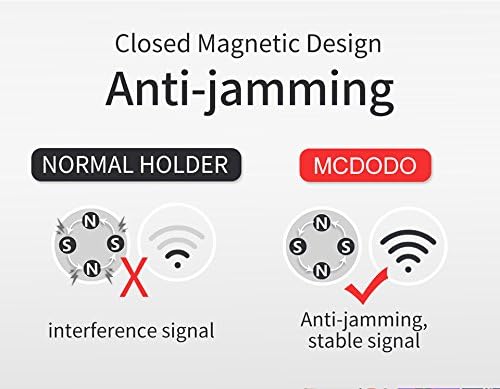
Image 4.2: A diagram comparing a normal magnetic holder with the mcdodo's closed magnetic design, illustrating how the mcdodo mount prevents signal interference.
5. Maintenance
To ensure the longevity and optimal performance of your car mount:
- Keep the magnetic surface clean and free from dust or debris. Use a soft, dry cloth for cleaning.
- Avoid exposing the mount to extreme temperatures for prolonged periods, as this may affect material integrity.
- Periodically check the air vent clip for secure attachment.
6. Troubleshooting
If you encounter issues with your mcdodo Magnetic Car Mount, refer to the following:
- Device not holding securely:
- Ensure the metal plate is correctly positioned on your device or case, preferably in the center.
- Verify that the metal plate is not obstructed by a very thick phone case, which can weaken the magnetic connection.
- Check if the magnetic surface of the mount or the metal plate is dirty; clean if necessary.
- Mount feels loose in the air vent:
- Re-insert the mount firmly into a suitable air vent slat.
- Ensure the air vent slats are strong enough to support the mount and your device.
- Signal interference:
- The mcdodo mount is designed with an anti-jamming feature. If you experience signal issues, ensure your device is properly aligned with the magnetic plate and mount.
7. Specifications
| Brand | mcdodo |
| Model Number | 5647458454 |
| Mounting Type | Vent |
| Special Features | Magnetic, 360° Rotation |
| Color | Black |
| Item Weight | 2.39 ounces |
| Package Dimensions | 5.98 x 2.72 x 1.3 inches |
| Compatible Devices | Smartphones, Mini Tablets, GPS devices (e.g., iPhone 8, iPhone 7, Samsung Galaxy series, HTC, Nokia Lumia, Google Nexus, Motorola Moto, LG, Blackberry, Sony Xperia, HUAWEI, etc.) |
8. Warranty and Support
For warranty information or technical support, please refer to the mcdodo official website or contact your retailer. Keep your purchase receipt for any warranty claims.


