1. Introduction
This manual provides essential information for the proper setup, operation, and maintenance of your Philips BASS+ On Ear Headphones, model SHL3075BK/27. Please read these instructions carefully to ensure optimal performance and longevity of your device.

Image 1.1: Philips BASS+ On Ear Headphones (SHL3075BK/27). These black on-ear headphones feature a comfortable headband and earcups, designed for extended listening sessions.
Video 1.1: Official product overview of the Philips BASS+ On Ear Headphones. This video highlights the key features and design aspects of the headphones, including their on-ear form factor and integrated microphone for communication.
2. Setup
2.1 Unpacking
Carefully remove all components from the packaging. Ensure the following items are present:
- Philips BASS+ On Ear Headphones (SHL3075BK/27)
- Integrated audio cable with 3.5mm jack and inline microphone/control
- This user manual

Image 2.1: The retail packaging for Philips BASS+ On Ear Headphones. The box displays the product name, brand, and a visual of the black headphones.
2.2 Connecting to an Audio Device
The Philips BASS+ On Ear Headphones connect via a standard 3.5mm audio jack. This ensures compatibility with a wide range of devices, including smartphones, tablets, laptops, and MP3 players.
- Locate the 3.5mm audio port on your audio device.
- Insert the 3.5mm jack from the headphone cable firmly into the audio port.
- Ensure the connection is secure for optimal audio transmission.

Image 2.2: Detail of the 3.5mm audio jack. The jack features a standard four-pole design, indicating support for both audio output and microphone input, with 'PHILIPS' branding on the connector housing.
2.3 Adjusting for Comfort
For the best listening experience and comfort, adjust the headphones to fit your head properly.
- Gently extend or retract the headband until the earcups rest comfortably over your ears.
- Ensure the earcups fully cover your ears to maximize sound isolation and bass performance.
3. Operating Instructions
3.1 Audio Playback
Once connected to your audio device, begin playing your desired audio content. The headphones will reproduce sound directly from your device.
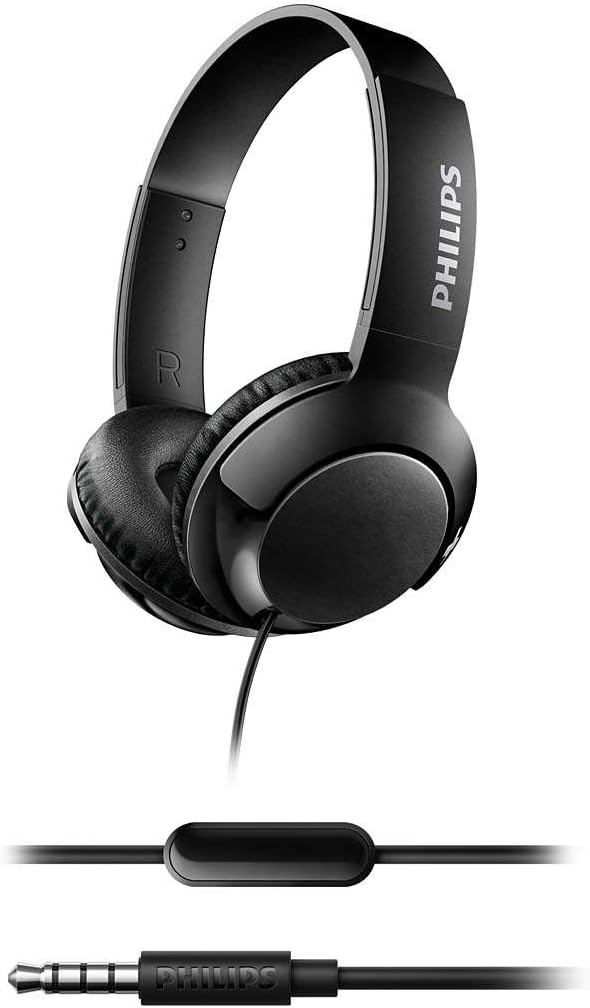
Image 3.1: Philips BASS+ On Ear Headphones with the integrated cable. This image displays the headphones connected to their audio cable, highlighting the inline remote control and the 3.5mm jack for device connection.
3.2 Using the Microphone and Inline Control
The headphones feature an integrated microphone and inline control for hands-free calls and audio management.
- Answering/Ending Calls: Press the button on the inline control once to answer an incoming call. Press it again to end an active call.
- Playing/Pausing Music: Press the button on the inline control once to play or pause music playback.
- Volume Control: The inline control includes a volume slider or buttons (depending on specific model variation) to adjust the audio level. Slide or press to increase or decrease volume.
- Voice Assistant: On some devices, a long press of the button may activate your device's voice assistant.
4. Maintenance
4.1 Cleaning
To maintain the appearance and functionality of your headphones:
- Wipe the earcups and headband with a soft, dry cloth.
- Do not use abrasive cleaners, alcohol, or chemical solvents, as these may damage the surfaces.
- Avoid getting moisture into any openings.
4.2 Storage
When not in use, store your headphones in a clean, dry place, away from extreme temperatures and direct sunlight. Avoid tangling the cable to prevent damage.
5. Troubleshooting
If you encounter issues with your headphones, refer to the following common problems and solutions:
5.1 No Sound or Low Volume
- Check Connection: Ensure the 3.5mm jack is fully inserted into your audio device.
- Device Volume: Verify that the volume on your audio device is turned up and not muted.
- Headphone Volume: Adjust the volume control on the headphone cable.
- Test with Another Device: Try connecting the headphones to a different audio source to determine if the issue is with the headphones or the original device.
5.2 Microphone Not Working
- Check Connection: Ensure the 3.5mm jack is fully inserted. A partial connection might provide audio but disable the microphone.
- Device Settings: Verify microphone input settings on your connected device.
- Compatibility: While standard, some older devices or specific configurations might have limited inline control/microphone compatibility.
5.3 Poor Sound Quality
- Source Quality: Ensure the audio source (music file, streaming service) is of good quality.
- Cable Condition: Inspect the audio cable for any visible damage or kinks.
- Clean Jack/Port: Ensure the 3.5mm jack and the device's audio port are clean and free of debris.
6. Specifications
Key technical specifications for the Philips BASS+ On Ear Headphones (SHL3075BK/27):
| Model Number | SHL3075BK/27 |
| Brand | Philips |
| Ear Placement | On Ear |
| Connectivity Technology | Wired |
| Control Type | Volume Control |
| Special Feature | Microphone Included |
| Material | Plastic |
| Product Dimensions | 8.46 x 6.61 x 7.28 inches |
| Item Weight | 8.6 ounces |
| Included Components | Headband (integrated with headphones) |
| UPC | 889446007367 |

Image 6.1: Top-down view of the Philips BASS+ On Ear Headphones. This perspective highlights the compact design and the 'BASS+' branding on the earcups, along with the integrated cable.
7. Warranty and Support
For detailed warranty information and customer support, please refer to the official Philips website or contact Philips customer service directly. Keep your proof of purchase for warranty claims.
Online Support: Visit www.philips.com/support


