
Lawmate CM-TC10
LawMate CM-TC10 Tie Clip Covert Camera User Manual
Model: CM-TC10
1. Introduction
The LawMate CM-TC10 is a highly discreet covert camera designed to be integrated into a standard tie clip. This unit functions as a camera head and requires connection to a compatible LawMate pocket Digital Video Recorder (DVR) for operation and recording. Its lightweight and completely covert design ensures the camera is undetectable to the human eye, making it ideal for discreet video capture in various environments.
This manual provides essential information for the proper setup, operation, maintenance, and troubleshooting of your LawMate CM-TC10 Tie Clip Covert Camera. Please read it thoroughly before using the device to ensure optimal performance and longevity.
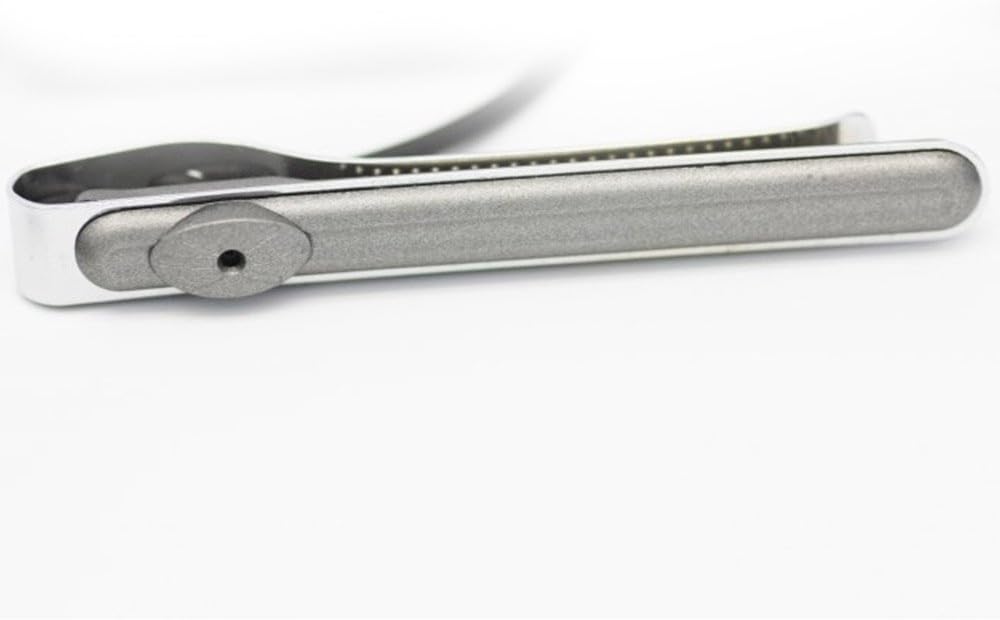
Image: The LawMate CM-TC10 Tie Clip Covert Camera. This image highlights the discreet camera lens, which is integrated into the tie clip's design, making it virtually unnoticeable. The device features a sleek, metallic finish, emphasizing its covert nature.
2. Setup
2.1 Package Contents
Before proceeding, ensure all components are present:
- LawMate CM-TC10 Tie Clip Covert Camera
- Connection cable (typically for LawMate DVRs)
- (Refer to your specific product packaging for exact contents)
2.2 Connecting to a LawMate DVR
The CM-TC10 is designed to work exclusively with compatible LawMate pocket DVRs. It does not function as a standalone recording device.
- Identify the Connection Port: Locate the camera input port on your LawMate pocket DVR. This is typically a multi-pin connector.
- Connect the Camera: Carefully align the connector of the CM-TC10's cable with the input port on the DVR. Push firmly until it clicks into place, ensuring a secure connection.
- Power On DVR: Once the camera is securely connected, power on your LawMate DVR according to its instruction manual. The DVR should recognize the connected camera.
- Verify Video Feed: Access the live view or recording mode on your DVR to confirm that the video feed from the CM-TC10 is displayed correctly.
Note: For detailed instructions on operating your specific LawMate DVR, please consult the DVR's dedicated user manual.
3. Operating Instructions
The LawMate CM-TC10 functions as a video input device for a compatible DVR. All recording, playback, and settings adjustments are managed through the connected DVR.
3.1 Discreet Placement
- Attach the tie clip to your tie or clothing in a position that allows the camera lens to have an unobstructed view of your desired recording area.
- Ensure the tie clip is securely fastened to prevent movement during recording.
- Practice wearing the tie clip and positioning the camera to achieve the best angle for your intended use.
3.2 Recording
To initiate recording, use the controls on your connected LawMate DVR. The CM-TC10 will transmit the video feed to the DVR for capture.
- Refer to your DVR's manual for specific instructions on starting, stopping, and managing recordings.
- Monitor the DVR's screen (if available) to ensure the camera is capturing the desired footage.
4. Maintenance
Proper maintenance ensures the longevity and optimal performance of your CM-TC10 camera.
- Cleaning the Lens: Use a soft, lint-free cloth specifically designed for optics to gently wipe the camera lens. Avoid abrasive materials or harsh chemicals, which can scratch or damage the lens.
- Cleaning the Body: Wipe the tie clip body with a dry or slightly damp soft cloth. Do not immerse the device in water or expose it to excessive moisture.
- Storage: When not in use, store the camera in a cool, dry place, away from direct sunlight, extreme temperatures, and high humidity. Keep it in its original packaging or a protective case to prevent dust accumulation and physical damage.
- Cable Care: Avoid bending or twisting the connection cable excessively, as this can damage internal wires. Always grasp the connector, not the cable, when plugging or unplugging.
5. Troubleshooting
If you encounter issues with your LawMate CM-TC10, refer to the following common problems and solutions. For more complex issues, consult your DVR's manual or contact customer support.
| Problem | Possible Cause | Solution |
|---|---|---|
| No video feed on DVR screen. |
|
|
| Poor video quality (blurry, distorted). |
|
|
| Camera not recognized by DVR. |
|
|
6. Specifications
| Feature | Detail |
|---|---|
| Model | CM-TC10 |
| Brand | Lawmate |
| Product Type | Tie Clip Covert Camera Head |
| Compatibility | Designed for use with LawMate Pocket DVRs |
| Photo Sensor Technology | CMOS |
| Video Capture Format | MPEG-4 (output from DVR) |
| International Protection Rating | IP54 (Dust protected, splash resistant) |
| Power Source | Powered by connected DVR |
| Connectivity Protocol | Proprietary (to LawMate DVRs) |
| Date First Available | May 19, 2017 |
| UPC | 703624459123 |
7. Warranty and Support
For information regarding warranty coverage, technical support, or service for your LawMate CM-TC10 Tie Clip Covert Camera, please refer to the documentation provided with your purchase or contact the retailer or manufacturer directly.
It is recommended to retain your proof of purchase for warranty claims.
- Manufacturer: LAWMATE
- Online Resources: Visit the official LawMate website for product updates, FAQs, and additional support resources.
- Retailer Support: For purchase-specific inquiries, contact the seller from whom you acquired the product.
Related documentsCM-TC10


Ask a question about this manual
Ask about setup, troubleshooting, compatibility, parts, safety, or missing instructions. Manuals+ will review the question and use this page’s manual context to help answer it.