
Product Overview
The Omnipure (Q5655) is a specialized Deionization (DI) water filter designed to effectively remove salt and Total Dissolved Solids (TDS) from water. This filter is equipped with the innovative Twist Tap in-head valve system, which automatically shuts off the water supply when the filter body is detached from its head. This feature simplifies filter replacement and prevents water leaks.
The Q5655 filter is versatile and can be integrated into various water systems, including ice makers, refrigerators, beverage dispensing equipment, drinking fountains, under-sink filtration setups, and reverse osmosis (RO) systems where post-RO deionization is desired.
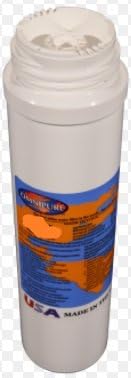
Image: The Omnipure Q5655 DI water filter, a cylindrical cartridge with a threaded top for connection to a Q-Series head. The label indicates 'Omnipure' and 'USA Made in the USA'.
Setup and Installation
The Omnipure Q5655 is designed as a replacement filter and requires an existing Omnipure Q-Series head for proper installation. Ensure you have the correct Q-Series head compatible with your system's plumbing.
Required Components:
- Existing Omnipure Q-Series head (available in 1/4" Quick-Connect fittings, 1/4" NPT female threads, or 3/8" NPT female threads).
- Appropriate tools for plumbing connections (if installing a new head or modifying existing lines).
Installation Steps:
- Turn off Water Supply: Locate the main water supply valve to your filtration system or appliance and turn it off completely.
- Relieve Pressure: Open a nearby faucet or dispense water from the system to relieve any residual water pressure.
- Remove Old Filter: If replacing an existing Q-Series filter, twist the old filter body counter-clockwise to detach it from the Q-Series head. The Twist Tap valve will automatically shut off the water flow.
- Prepare New Filter: Remove any protective caps or seals from the new Omnipure Q5655 filter.
- Install New Filter: Align the new filter body with the Q-Series head. Push the filter firmly into the head and twist clockwise until it is securely seated. You should feel it lock into place.
- Restore Water Supply: Slowly turn the main water supply valve back on. Check for any leaks around the filter head connection.
- Flush Filter: Allow water to run through the new filter for several minutes (e.g., 5-10 minutes) to flush out any carbon fines or air from the system. This is crucial for optimal performance.
Operation
Once installed, the Omnipure Q5655 filter operates continuously as water flows through your system. Its primary function is to deionize water by removing dissolved mineral salts and Total Dissolved Solids (TDS) through its mixed bed DI resin media.
The integrated Twist Tap in-head valve system ensures convenience and safety during filter changes. When the filter cartridge is twisted off, the valve within the head automatically closes, preventing water flow and eliminating the need to shut off the main water supply to the entire system.
The effectiveness of the DI filter in removing TDS will gradually decrease over time as the resin media becomes exhausted. The rate of exhaustion depends on the quality of the incoming water and the volume of water processed.
Maintenance
Regular replacement of the Omnipure Q5655 DI filter is essential to maintain optimal water quality and ensure effective TDS reduction. The lifespan of the filter depends on the initial TDS level of your water and your water consumption.
Filter Replacement:
- Replace the filter when you observe an increase in the TDS level of your filtered water, or when the water quality noticeably declines.
- For critical applications requiring ultra-pure water, consider using a TDS meter to monitor the output water quality and replace the filter proactively.
- Follow the installation steps outlined in the 'Setup and Installation' section for replacing the filter.
Troubleshooting
This section addresses common issues you might encounter with your Omnipure Q5655 DI filter.
Common Issues and Solutions:
- Issue: Reduced Water Flow.
- Solution: Check for kinks in the water lines. Ensure the filter is not clogged; if it is, it may be time for replacement. Verify that the main water supply is fully open.
- Issue: High TDS Readings After Filtration.
- Solution: This indicates the DI resin is exhausted. Replace the filter cartridge. Ensure the filter is properly seated in the Q-Series head.
- Issue: Leaks at Filter Connection.
- Solution: Ensure the filter is twisted fully and securely into the Q-Series head. Check the O-rings on the filter head for damage or misalignment. Turn off water, re-seat the filter, and re-check.
For more detailed technical information or issues not covered here, please refer to the official Omnipure manufacturer's website or contact their customer support directly.
Specifications
| Specification | Detail |
|---|---|
| Model Number | Q5655 |
| Dimensions (D x W x H) | 2.5"D x 2.5"W x 12"H |
| Item Weight | 1.44 ounces |
| External Testing Certification | NSF |
| Fitting Size Compatibility | Requires existing Q-Series head (available in 1/4" Quick-Connect, 1/4" NPT female, or 3/8" NPT female threads) |
| Filter Type | Mixed Bed Deionization (DI) |
| UPC | 740642884919 |
Warranty and Support
Specific warranty terms for the Omnipure Q5655 DI filter are typically provided by the manufacturer or the authorized seller at the time of purchase. Please retain your proof of purchase for warranty claims.
For detailed warranty information, technical assistance, or customer support, please contact Omnipure directly through their official website or the customer service contact provided by your retailer.
Always ensure you are purchasing genuine Omnipure products from authorized distributors to ensure product authenticity and eligibility for warranty support.
