
Denon D-M41DAB
Denon D-M41 DAB Micro Hi-Fi System User Manual
Model: D-M41DAB
1. Introduction
Thank you for purchasing the Denon D-M41 DAB Micro Hi-Fi System. This system is designed to deliver high-quality audio performance in a compact form factor, building upon the acclaimed D-M40. It features a newly developed discrete amplifier circuit for enhanced clarity and impact, integrated Bluetooth for wireless streaming, a built-in CD player, and DAB/DAB+/FM/MW radio tuners. The system is complemented by the SC-M41 speakers, developed with European audio technology.
Key Features:
- Compact Hi-Fi quality CD receiver
- Output power: 2 x 30 W
- Pre-amplified output for active subwoofer
- Integrated Bluetooth connectivity
- SC-M41 speaker system with European sound technology
- Two optical digital inputs for TV or other digital devices
- DAB/DAB+/FM/MW radio tuners
2. Important Safety Information
Please read all safety and operating instructions carefully before using your Denon D-M41 system. Keep these instructions for future reference.
- Power Source: Connect the unit only to a power supply of the type described in the operating instructions or as marked on the unit.
- Ventilation: Ensure adequate ventilation. Do not block any ventilation openings. Install in accordance with the manufacturer's instructions.
- Heat: Do not install near any heat sources such as radiators, heat registers, stoves, or other apparatus (including amplifiers) that produce heat.
- Water and Moisture: Do not use this apparatus near water. Do not expose to dripping or splashing.
- Cleaning: Clean only with a dry cloth.
- Laser Product: This product is a Class 1 Laser Product. Do not open the enclosure or attempt to service the unit yourself. Refer all servicing to qualified service personnel.
- Protection Circuit: The unit is equipped with a protection circuit that may shut down the system if it becomes too hot due to poor ventilation or a hot environment. Allow the unit to cool down before resuming operation.
3. Setup
3.1. Package Contents
Before you begin, ensure all items are present in the package:
- Denon D-M41DAB CD Receiver Unit
- SC-M41 Bookshelf Speakers (x2)
- Remote Control (RC-1214) and batteries
- Power Cable
- FM/DAB Antenna
- Speaker Cables

Figure 3.1: This image displays all primary components of the Denon D-M41 system: the central receiver, two SC-M41 bookshelf speakers, and the remote control unit.
3.2. Speaker Connection
Connect the supplied SC-M41 speakers to the speaker terminals on the rear of the D-M41DAB receiver. Ensure correct polarity (+ to + and - to -) for optimal sound quality. The speaker impedance should be between 6 and 16 ohms.
3.3. Antenna Connection
Connect the supplied FM/DAB antenna to the corresponding terminal on the rear panel. Extend the antenna fully for best reception.
3.4. Power Connection
After all other connections are made, connect the power cable to the AC IN terminal on the rear of the unit and then to a wall outlet.
3.5. Connecting External Devices
The D-M41DAB offers various connection options for external devices:
- Optical Digital Inputs (DIGITAL IN 1, 2): Use these for connecting digital audio sources like a TV or set-top box.
- Analog Input (ANALOG IN): Use RCA cables to connect analog audio devices.
- Subwoofer Output (SUBWOOFER OUT): Connect an active subwoofer to enhance bass performance.

Figure 3.2: The rear panel of the Denon D-M41DAB receiver shows various input and output ports, including speaker terminals, subwoofer out, analog in, optical digital inputs, and antenna connections.

Figure 3.3: The Denon D-M41 system includes the main receiver unit and two SC-M41 speakers, designed for optimal audio performance and compact placement.
4. Operating Instructions
4.1. Basic Operation
- Power On/Off: Press the POWER button on the front panel or remote control.
- Volume Control: Rotate the VOLUME knob on the front panel or use the VOLUME +/- buttons on the remote.
4.2. Source Selection
Press the SOURCE button on the front panel or the dedicated source buttons (CD, TUNER, Bluetooth, OPTICAL IN 1/2, ANALOG IN) on the remote control to switch between input sources.
4.3. CD Playback
- Insert a CD into the disc tray. The unit will automatically switch to CD source and begin playback.
- Use the PLAY/PAUSE, STOP, SKIP (<< / >>), and FOLDER/ALL buttons on the front panel or remote for control.
- The unit supports audio CDs and MP3 files on CD-R/CD-RW discs. Ensure MP3s are burned as data CDs.
4.4. Radio Operation (DAB/FM)
- Select the TUNER source.
- Press the BAND button to switch between FM and DAB/DAB+.
- Use the TUNE +/- buttons to manually tune or press and hold for auto-scan.
- Preset Stations: Store up to 40 FM/DAB stations. Tune to the desired station, then press and hold a numeric button (1-9) on the remote to save.
4.5. Bluetooth Pairing and Playback
- Select the Bluetooth source. The display will show "Bluetooth".
- On your Bluetooth device (smartphone, tablet, etc.), search for available devices and select "Denon D-M41".
- Once paired, you can stream audio wirelessly from your device. The unit can remember up to 8 paired devices.
- To minimize sound impact on other sources, Bluetooth can be deactivated if not in use.
4.6. Sound Adjustments
Use the remote control to access and adjust sound settings:
- Bass/Treble: Adjust the low and high frequency response.
- Balance: Adjust the left/right speaker output balance.
- Super Dynamic Bass (S.D.B.): Enhances bass response.
- Source Direct: Bypasses tone control circuits for a purer audio signal.
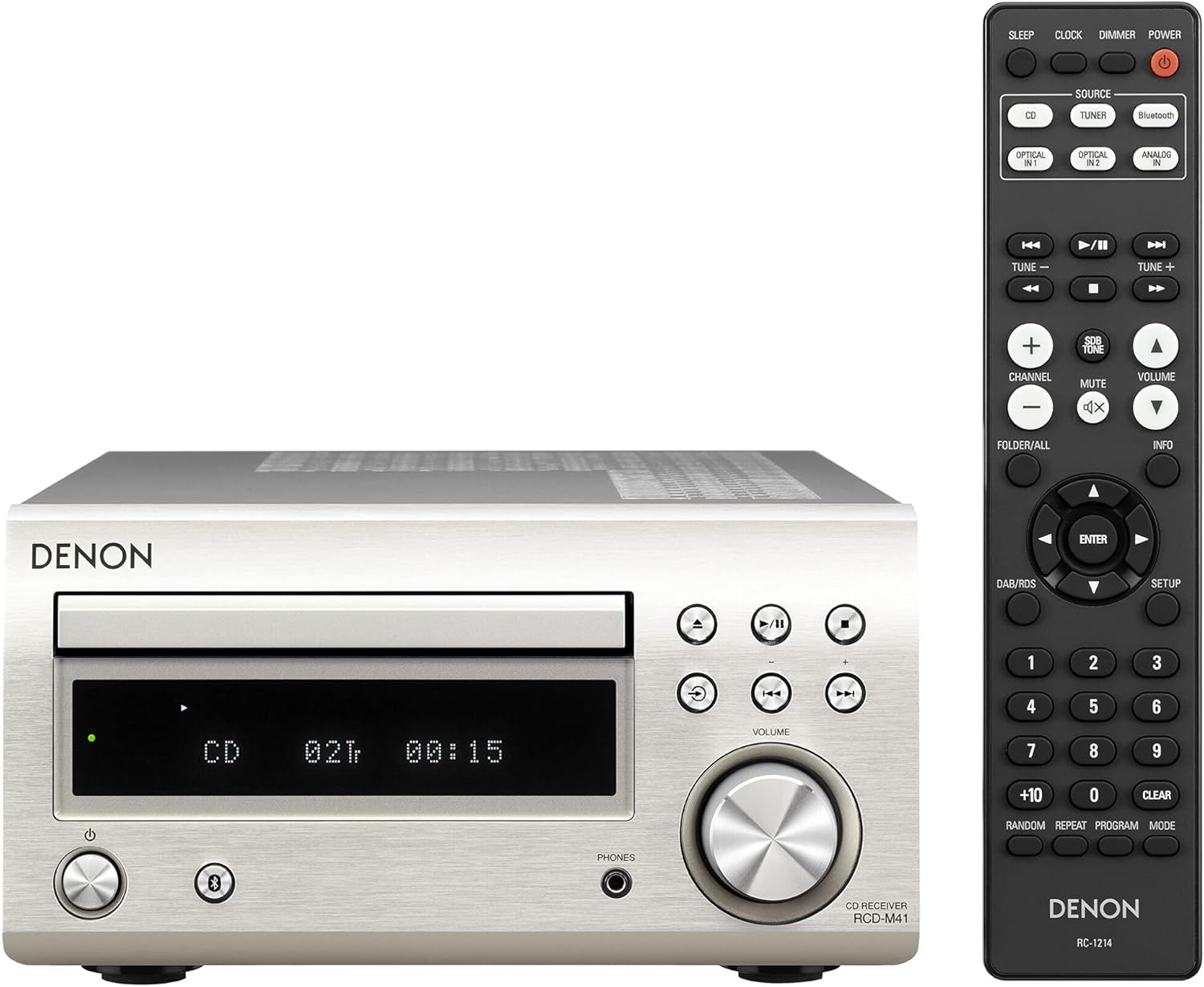
Figure 4.1: The Denon D-M41DAB receiver unit is shown alongside its comprehensive remote control, which allows for easy navigation and control of all system functions.
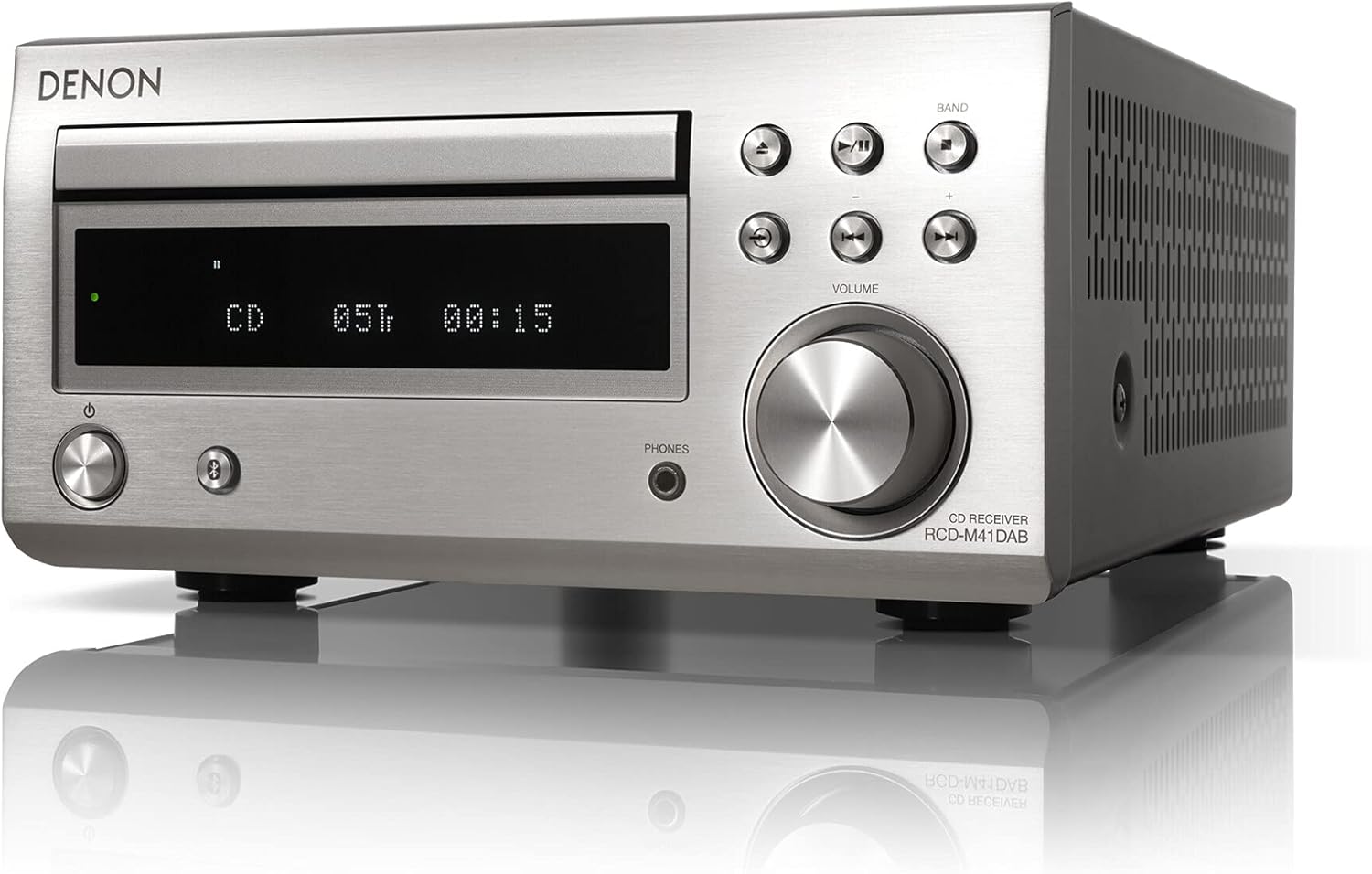
Figure 4.2: A close-up view of the Denon D-M41DAB receiver's front panel, showing the CD tray, display, volume knob, and various control buttons including power, source, and playback controls.
5. Maintenance
5.1. Cleaning
Wipe the unit and speakers with a soft, dry cloth. Do not use abrasive cloths, thinners, alcohol, or other chemical cleaning agents, as these may damage the finish.
5.2. Storage
If you plan to store the unit for an extended period, disconnect it from the power outlet and store it in a cool, dry place away from direct sunlight and extreme temperatures.
6. Troubleshooting
If you experience issues with your Denon D-M41 system, please refer to the following common problems and solutions before contacting support.
| Problem | Possible Cause | Solution |
|---|---|---|
| No power | Power cable not connected; Power outlet faulty | Check power cable connection; Try a different outlet |
| No sound | Volume too low; Incorrect source selected; Speaker cables disconnected; Mute function active | Increase volume; Select correct source; Reconnect speaker cables; Deactivate mute |
| Bluetooth not connecting | Bluetooth not enabled on device; Unit not in pairing mode; Device too far | Ensure Bluetooth is on; Select Bluetooth source on unit; Move device closer; Try re-pairing |
| Poor radio reception | Antenna not properly connected or extended; Interference | Check antenna connection and position; Move unit away from other electronic devices |
| Unit shuts down unexpectedly | Protection circuit activated due to overheating | Ensure adequate ventilation around the unit; Allow unit to cool down before restarting |
7. Specifications
| Feature | Specification |
|---|---|
| Model Number | D-M41DAB |
| Brand | Denon |
| Color | Silver / Black |
| Power Output | 2 x 30 W (6 ohms, 1 kHz, T.H.D. 10%) |
| Speaker Impedance | 6 ~ 16 ohms |
| Connectivity | Bluetooth, 2x Optical Digital In, 1x Analog In (RCA), 1x Subwoofer Out, Headphone Out (front) |
| Supported Media | CD, CD-R/RW (Audio CD, MP3) |
| Radio Tuner | DAB/DAB+, FM/MW |
| Dimensions (W x D x H) | 30.9 x 21 x 11.5 cm (approx. 12.17 x 8.27 x 4.53 inches) |
| Weight | Approx. 17.64 pounds (8 kg) |
| Power Source | AC Cable |
8. Warranty and Support
Denon products are manufactured to the highest quality standards. For information regarding your product's warranty, please refer to the warranty card included in your product packaging or visit the official Denon website for details specific to your region.
For technical support, frequently asked questions, and additional resources, please visit the official Denon support website:
Related documentsD-M41DAB


Ask a question about this manual
Ask about setup, troubleshooting, compatibility, parts, safety, or missing instructions. Manuals+ will review the question and use this page’s manual context to help answer it.