
1. Product Overview
The LaiPuDuo 11-Key RF Mini Wireless Remote LED Controller is designed for controlling single-color LED strip lights operating on DC5-24V. This compact and lightweight controller utilizes 433MHz radio frequency (RF) signals, allowing for control without direct line-of-sight. It features 8 dynamic modes, 10-level speed adjustment, and 10-level static brightness adjustment, making it a versatile solution for various lighting applications.
What's Included
- LED Controller
- Remote Control
2. Features
- Output Current: <6A (each circuit), DC5-24V.
- Wireless Control: 11-button RF wireless remote control operating at 433MHz.
- Memory Function: Features automatic shutdown memory, retaining the last setting.
- Versatile Application: Compatible with various LED lights including LED source, LED strips (3528, 5050, COB), wall washer lights, and glass curtain wall lights.
- Dynamic Modes: Includes 8 kinds of monochrome dynamic models (e.g., flash blasting, breathing, strobe, flicker).
- Speed Adjustment: 10 levels of dynamic speed adjustment.
- Brightness Adjustment: Single-channel static 10-level brightness adjustment.
- Ease of Use: Compact, lightweight, intuitive button design, easy to wire and operate.
- Remote Range: Offers control from a long distance, with signal penetration through walls and doors.
3. Specifications
| Specification | Value |
|---|---|
| Product Dimensions | 4.96 x 3.31 x 0.39 inches |
| Item Weight | 1.23 ounces |
| Item Model Number | 11key RF Mini |
| Brand | LaiPuDuo |
| Special Feature | Remote Control |
| Color | White/Black |
| Max Number of Supported Devices | 1 |
| Compatible Devices | LED lamps, LED strips (3528, 5050, COB) |
| Manufacturer | Shenzhen LPD Co.,Ltd |
4. Setup Instructions
4.1 Connecting the Controller
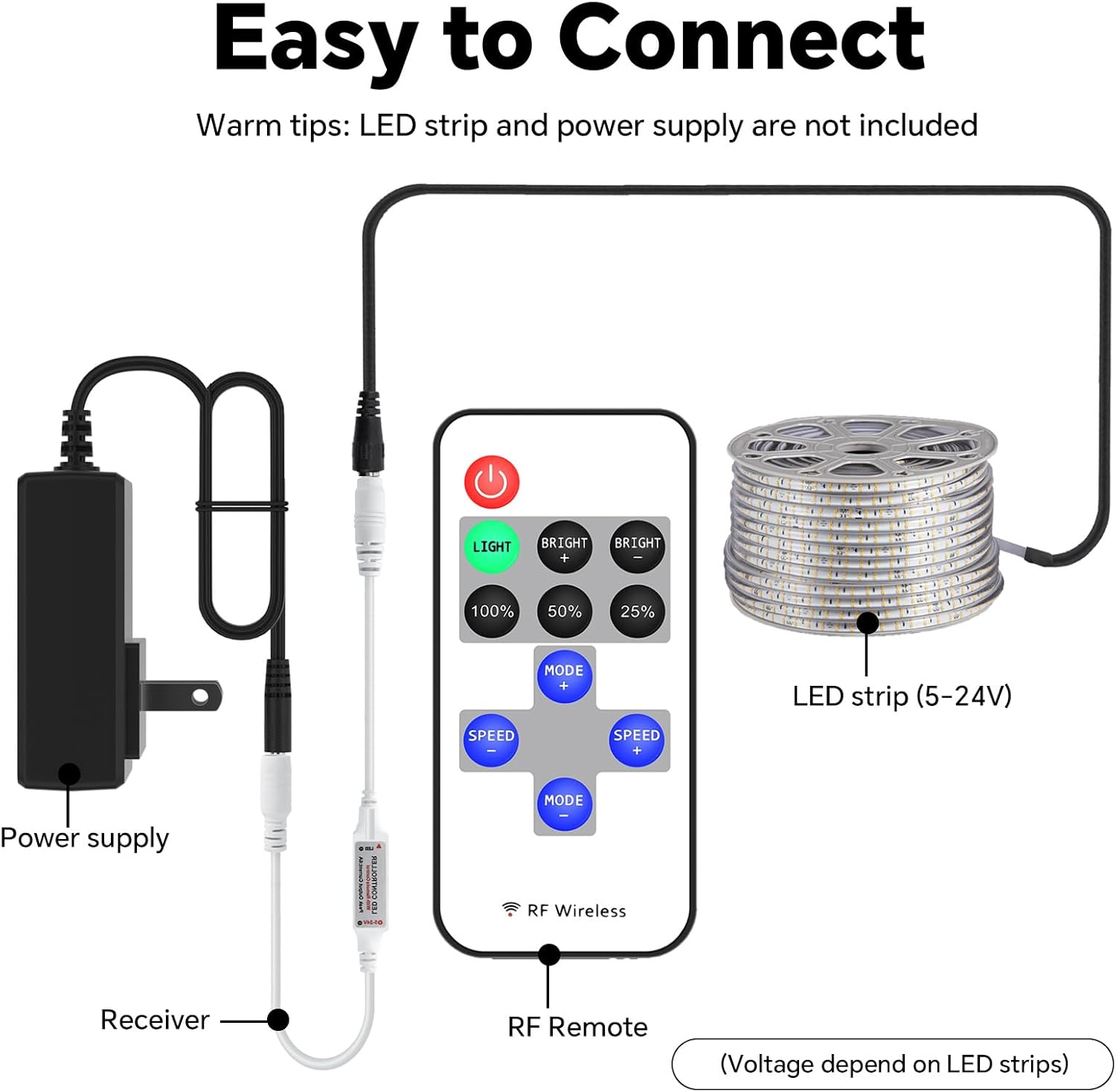
Follow these steps to connect your LED controller system. Ensure all components are compatible with DC5-24V power. The LED strip and power supply are not included with this controller.
- Connect your DC5-24V power supply to the input side of the LED controller receiver.
- Connect your single-color LED strip light to the output side of the LED controller receiver.
- Ensure all connections are secure before applying power.
4.2 Pairing the Remote Control
The remote control is typically pre-paired with the receiver. If re-pairing is necessary or if the remote is unresponsive, follow the instructions in the video below.
5. Operating Instructions
5.1 Remote Control Functions
The 11-key RF Mini Remote provides intuitive control over your LED strip lights. Refer to the diagram below for button identification and their respective functions.

- Power Button (Red): Turns the LED lights On or Off.
- LIGHT Button (Green): Activates the static lighting function.
- BRIGHT + / BRIGHT - Buttons: Adjusts the brightness level of the static light.
- 100% / 50% / 25% Buttons: Sets the static brightness to predefined levels.
- MODE + / MODE - Buttons: Cycles through the 8 dynamic lighting modes.
- SPEED + / SPEED - Buttons: Adjusts the speed of the active dynamic lighting mode (10 levels).
5.2 Brightness Adjustment
You can precisely control the brightness of your LED lights using the dedicated brightness buttons or the '+' and '-' controls. The remote offers 10 levels of brightness adjustment for static light.

5.3 Dynamic Modes and Speed
The controller features 8 distinct dynamic modes, such as flashing, breathing, and strobing effects. Use the 'MODE +' and 'MODE -' buttons to switch between these modes. The 'SPEED +' and 'SPEED -' buttons allow you to adjust the speed of the selected dynamic mode across 10 different levels.

6. Maintenance
6.1 Battery Replacement
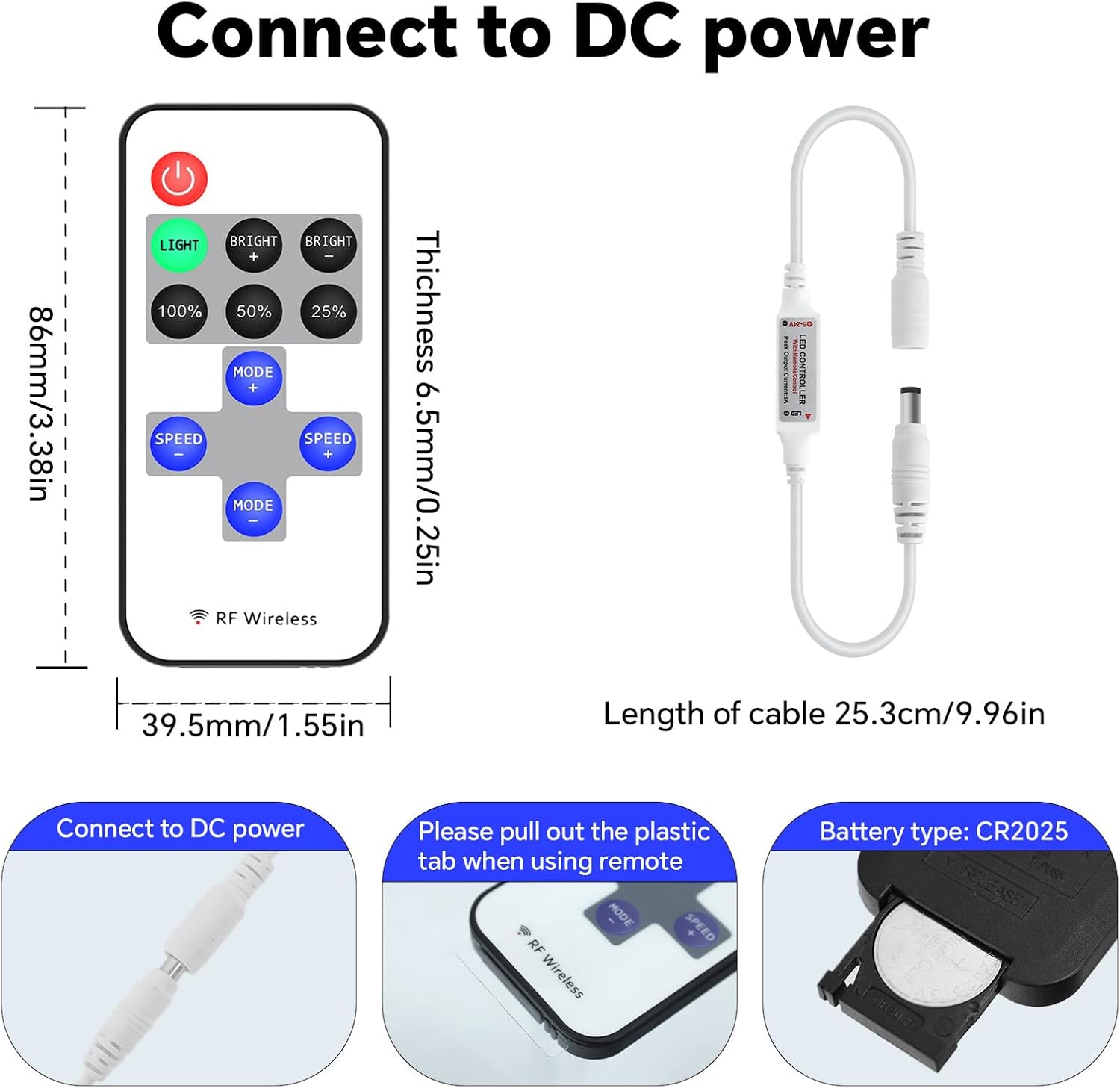
The remote control is powered by a CR2025 coin cell battery. If the remote's range decreases or it becomes unresponsive, the battery may need replacement.
- Locate the battery compartment on the back of the remote control.
- Slide open the battery tray or use a small tool to gently pry it open.
- Remove the old CR2025 battery.
- Insert a new CR2025 battery with the positive (+) side facing up.
- Close the battery compartment securely.
7. Troubleshooting
- Lights not responding: Check if the remote control battery needs replacement. Ensure the plastic tab has been removed from the battery compartment. Verify all power and LED strip connections are secure.
- Intermittent control: Ensure the remote is within effective range. While RF technology allows for signal penetration, extreme distances or dense obstacles may affect performance.
- Lights not turning on: Confirm the power supply is functioning correctly and providing the appropriate voltage (DC5-24V). Check the LED strip for any damage.
- Incorrect light behavior: If the lights are not behaving as expected, try re-pairing the remote control as shown in the setup video.
8. Important Information
8.1 Safety Guidelines
- Do not expose the controller or remote to moisture or extreme temperatures.
- Ensure the power supply voltage matches the controller's requirements (DC5-24V).
- Avoid short-circuiting the connections.
- Keep out of reach of children.
- Dispose of batteries responsibly according to local regulations.
8.2 Warranty and Support
For warranty information, technical support, or further assistance, please refer to the product packaging or contact the manufacturer directly through their official website or customer service channels.