Introduction
This manual provides comprehensive instructions for the safe and effective use of your Winplus AC55925-80 3-in-1 Emergency Socket Power Bank. This device combines a compact power bank, a USB car charger, and an emergency glass-breaking tool. Please read this manual thoroughly before operation and retain it for future reference.
Product Overview
The Winplus 3-in-1 Emergency Socket Power Bank is designed for convenience and safety, offering multiple functionalities in a compact form factor.

Figure 1: Winplus 3-in-1 Emergency Socket Power Bank with key features highlighted.
Components:
- Compact Power Bank: Provides portable power for charging devices.
- USB Car Charger: Plugs into a 12V car socket to charge devices and the power bank.
- Emergency Glass-Breaking Tool: Integrated for emergency situations.
- USB Output Port: For connecting charging cables to devices.
- Micro USB Input Port: For charging the internal power bank.
- LED Indicator: Displays charging status.

Figure 2: Detailed view of the device's ports.
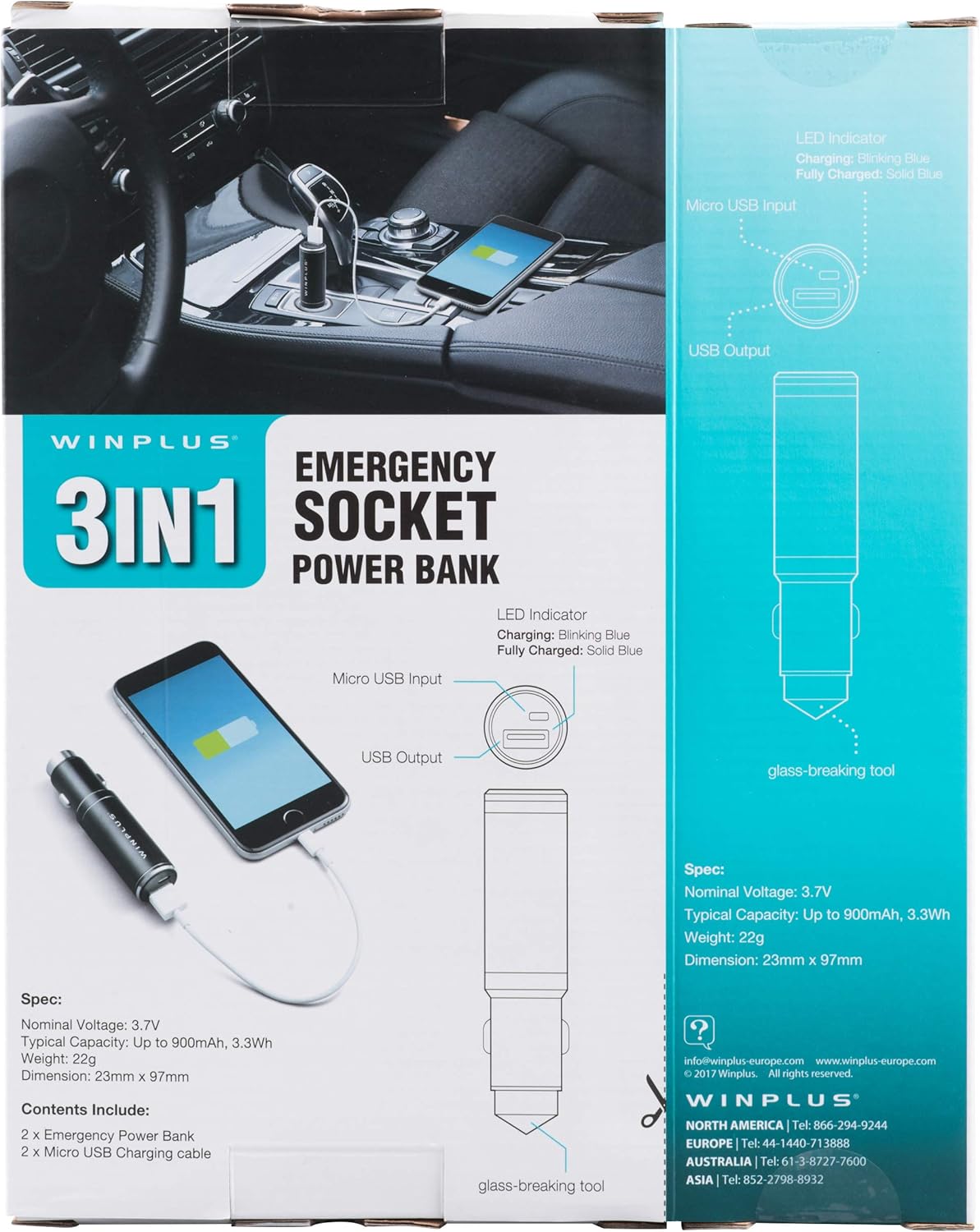
Figure 3: LED indicator status and glass-breaking tool location.
Setup
Initial Charging of the Power Bank:
- Locate the Micro USB Input port on the device.
- Connect the provided Micro USB charging cable to the Micro USB Input port.
- Connect the other end of the USB cable to a standard USB power source (e.g., a computer USB port, a wall adapter, or the car's 12V socket when used as a car charger).
- The LED indicator will blink blue during charging.
- Once fully charged, the LED indicator will turn solid blue.
Note: It is recommended to fully charge the power bank before its first use.
Operating Instructions
Using as a Portable Power Bank:
- Ensure the power bank is charged (solid blue LED indicator).
- Connect your device's charging cable to the USB Output port on the power bank.
- Connect the other end of the cable to your mobile device (smartphone, tablet, etc.).
- The power bank will automatically begin charging your device.
Using as a USB Car Charger:
- Insert the Winplus 3-in-1 device into your vehicle's 12V accessory socket (cigarette lighter socket).
- Connect your device's charging cable to the USB Output port on the Winplus device.
- Connect the other end of the cable to your mobile device.
- Your device will begin charging. The internal power bank will also charge simultaneously if it is not full.
Using the Emergency Glass-Breaking Tool:
The emergency glass-breaking tool is located at the tip of the device, opposite the USB ports. This tool is intended for emergency use only to break vehicle side windows in situations where occupants are trapped.
- In an emergency, firmly press the tip of the tool against a corner of a side window.
- Apply steady pressure until the spring-loaded mechanism activates and shatters the glass.
- Once the glass is broken, carefully clear any remaining shards before exiting the vehicle.
WARNING: Use this tool only in genuine emergencies. Misuse can cause serious injury. Keep out of reach of children.
Maintenance
- Keep the device dry. Moisture can damage internal circuits.
- Do not expose to extreme temperatures (hot or cold).
- Clean the device with a soft, dry cloth. Do not use harsh chemicals or abrasive cleaners.
- Store in a cool, dry place when not in use.
- Avoid dropping or subjecting the device to strong impacts.
Troubleshooting
| Problem | Possible Cause | Solution |
|---|---|---|
| Device not charging. | Power bank is depleted. Cable is faulty. USB port is dirty or damaged. | Recharge the power bank. Try a different charging cable. Clean the USB ports carefully or try another port. |
| LED indicator not lighting up. | Device is not connected to a power source. Device is fully charged (if solid blue). Device is faulty. | Ensure proper connection to a power source. Check if it's already solid blue. Contact customer support if issues persist. |
| Slow charging. | Cable is not suitable. Power source is low current. Device being charged has high power requirements. | Use a high-quality charging cable. Connect to a higher current USB adapter. This device provides 2.1A output, which is standard for fast charging most phones. |
Specifications
- Model: AC55925-80
- Nominal Voltage: 3.6V
- Typical Capacity: Up to 2500 mAh, 9 Wh
- Battery Cell Composition: Lithium Polymer
- USB Output: 5V / 2.1A
- Micro USB Input: 5V / 0.5A
- Dimensions: 23mm x 127mm (approximate)
- Item Weight: 510 g (for the 2-pack)
- Connector Type: Micro USB (Input), USB Type-A (Output)
Safety Information
- Do not disassemble, open, or shred the battery pack.
- Do not expose the battery pack to heat or fire. Avoid storage in direct sunlight.
- Do not short-circuit a battery pack. Do not store battery packs haphazardly in a box or drawer where they may short-circuit each other or be short-circuited by other metal objects.
- Do not subject battery packs to mechanical shock.
- In the event of a battery leaking, do not allow the liquid to come into contact with the skin or eyes. If contact has been made, wash the affected area with copious amounts of water and seek medical advice.
- Do not use any charger other than that specifically provided for use with the equipment.
- Keep battery packs out of the reach of children.
- Seek medical advice immediately if a battery pack has been swallowed.
- Always purchase the correct battery pack for the equipment.
- Keep battery packs clean and dry.
- Do not leave a battery on prolonged charge when not in use.
- Dispose of battery packs properly according to local regulations.
Warranty and Support
For warranty information or technical support, please contact Winplus North America Inc. directly.
- Manufacturer: Winplus North America Inc
- Contact Information: Refer to product packaging or the official Winplus website for the most current support details.
You can also visit the Winplus website for FAQs and additional product information: www.winplus-europe.com


