
Redi-Remote RTCHT940XRC
Redi-Remote Replacement Remote Control User Manual
For Craig Models: CHT940XRC, CHT940X, CHT939, CHT939M
1. Introduction
This manual provides detailed instructions for the Redi-Remote replacement remote control. This remote is specifically designed to be compatible with various Craig units, including models CHT940XRC, CHT940X, CHT939, and CHT939M. It is important to note that this is a custom replacement remote manufactured by Redi-Remote, and not an original Craig remote control.
2. Key Features
- No Programming Required: This remote is pre-programmed and ready to use with compatible Craig units right out of the box.
- Dedicated Functionality: Designed to perform every function for the specific Craig unit it is intended to control.
- Non-Programmable for Auxiliary Devices: Redi-Remotes cannot be programmed to control any auxiliary devices.
- Compact Design: Measures approximately 7 1/2" x 2 1/4" x 3/4", offering a comfortable grip.
- Sliding Cover: Features a sliding cover over the lower half to reveal model-specific functions.
3. Setup and Initial Use
3.1. Battery Installation
The remote control requires 4 AAA batteries for operation. To install the batteries:
- Locate the battery compartment on the back of the remote control.
- Slide open the battery compartment cover.
- Insert 4 AAA batteries, ensuring the positive (+) and negative (-) terminals align correctly with the indicators inside the compartment.
- Close the battery compartment cover securely.
3.2. First Use
No programming is required for this remote. Once batteries are installed, point the remote towards your compatible Craig unit and begin operation.
4. Operating Instructions
Familiarize yourself with the layout and functions of the remote control buttons. The remote features a sliding cover that conceals additional, model-specific functions.
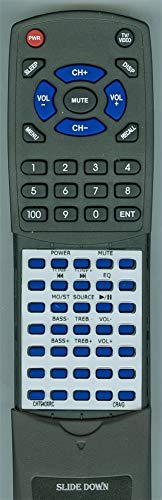
Figure 1: Redi-Remote Replacement Remote Control. This image displays the full remote, including the top section with power, channel, volume, and number pad buttons, and the lower section with media controls and audio adjustments, revealed by sliding down the cover.
4.1. Button Functions (Top Section)
| Button | Function |
|---|---|
| PWR | Power On/Off for the Craig unit. |
| SLEEP | Activates the sleep timer function. |
| TV/VIDEO | Switches between TV and Video input modes. |
| DISP | Displays on-screen information. |
| CH+ / CH- | Changes channels up or down. |
| VOL+ / VOL- | Adjusts volume up or down. |
| MUTE | Mutes or unmutes the audio. |
| MENU | Accesses the unit's main menu. |
| RECALL | Recalls the previously selected channel or input. |
| 0-9, 100, ENT | Numeric keypad for direct channel entry and other numerical inputs. 'ENT' confirms entry. |
4.2. Button Functions (Lower Section - Slide Down to Reveal)
Slide the lower cover of the remote downwards to access these additional functions.
| Button | Function |
|---|---|
| POWER (lower) | Additional power control, possibly for specific components. |
| MUTE (lower) | Additional mute control. |
| TUNE+ / TUNE- | Adjusts tuner frequency up or down. |
| EQ | Accesses equalizer settings. |
| MO/ST SOURCE | Selects mono/stereo mode or input source. |
| Play/Pause (►/∥∥) | Controls playback (play/pause) for media. |
| BASS+ / BASS- | Adjusts bass levels up or down. |
| TREB+ / TREB- | Adjusts treble levels up or down. |
| VOL+ / VOL- (lower) | Additional volume controls, possibly for specific audio outputs. |
5. Maintenance
5.1. Battery Replacement
Replace batteries when the remote's response becomes sluggish or stops working. Always replace all 4 AAA batteries at the same time with new ones. Do not mix old and new batteries, or different types of batteries.
5.2. Cleaning
To clean the remote control, use a soft, dry cloth. For stubborn dirt, slightly dampen the cloth with water. Do not use abrasive cleaners, solvents, or alcohol, as these can damage the remote's surface or internal components.
6. Troubleshooting
If you experience issues with your Redi-Remote, consider the following:
- Remote not responding: Ensure batteries are correctly installed and are not depleted. Replace batteries if necessary.
- Line of Sight: Ensure there are no obstructions between the remote control and the Craig unit's infrared receiver. The remote requires a clear line of sight to function.
- Compatibility: Verify that your Craig unit model (CHT940XRC, CHT940X, CHT939, CHT939M) is listed as compatible.
If you have any concerns with the remote after purchase that are not resolved by the above steps, please contact the seller directly for assistance.
7. Specifications
| Feature | Detail |
|---|---|
| Product Dimensions | 7 x 2.5 x 1 inches |
| Item Weight | 5 ounces |
| Model Number | RTCHT940XRC |
| Batteries Required | 4 AAA batteries (not included) |
| Connectivity Technology | Infrared (IR) |
| Max Number of Supported Devices | 1 (the specified Craig unit) |
| Special Feature | No Programming Required |
| Manufacturer | Redi-Remote |
8. Support
For any questions, concerns, or issues regarding your Redi-Remote replacement remote control, please contact the seller directly through your purchase platform. They will be able to provide specific assistance and support related to your product.
Ask a question about this manual
Ask about setup, troubleshooting, compatibility, parts, safety, or missing instructions. Manuals+ will review the question and use this page’s manual context to help answer it.