
Product Overview
The Generic CR-912 Allergic Rhinitis Laser Treatment Machine is designed to provide relief from allergic rhinitis symptoms through a combination of laser and massage therapy. This compact and portable device is intended for personal use to help manage nasal allergies.

Figure 1: Front view of the CR-912 device, showing the display and control buttons.
Safety Precautions
- Do not use this device if you have a pacemaker or other electronic medical implants.
- Consult a physician before use if you have any pre-existing medical conditions, especially related to nasal passages or blood clotting.
- Keep out of reach of children.
- Do not immerse the device in water or other liquids.
- Use only as directed in this manual.
- If you experience any discomfort or adverse reactions, discontinue use immediately and consult a medical professional.
Package Contents
Verify that all items are present in the package:
- 1 x Generic CR-912 Main Unit
- 1 x Nasal Probe (with two laser emitters)
- 1 x Connection Cable for Nasal Probe
- User Manual (this document)
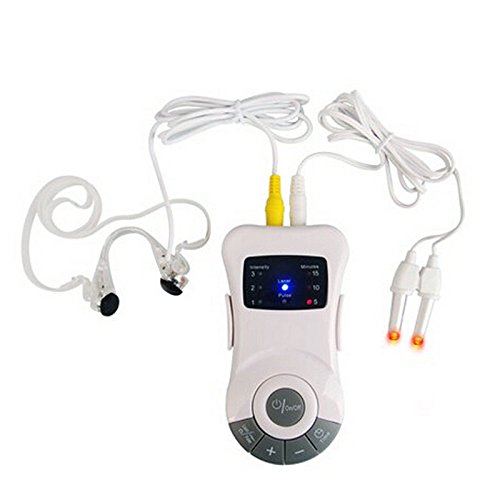
Figure 2: The CR-912 main unit connected to the nasal probe and an additional ear clip accessory (not included in standard package).
Setup
1. Battery Installation
- Locate the battery compartment on the back of the main unit.
- Open the battery cover.
- Insert 3 x AAA batteries (not included) according to the polarity indicators (+/-).
- Close the battery cover securely.
2. Connecting the Nasal Probe
- Identify the connection port on the top of the main unit.
- Carefully insert the plug of the nasal probe cable into the port until it clicks into place.
- Ensure the connection is firm to prevent interruptions during use.
Operating Instructions
Device Controls
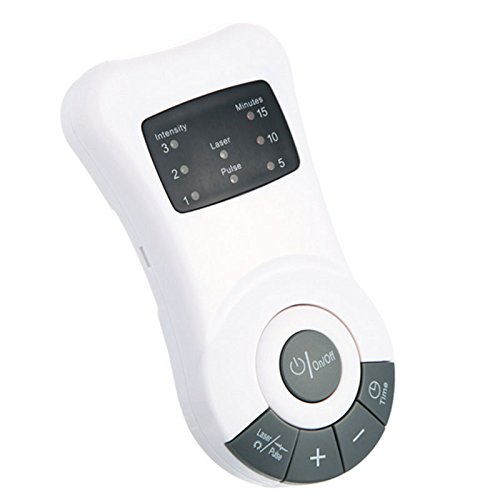
Figure 3: Angled view of the CR-912 device, highlighting the control panel.
- On/Off Button: Press to power the device on or off.
- Laser/Pulse Button: Toggles between laser therapy mode and pulse massage mode.
- + Button: Increases intensity level or treatment time.
- - Button: Decreases intensity level or treatment time.
- Time Button: Selects the desired treatment duration (5, 10, or 15 minutes).
Usage Steps
- Preparation: Ensure the nasal probe is clean. Gently insert the two laser emitters of the nasal probe into your nostrils.
- Power On: Press the On/Off button to turn on the device. The display will illuminate.
- Select Mode: Press the Laser/Pulse button to choose between laser therapy (indicated by "Laser" light) or pulse massage (indicated by "Pulse" light).
- Set Intensity: Use the + or - buttons to adjust the intensity level (1, 2, or 3). Start with level 1 and increase gradually if comfortable.
- Set Time: Press the Time button to cycle through the available treatment durations (5, 10, or 15 minutes). The selected time will be indicated on the display.
- Start Treatment: The device will automatically begin the treatment once settings are selected.
- End of Treatment: The device will automatically shut off after the set time has elapsed.
- Power Off: If you wish to stop the treatment early, press the On/Off button.
- Clean Up: Remove the nasal probe and clean it as per the Maintenance section.
Maintenance
Cleaning the Device and Probe
- Always turn off the device and disconnect the nasal probe before cleaning.
- Wipe the main unit with a soft, dry cloth. Do not use abrasive cleaners or immerse in water.
- Clean the nasal probe tips with a soft cloth dampened with mild soap and water, or an alcohol wipe. Ensure the probe is completely dry before storage or next use.
- Do not sterilize the probe using high heat or harsh chemicals.
Storage
- Store the device in a cool, dry place, away from direct sunlight and extreme temperatures.
- If the device will not be used for an extended period, remove the batteries to prevent leakage.
Troubleshooting
| Problem | Possible Cause | Solution |
|---|---|---|
| Device does not turn on. | Batteries are dead or incorrectly installed. | Replace batteries with new ones, ensuring correct polarity. |
| No laser light or pulse sensation. | Nasal probe not properly connected or damaged. | Ensure the probe cable is firmly inserted. Inspect probe for visible damage. |
| Display is dim or flickering. | Low battery power. | Replace batteries. |
Specifications
| Feature | Detail |
|---|---|
| Model Name | Nose Allergy Reliever Massager (CR-912) |
| Power Supply | DC 4.5V (3 x AAA batteries) |
| Material | ABS Plastic |
| Dimensions | Approx. 106mm x 20mm x 66mm |
| Application | Rhinitis Therapy, Nasal Allergy Relief |
| Treatment Modes | Laser Therapy, Pulse Massage |
| Intensity Levels | 3 Levels |
| Treatment Time | 5, 10, 15 minutes (selectable) |
Warranty and Support
This product comes with a standard manufacturer's warranty. Please refer to the packaging or contact your point of purchase for specific warranty terms and conditions.
For technical support or inquiries, please contact the retailer or manufacturer directly. Keep your purchase receipt as proof of purchase for warranty claims.
Note: As this is a generic product, specific support contact details may vary by region or seller.
Additional Resources
No official product videos from the seller were found for this item. Please refer to the written instructions and diagrams provided in this manual for guidance.