
ELP ELP-USBFHD06H-L100
ELP Sony IMX323 USB Camera Module User Manual
Model: ELP-USBFHD06H-L100
1. Product Overview
The ELP Sony IMX323 USB Camera Module is a compact, high-definition 1080P webcam board designed for various embedded applications. Featuring a Sony IMX323 low illumination image sensor and a 100-degree no-distortion lens, it delivers clear images even in low-light conditions. This UVC-compliant camera includes a built-in microphone for audio recording and supports multiple operating systems, making it a versatile solution for computers, laptops, Raspberry Pi, and Android devices.
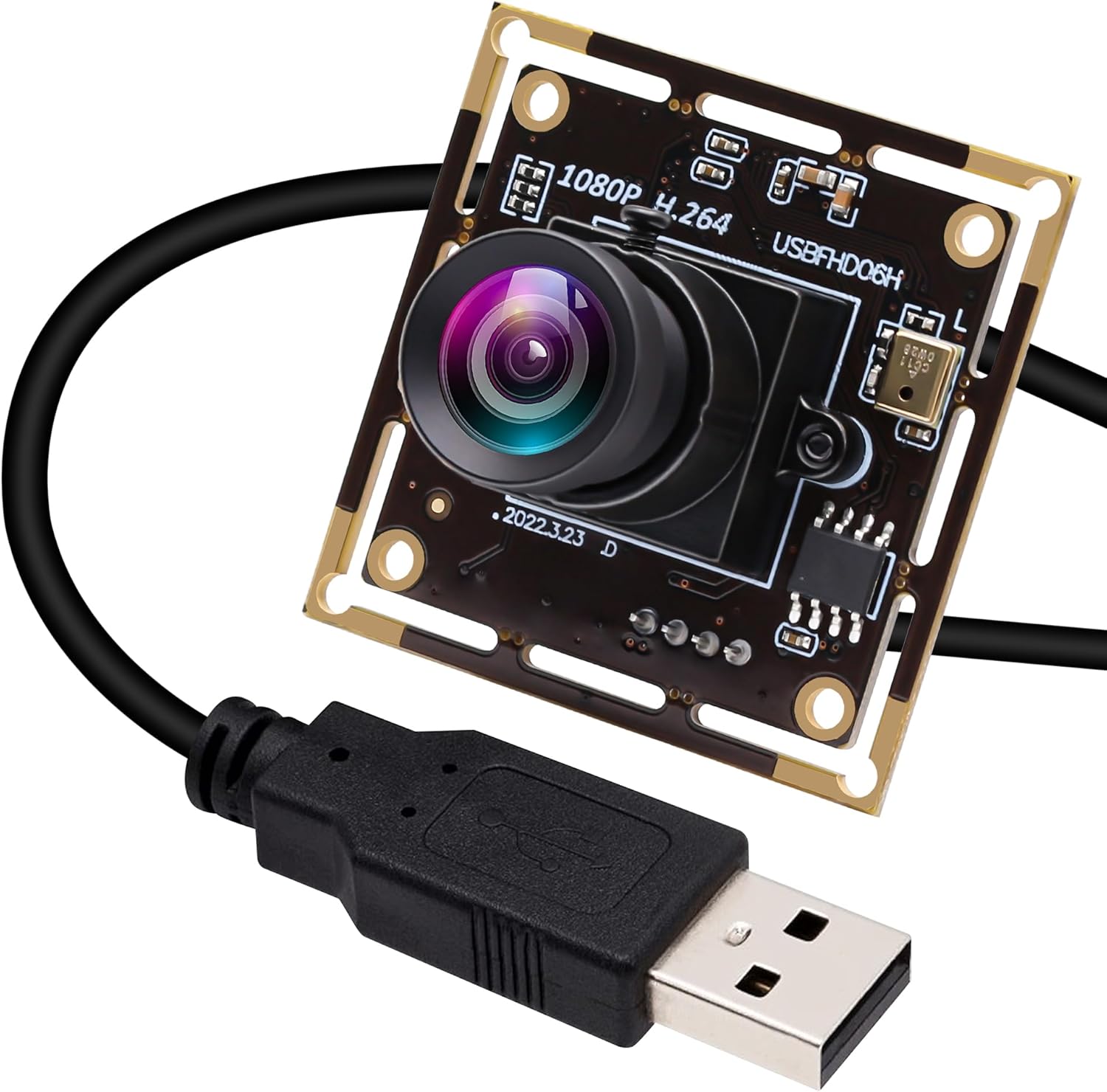
Figure 1: ELP Sony IMX323 USB Camera Module with attached USB cable.
2. Key Features
- High-Quality Imaging: Equipped with a Sony IMX323 low illumination image sensor, providing high-quality images and excellent performance in dim light.

Figure 2: Demonstration of the camera's low illumination capability, showing clear images in dim environments.
- Integrated Microphone: Features a built-in microphone for convenient audio recording alongside video.

Figure 3: The camera module highlighting its built-in microphone for audio capture.
- H.264 Compression & HD Resolution: Supports H.264 compression format and delivers HD 1080P resolution (1920x1080) at 30fps, offering higher coding efficiency and clear video output.

Figure 4: Visual comparison illustrating the excellent picture quality at 1920x1080 resolution.
Video 1: Demonstrates the 1080P H.264 video quality and low light performance of the ELP USB Camera.
- Wide Compatibility: UVC (USB Video Class) compliant, ensuring plug-and-play functionality without the need for additional drivers on Windows, Linux, Mac, Raspberry Pi, and Android systems.

Figure 5: The camera module's broad compatibility with Android, Linux, Windows, and Mac OS.
Video 2: Illustrates the UVC compliance and plug-and-play functionality of the camera, including connection to a mobile device.
- Compact Design: Mini size (38x38mm/32x32mm) with a thin profile, ideal for embedded applications in robotics, 3D printers, kiosks, and more.

Figure 6: The compact size of the camera module, measuring 38x38mm.
Video 3: Showcases various applications for the ELP USB camera module, including robotic projects and machine vision.
3. Setup Guide
3.1 What's in the Box
- ELP Sony IMX323 USB Camera Module
- USB Cable
3.2 Connecting the Camera
The ELP USB Camera Module is designed for simple plug-and-play operation thanks to its UVC compliance. No special drivers are required for most common operating systems.
- Locate an available USB 2.0 port on your computer, laptop, Raspberry Pi, or Android device.
- Connect the provided USB cable to the camera module and then to the USB port on your device.
- The operating system should automatically detect and install the camera. A notification may appear indicating that the device is ready for use.

Figure 7: Simple plug-and-play connection of the camera module to a computer.
Video 4: Demonstrates the plug-and-play setup and initial video feed from the ELP USB camera.
4. Operating Instructions
4.1 Using with Software
Once connected, the camera can be accessed through various webcam software applications. For Windows, applications like AMCap or the built-in Camera app can be used. For Linux, applications like Cheese or VLC are common. Android devices may require a UVC camera app.
- Open your preferred camera software.
- Select the ELP USB Camera Module as the video input device.
- Adjust video settings such as resolution, frame rate, exposure, and other parameters within the software interface to optimize performance for your specific application.
Video 5: Demonstrates how to adjust camera parameters and view the live feed using typical webcam software.
5. Maintenance
To ensure the longevity and optimal performance of your ELP USB Camera Module, follow these maintenance guidelines:
- Cleaning: Gently wipe the lens with a soft, lint-free cloth. For stubborn smudges, use a lens cleaning solution specifically designed for optical surfaces. Avoid abrasive materials or harsh chemicals.
- Storage: When not in use, store the camera module in a dry, dust-free environment. Protect it from extreme temperatures and direct sunlight.
- Handling: Handle the camera module by its edges to avoid touching the lens or circuit board components. Avoid dropping or subjecting the module to strong impacts.
6. Troubleshooting
If you encounter issues with your ELP USB Camera Module, refer to the following common troubleshooting steps:
- Camera Not Detected:
- Ensure the USB cable is securely connected to both the camera module and the host device.
- Try connecting the camera to a different USB port on your device.
- Test the camera on another computer or device to rule out a host device issue.
- Restart your computer or device.
- No Video Feed / Black Screen:
- Verify that the correct camera is selected as the input device in your software application.
- Check the software settings for any disabled video previews or incorrect resolution/frame rate settings.
- Ensure there is sufficient lighting in the environment, especially for optimal low-light performance.
- Poor Image Quality:
- Clean the camera lens as described in the Maintenance section.
- Adjust exposure, brightness, contrast, and other image parameters within your camera software.
- Ensure adequate and even lighting in the scene.
7. Specifications
| Feature | Detail |
|---|---|
| Brand | ELP |
| Model Number | ELP-USBFHD06H-L100 |
| Image Sensor | Sony IMX323 |
| Max Resolution | 1920x1080 (1080p) |
| Video Capture Resolution | 1080p |
| Frame Rate | 30fps at 1920x1080 / 1280x720 |
| Minimum Illumination | 0.01 Lux |
| Lens Type | 100-degree No Distortion Lens |
| Built-in Microphone | Yes |
| Connectivity Technology | USB 2.0 |
| Operating System Support | Windows, Linux, Mac, Raspberry Pi, Android (UVC compliant) |
| Dimensions | 38x38mm / 32x32mm (Mini size) |
| Item Weight | 1.06 ounces |
| Power Source | DC 5 Volts (USB powered) |
8. Warranty and Support
ELP products are manufactured to high quality standards. For specific warranty information, please refer to the product packaging or contact the retailer where the product was purchased. For technical support, troubleshooting assistance, or general inquiries, please visit the official ELP website or contact their customer service department.
Manufacturer: Ailipu Technology Co., Ltd
Ask a question about this manual
Ask about setup, troubleshooting, compatibility, parts, safety, or missing instructions. Manuals+ will review the question and use this page’s manual context to help answer it.