Introduction
The Pioneer Elite VSX-LX302 is an advanced audio/video component receiver designed to deliver immersive sound and high-quality video experiences. It supports DTS:X and Dolby Atmos for multi-dimensional audio, enhanced by Reflex Optimizer for Atmos-enabled speakers. The receiver is compatible with Ultra HD video, HDR10, and Dolby Vision, supporting 4K/60p/4:4:4/24-bit content. Connectivity features include FireConnect, Chromecast built-in, and DTS Play-Fi for multi-room audio streaming. It offers a phono input and six HDMI inputs, providing versatile options for various home entertainment setups.
Key Features
- Power Output: 200 W/Ch. (6 ohms, 1 kHz, THD 10 %, 1Ch Driven) / 100 W/Ch. (8 ohms, 20 Hz-20 kHz, THD 0.08 %, 2Ch Driven, FTC)
- Audio Formats: Multi-dimensional sound processing with Dolby Atmos & DTS:X.
- Video Compatibility: Ultra HD pass-through with HDCP 2.2, Dolby Vision compatible with HDR10 and BT.2020 support (4K/60p/4:4:4/24-bit).
- Calibration: MCACC Auto Room Tuning and synchronized sound with Phase Control.
- Speaker Support: Supports 4 Ohm speakers.
- Wireless & Multi-room Audio: Features FireConnect, Chromecast built-in, and DTS Play-Fi Technologies.
Setup
Unpacking and Contents
Carefully remove all components from the packaging. Ensure the following items are present:
- Pioneer Elite VSX-LX302 Receiver
- Remote Control
- AAA batteries (2)
- Room Calibration Microphone
- Instruction Manual (this document)
- FM Antenna
- AM Antenna
Connecting Your Receiver
Before making any connections, ensure the receiver is powered off and unplugged from the wall outlet.
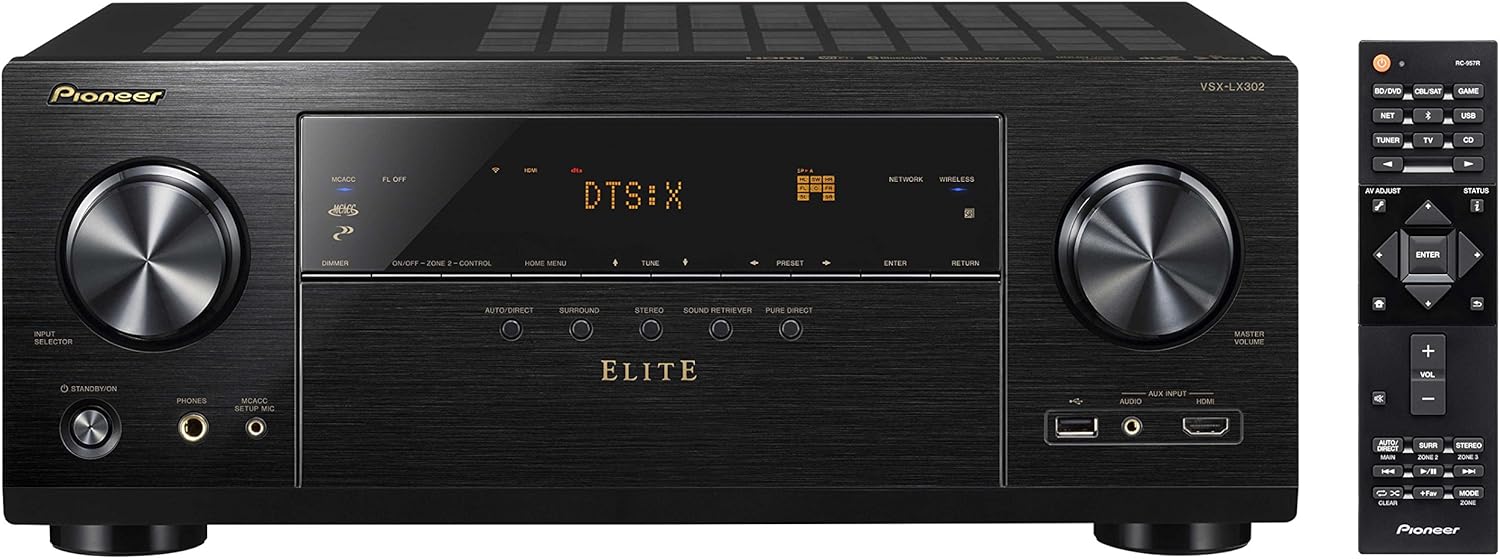
Figure 1: Front view of the Pioneer Elite VSX-LX302 receiver, showing input selector, display, and volume controls.

Figure 2: Rear view of the Pioneer Elite VSX-LX302 receiver, detailing various audio and video input/output ports.
Speaker Connections
Connect your speakers to the corresponding terminals on the rear panel (Figure 2). The VSX-LX302 supports a 7.2 channel configuration. Ensure correct polarity (+ to + and - to -) for optimal sound quality. This receiver supports 4 Ohm speakers.
HDMI Connections
Connect your video sources (e.g., Blu-ray player, gaming console, streaming device) to the HDMI IN ports on the rear panel. Connect your TV or projector to the HDMI OUT (ARC) port. The receiver features 6 HDMI inputs and 2 HDMI outputs, all supporting HDCP 2.2, Dolby Vision, HDR10, and BT.2020.
Audio Connections
Utilize the various audio inputs for other devices. A dedicated PHONO input is available for turntables. Digital audio inputs (optical and coaxial) are also provided.
Network Connection
Connect the receiver to your home network via an Ethernet cable to the NETWORK port or use the built-in Wi-Fi for wireless connectivity. This enables features like Chromecast built-in, DTS Play-Fi, and internet radio.
Automatic Room Calibration (MCACC)
Use the included Room Calibration Microphone and the MCACC (Multi-Channel Acoustic Calibration System) feature to automatically optimize the sound settings for your specific listening environment. Follow the on-screen instructions displayed on your TV.
Operating Instructions
Powering On/Off
Press the POWER button on the front panel or the remote control to turn the receiver on or off.
Input Selection
Use the INPUT SELECTOR knob on the front panel or the corresponding buttons on the remote control to switch between connected audio/video sources (e.g., BD/DVD, GAME, SAT/CATV, CD).
Volume Control
Adjust the volume using the MASTER VOLUME knob on the front panel or the VOLUME +/- buttons on the remote control.
Sound Modes
Select various sound modes (e.g., Auto Direct, Surround, Stereo, Pure Direct) to optimize audio playback for different content types. The receiver supports Dolby Atmos and DTS:X for immersive surround sound.
Network Features
Access streaming services, internet radio, and multi-room audio functionalities (FireConnect, Chromecast built-in, DTS Play-Fi) through the receiver's network connection. Control these features using the Pioneer Remote App on your smartphone or tablet.
Maintenance
To ensure optimal performance and longevity of your Pioneer Elite VSX-LX302 receiver, follow these maintenance guidelines:
- Cleaning: Regularly wipe the exterior with a soft, dry cloth. Avoid using abrasive cleaners or solvents.
- Ventilation: Ensure adequate ventilation around the receiver. Do not block ventilation openings. Allow sufficient space (at least 6 inches) above and around the unit for proper airflow.
- Dust Removal: Periodically use a soft brush or a vacuum cleaner with a brush attachment to remove dust from the ventilation grilles.
- Power Cord: Inspect the power cord for any damage. If damaged, discontinue use and contact qualified service personnel.
- Environmental Conditions: Avoid exposing the receiver to extreme temperatures, humidity, direct sunlight, or excessive dust.
Troubleshooting
If you encounter issues with your receiver, refer to the following common troubleshooting steps:
- No Power: Ensure the power cord is securely plugged into the receiver and a working wall outlet. Check if the power outlet is active.
- No Sound: Verify that the correct input source is selected. Check all speaker connections for proper polarity and secure fit. Ensure the volume is not muted or set too low. Confirm that the speakers are enabled in the receiver's settings.
- No Video: Confirm that the correct HDMI input is selected. Check HDMI cable connections between the source, receiver, and TV/projector. Ensure the TV/projector is set to the correct HDMI input.
- Network Connectivity Issues: Check your router and internet connection. Ensure the receiver is within range of your Wi-Fi network or the Ethernet cable is securely connected. Try restarting the receiver and your network equipment.
- Remote Control Not Working: Check and replace the batteries in the remote control. Ensure there are no obstructions between the remote and the receiver's IR sensor.
- Distorted Sound: Check speaker impedance compatibility. Ensure speaker wires are not frayed or shorting. Reduce the volume if distortion occurs at high levels.
For more detailed troubleshooting, consult the full instruction manual or visit the Pioneer support website.
Specifications
| Product Dimensions | 14.6 x 17.1 x 6.8 inches |
| Item Weight | 22 pounds |
| Item Model Number | VSX-LX302 |
| Brand | PIONEER |
| Connectivity Technology | HDMI |
| Controller Type | Android |
| Special Feature | Multiroom |
| Compatible Devices | Speaker |
| Total HDMI Ports | 9 (6 In, 2 Out) |
| Connector Type | HDMI |
| Audio Encoding | DTS |
| Audio Output Mode | Surround |
| Surround Sound Channel Configuration | 7.2 |
| Date First Available | May 12, 2017 |
Warranty and Support
For detailed warranty information, please refer to the warranty card included with your product or visit the official Pioneer website. For technical support, product registration, or service inquiries, please visit the Pioneer support section on their official website or contact their customer service directly.


