
Redi-Remote RT24140911
Redi-Remote Replacement Remote Control User Manual
For Onkyo Models: RC-911R, TXNR555, TXNR656
Introduction
This manual provides instructions for the Redi-Remote replacement remote control, designed for seamless operation with specific Onkyo audio/video receiver models. This remote is a custom-built replacement and is not an original Onkyo product. It is engineered to perform all essential functions of the original remote for the compatible units.
Product Overview
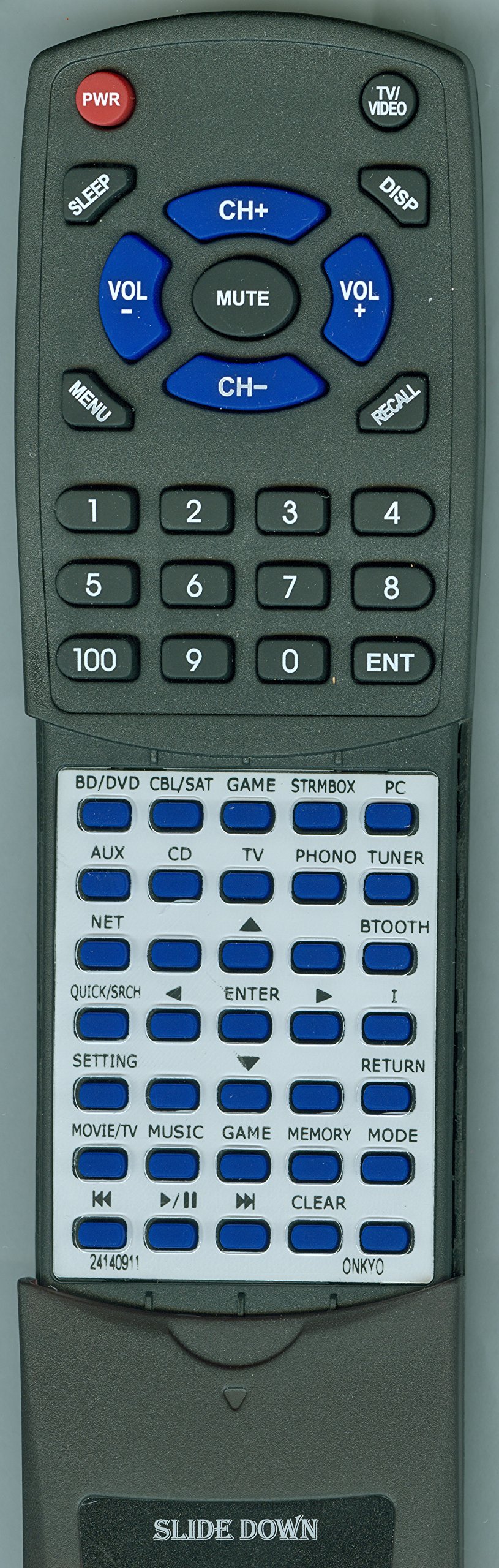
Figure 1: Redi-Remote Replacement Remote Control. This image displays the front view of the remote control, highlighting its button layout and overall design. Note the sliding cover at the bottom.
The Redi-Remote replacement remote control is designed for ease of use with a straightforward button layout. It features a sliding cover over the lower half, which reveals additional buttons when slid down.
Setup
1. Battery Installation
- Locate the battery compartment on the back of the remote control.
- Slide open the battery compartment cover.
- Insert four (4) AAA batteries, ensuring correct polarity (+ and -) as indicated inside the compartment.
- Close the battery compartment cover securely.
2. Initial Use (No Programming Required)
This Redi-Remote replacement control requires no programming. It is pre-configured to operate the specified Onkyo models immediately after battery installation. Simply point the remote at your Onkyo unit and begin use.
Note: This remote control cannot be programmed to control auxiliary devices. It is designed exclusively for the specific Onkyo unit it replaces.
Operating Instructions
The remote control provides full functionality for your compatible Onkyo receiver. Familiarize yourself with the button layout for optimal use.
- Power On/Off: Use the dedicated power button to turn your Onkyo unit on or off.
- Input Selection: Buttons are provided to select various audio/video inputs (e.g., CD, DVD, HDMI 1, HDMI 2).
- Volume Control: Adjust the master volume using the Volume Up and Volume Down buttons.
- Navigation and Menu: Use the directional arrow buttons and the Enter/OK button to navigate menus on your Onkyo unit's display.
- Sliding Cover: The lower section of the remote features a sliding cover. Slide this cover down to access additional functions and buttons, such as advanced audio settings, setup menus, or specific playback controls.
Point the remote control directly towards the infrared sensor on your Onkyo receiver for reliable operation. Ensure there are no obstructions between the remote and the receiver.
Maintenance
Cleaning the Remote
To clean the remote control, use a soft, dry cloth. For stubborn dirt, slightly dampen the cloth with water or a mild, non-abrasive cleaner. Avoid using harsh chemicals or abrasive materials, as these can damage the remote's surface or buttons.
Battery Replacement
Replace batteries when the remote's response becomes inconsistent or when the operating range decreases significantly. Always replace all four AAA batteries at the same time with new ones. Do not mix old and new batteries, or different types of batteries.
Storage
When storing the remote for extended periods, remove the batteries to prevent leakage, which can damage the remote's internal components.
Troubleshooting
- Remote not responding:
- Ensure batteries are installed correctly with the correct polarity.
- Replace old batteries with new ones.
- Check for any obstructions between the remote's infrared emitter and the receiver's sensor.
- Ensure you are within the maximum operating range (approximately 20 feet).
- Buttons not working:
- Clean the remote's surface and buttons to remove any dirt or residue that might be interfering with button presses.
- If specific buttons are unresponsive, it might indicate a fault with the remote.
- Remote controls other devices:
- This remote is designed only for the specified Onkyo models and cannot be programmed for other devices. If it appears to control other devices, it is likely due to incidental infrared signal overlap, which is rare.
Specifications
| Brand | Redi-Remote |
| Model Number | RT24140911 |
| Compatible Onkyo Models | RC-911R, TXNR555, TXNR656 |
| Connectivity Technology | Infrared |
| Special Feature | No Programming Required |
| Max Number of Supported Devices | 1 |
| Button Quantity | 58 |
| Maximum Range | 20 Feet |
| Batteries Required | 4 AAA batteries (not included) |
| Item Weight | 5 Ounces |
| Dimensions | 7 1/2" x 2 1/4" x 3/4" |
Support Information
For any concerns or questions regarding your Redi-Remote replacement control after purchase, please contact the seller directly. Provide your purchase details and the model number (RT24140911) for efficient assistance.
Ask a question about this manual
Ask about setup, troubleshooting, compatibility, parts, safety, or missing instructions. Manuals+ will review the question and use this page’s manual context to help answer it.