
1. Introduction
Thank you for choosing the Victagen N2 PLUS Universal Smart Charger. This manual provides essential information for the safe and efficient operation of your charger. Please read it thoroughly before use and retain it for future reference.
2. Safety Information
- Use this charger only for rechargeable batteries specified in this manual. Attempting to charge non-rechargeable batteries may lead to explosion, rupture, or leakage, causing personal injury or property damage.
- Do not expose the charger to rain, moisture, or extreme temperatures.
- Do not disassemble, modify, or attempt to repair the charger. Contact customer support if service is required.
- Keep the charger away from children and pets.
- Ensure proper ventilation during charging. Do not cover the charger.
- Unplug the charger from the power source when not in use.
- Do not use the charger if it appears damaged.
3. Product Features
3.1. Compact and Wide Compatibility
The Victagen N2 PLUS charger is designed to accommodate two batteries of varying sizes and chemistries simultaneously. It automatically identifies Li-ion, Ni-MH, and Ni-Cd rechargeable batteries.
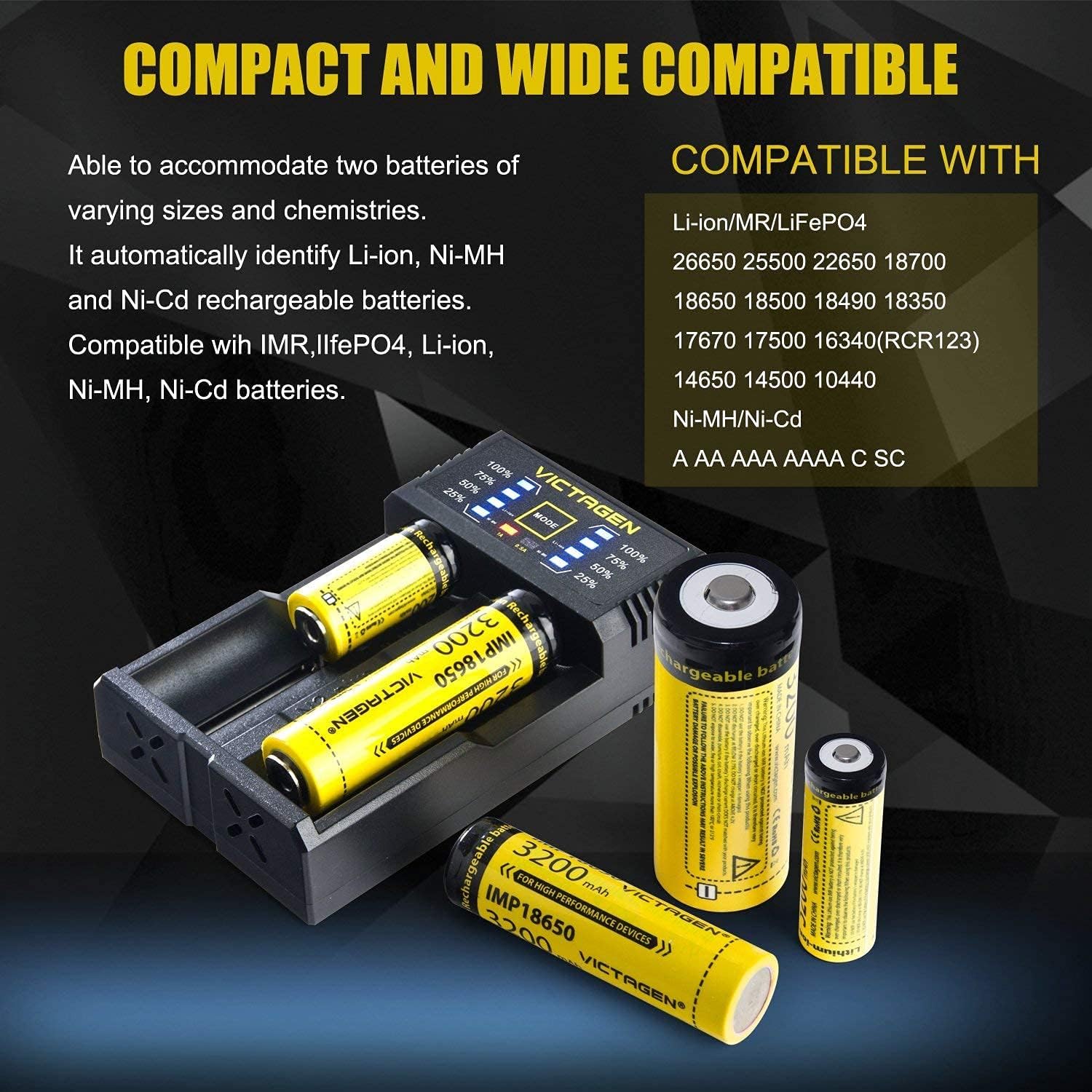
Image: The charger is compatible with Li-ion/IMR/LiFePO4 batteries (26650, 25500, 22650, 18700, 18650, 18500, 18490, 18350, 17670, 17500, 16340(RCR123), 14650, 14500, 10440) and Ni-MH/Ni-Cd batteries (AA, AAA, AAAA, C, SC).
3.2. USB Charging Power Bank Function
This charger features a 5V 1A USB output, allowing it to supply constant power to charge your phones, cameras, pads, GPS, and other devices. It also includes an innovative 0-V activation function to revive dead or over-discharged batteries.

Image: The charger functions as a power bank, providing 5V 1A USB output to charge external devices like smartphones.
3.3. USB Rechargeable
The Victagen N2 PLUS charger is USB rechargeable, offering flexibility to charge it anywhere, anytime. It can be powered via a USB port from a computer, power bank, or car charger. Note: A wall outlet adapter is not included.

Image: Demonstrates the charger's versatility, showing it being powered by a car USB port, a wall adapter (not included), a laptop, and a portable power bank.
3.4. Input and Output Details
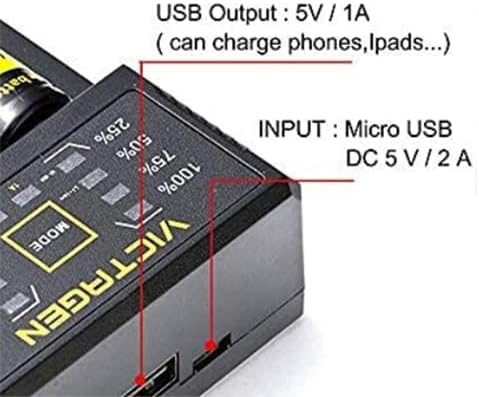
Image: A detailed view of the charger's side, indicating the Micro USB input (DC 5V / 2A) and the USB output (5V / 1A).
4. Setup
- Unpack the Charger: Carefully remove the Victagen N2 PLUS charger and its accessories from the packaging.
- Connect Power: Connect the provided Micro USB cable to the charger's input port. Plug the other end of the USB cable into a compatible 5V/2A USB power source (e.g., a computer USB port, a USB wall adapter, or a power bank).
- Power On: The charger's display will illuminate, indicating it is ready for use.

Image: The Victagen N2 PLUS charger, a USB charging cable, and the instruction manual are shown as typical package contents.
5. Operating Instructions
5.1. Charging Batteries
- Insert Batteries: Carefully insert one or two compatible rechargeable batteries into the charging slots. Ensure the positive (+) and negative (-) terminals of the batteries match the polarity indicators in the charger slots.
- Automatic Detection: The charger will automatically detect the battery type (Li-ion, Ni-MH, Ni-Cd) and begin the charging process.
- Charging Indicator: The LED indicators on the charger will show the charging status (e.g., 25%, 50%, 75%, 100%).
- Completion: Once charging is complete, all LED indicators for that slot will show 100%. Remove the fully charged batteries from the charger.
5.2. Using as a Power Bank
- Insert Charged Batteries: Ensure at least one fully charged battery is inserted into the charger.
- Connect External Device: Connect your external device (e.g., smartphone) to the USB output port (5V/1A) on the side of the charger using its charging cable.
- Begin Charging: The charger will automatically begin supplying power to your device.
6. Maintenance
- Cleaning: Disconnect the charger from the power source before cleaning. Use a soft, dry cloth to wipe the surface of the charger. Do not use abrasive cleaners or solvents.
- Storage: Store the charger in a cool, dry place away from direct sunlight and extreme temperatures when not in use.
- Battery Care: Always remove batteries from the charger once fully charged. Do not leave batteries in the charger for extended periods after charging is complete.
7. Troubleshooting
- Charger not powering on:
- Ensure the USB cable is securely connected to both the charger and the power source.
- Verify that the USB power source is functional and providing 5V/2A.
- Battery not charging:
- Check that the battery is inserted with correct polarity (+/-).
- Ensure the battery is a compatible rechargeable type (Li-ion, Ni-MH, Ni-Cd).
- The battery might be severely over-discharged. The 0-V activation function may attempt to revive it, but some batteries may be beyond recovery.
- Clean the battery contacts and charger contacts if they appear dirty.
- External device not charging from USB output:
- Ensure fully charged batteries are inserted into the charger.
- Check the connection of the USB cable to your external device.
- Verify that your external device is compatible with 5V/1A charging.
8. Specifications
| Brand | Victagen |
| Model | N2 PLUS |
| Input | Micro USB DC 5V / 2A |
| USB Output | 5V / 1A |
| Compatible Battery Types | Li-ion (IMR, LiFePO4), Ni-MH, Ni-Cd |
| Approximate Charging Time | 2 Hours (depending on battery capacity) |
| Compliance | RoHS |
| UPC | 714394971975 |
9. Warranty and Support
For warranty information and customer support, please refer to the documentation provided with your purchase or contact the retailer where the product was acquired. You may also visit the official Victagen website for further assistance.