
1. Introduction
The LiftMaster L5 Logic Control Board (Model K001D8075-1) is a critical component designed for commercial garage door openers, ensuring reliable and smooth operation. This board integrates advanced logic to manage the opener's functions, providing efficient and secure access control for commercial environments.
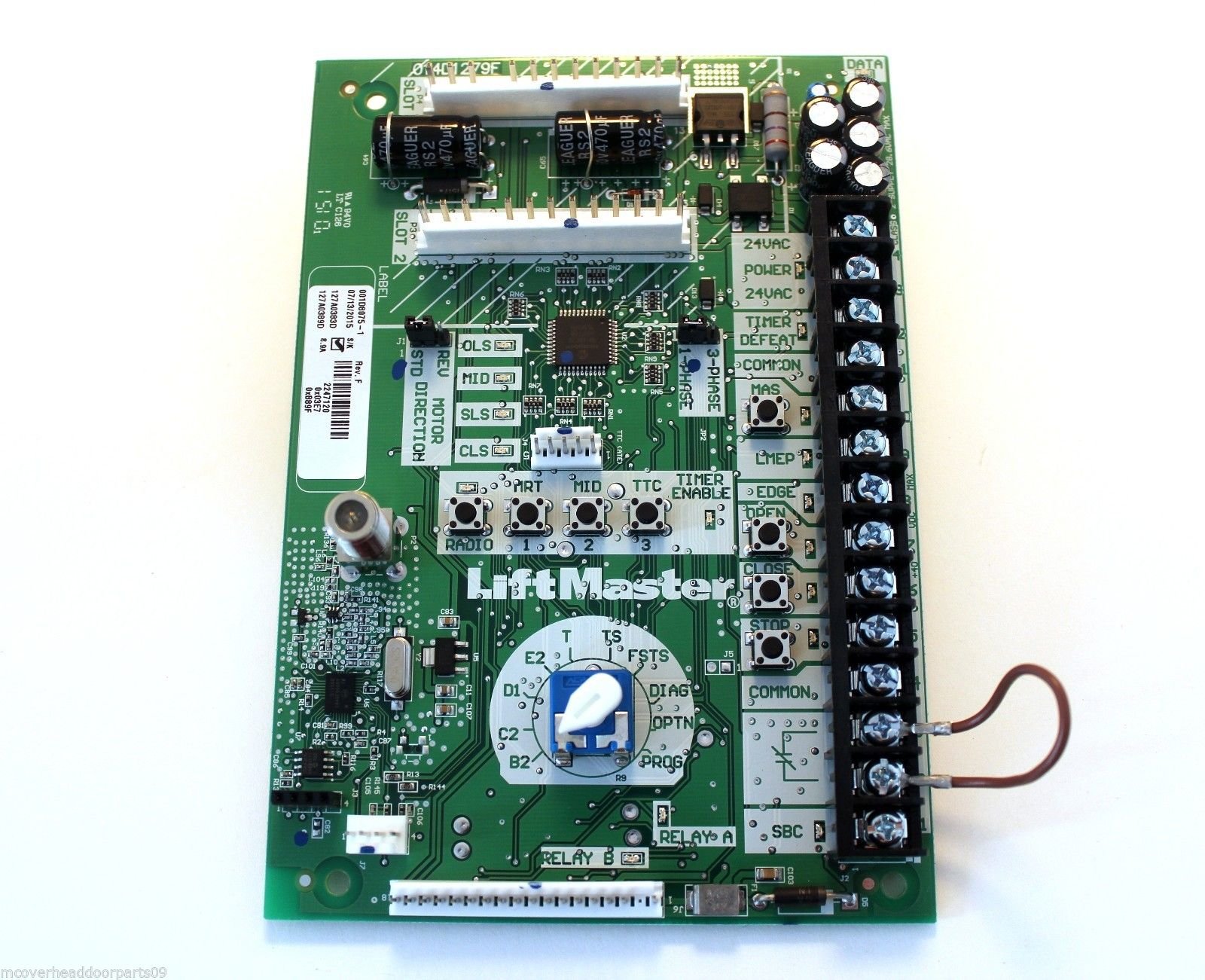
Image of the LiftMaster L5 Logic Control Board, showing its electronic components and connectors.
2. Important Safety Information
- WARNING: Disconnect all electrical power to the garage door opener before installing or servicing the control board. Failure to do so may result in serious injury or death.
- Installation should only be performed by qualified personnel.
- Ensure all wiring connections comply with local electrical codes.
- Keep hands and clothing clear of moving parts during operation.
- Do not attempt to repair the control board yourself. Contact a qualified technician.
3. Package Contents
Verify that your package contains the following items:
- LiftMaster L5 Logic Control Board (K001D8075-1)
- Installation Guide (this document)
4. Setup and Installation
4.1. Installation Requirements
- Compatible LiftMaster Commercial Garage Door Opener.
- Basic electrical tools (screwdrivers, wire strippers, multimeter).
- Knowledge of electrical wiring and safety procedures.
4.2. Installation Steps
- Power Disconnection: Ensure the main power supply to the garage door opener is completely disconnected at the circuit breaker.
- Access Control Board: Open the control panel housing of your commercial garage door opener to access the existing logic board.
- Document Connections: Before removing the old board, carefully photograph or diagram all existing wire connections to ensure correct re-installation.
- Remove Old Board: Disconnect all wires and mounting screws securing the old logic board. Carefully remove it.
- Install New Board: Position the new LiftMaster L5 Logic Control Board (K001D8075-1) in place and secure it with the mounting screws.
- Reconnect Wiring: Refer to your documented connections and carefully re-attach all wires to the corresponding terminals on the new board. Double-check each connection for security and correctness.
- Close Panel: Securely close the control panel housing.
- Restore Power: Restore power to the garage door opener at the circuit breaker.
- Test Operation: Perform initial tests to ensure the opener functions correctly. Refer to the "Operating Instructions" section for basic testing.
5. Operating Instructions
The L5 Logic Control Board manages the core functions of your commercial garage door opener. Once installed, the opener's operation will largely depend on the specific model of your garage door opener and its associated accessories (e.g., remote controls, wall stations, safety sensors).
5.1. Basic Operation
- Open/Close: Use the designated wall control button or remote control to initiate opening or closing cycles.
- Stop: Pressing the open/close button again during operation will typically stop the door.
- Safety Reversal: Ensure safety sensors are properly aligned. If an obstruction is detected, the door should reverse automatically.
5.2. Programming
Specific programming procedures for limits, forces, and remote controls are typically detailed in the main garage door opener manual. The L5 Logic Control Board facilitates these functions. Consult your primary opener manual for detailed programming steps.
6. Maintenance
Regular maintenance ensures the longevity and optimal performance of your LiftMaster L5 Logic Control Board and the entire garage door opener system.
- Visual Inspection: Periodically inspect the control board for any signs of damage, loose connections, or debris.
- Cleanliness: Keep the control panel area clean and free from dust, moisture, and insects. Use a soft, dry brush or compressed air for cleaning.
- Wiring Checks: Annually, with power disconnected, check all wiring connections to the board for tightness and corrosion.
- Professional Service: For any complex issues or internal component checks, contact a certified LiftMaster technician.
7. Troubleshooting
This section addresses common issues related to the L5 Logic Control Board. For comprehensive system troubleshooting, refer to your main garage door opener manual.
| Problem | Possible Cause | Solution |
|---|---|---|
| Opener not responding to commands. | No power to the board; loose wiring; faulty remote/wall control. | Check power supply and circuit breaker. Inspect all wiring connections to the board. Test with a different remote or wall control. |
| Door reverses unexpectedly. | Misaligned safety sensors; obstruction in door path; force settings too low. | Check and align safety sensors. Clear any obstructions. Consult main opener manual to adjust force settings. |
| LED indicators on board are off or flashing incorrectly. | Power issue; board malfunction; error code. | Verify power. Consult your main opener manual for specific LED error codes. If persistent, contact support. |
| New board not functioning after installation. | Incorrect wiring; board not seated properly; faulty board. | Double-check all wiring against your diagram. Ensure the board is securely seated. If issues persist, the board may be faulty; contact supplier. |
8. Specifications
- Brand: LiftMaster
- Model Number: K001D8075-1
- Part Number: K001D8075-1
- Material: Metal (for components)
- Assembly Required: No (for the board itself)
- UPC: 012381000340
- Compatibility: Designed for specific LiftMaster Commercial Garage Door Openers.
9. Warranty and Support
Warranty information for the LiftMaster L5 Logic Control Board (K001D8075-1) is typically provided with the original purchase documentation or can be found on the official LiftMaster website. For technical support, service, or to inquire about warranty claims, please refer to the contact information provided by LiftMaster or your authorized dealer.
As specific warranty details are not available in this document, it is recommended to visit the LiftMaster official website or contact their customer service directly for the most current information.


