
Introduction
The Hormann RotaMatic P 2-1 is an advanced gate operator designed for automating 2-leaf swing gates. This system offers reliable and convenient operation, integrating seamlessly with various gate designs. Its robust construction ensures durability and consistent performance across a wide range of environmental conditions. This manual provides essential information regarding the setup, operation, maintenance, and technical specifications of your RotaMatic P 2-1 gate operator.
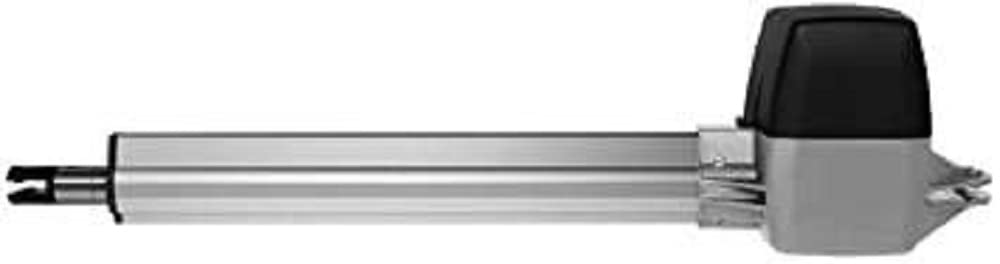
Image showing the main unit of the Hormann RotaMatic P 2-1 gate operator.
Setup and Installation
The RotaMatic P 2-1 gate operator is specifically designed for 2-leaf swing gates. Proper installation is crucial for safe and efficient operation. It is highly recommended that installation be performed by a qualified professional.
Key Installation Considerations:
- Gate Compatibility: Suitable for 2-leaf swing gates with a maximum height of 2000 mm and a width range of 1000-2500 mm per leaf.
- Weight Capacity: Each gate leaf must not exceed 400 kg.
- Power Supply: Requires a 230-240 V AC mains connection. The motor operates on 24 V DC.
- Environmental Conditions: Designed to operate in temperatures ranging from -20 °C to +60 °C. The housing has an IP44 protection rating, and the separate control box has an IP65 rating.
Components Included:
- 1 x Hormann RotaMatic P 2-1 Gate Operator
- Manual transmitter (remote control)
- Receiver unit
Refer to the comprehensive installation guide provided with your product for detailed step-by-step instructions, wiring diagrams, and safety precautions.
Operating Instructions
The RotaMatic P 2-1 gate operator is designed for user-friendly operation, primarily controlled via the included manual transmitter.
Basic Operation:
- Opening/Closing: Press the designated button on your manual transmitter to initiate gate movement. The system uses pulse control.
- Soft Start and Soft Stop: The operator features a soft start and soft stop function, ensuring smooth and quiet gate movement, reducing wear and tear on the gate and operator.
- Adjustable Speed: The speed of the gate can be individually adjusted to suit specific requirements and gate sizes, ensuring uniform operation.
- Safety Features: The system includes force limitation to prevent injury or damage if an obstruction is encountered. It supports up to two connectable safety devices (e.g., photocells).
- Automatic Power Supply: The system features an adjustable automatic power supply.
Ensure the gate path is clear before operating. In case of power failure, refer to the detailed manual for instructions on manual release.
Maintenance
Regular maintenance ensures the longevity and optimal performance of your Hormann RotaMatic P 2-1 gate operator. Perform checks periodically to identify any potential issues.
Recommended Maintenance Practices:
- Visual Inspection: Regularly inspect the gate, hinges, and operator components for signs of wear, damage, or corrosion.
- Cleanliness: Keep the operator housing and surrounding area clean from dirt, debris, and vegetation that could obstruct movement or ventilation.
- Lubrication: Check the gate hinges and moving parts for proper lubrication. Apply appropriate lubricants as recommended in the full product manual.
- Safety Device Check: Periodically test any connected safety devices (e.g., photocells) to ensure they are functioning correctly.
For detailed maintenance schedules and procedures, consult the complete instruction manual.
Troubleshooting
If your Hormann RotaMatic P 2-1 gate operator is not functioning as expected, consider the following common issues before contacting support.
Common Issues and Solutions:
- Gate Not Responding:
- Check the power supply to the operator.
- Ensure the manual transmitter has working batteries and is within range.
- Verify that no safety devices (e.g., photocells) are obstructed or malfunctioning.
- Gate Stops Mid-Movement:
- Check for physical obstructions in the gate's path.
- Inspect the gate for any mechanical issues (e.g., stiff hinges, damaged rollers).
- The force limitation feature may have been activated due to an obstruction. Remove the obstruction and try again.
- Unusual Noises:
- Inspect for loose components or debris within the operator housing.
- Check gate hinges and moving parts for lack of lubrication.
For more complex issues or if the problem persists, consult the detailed troubleshooting section in the complete product manual or contact a qualified service technician.
Technical Specifications
| Model Number | 4510971 |
| Suitable for | 2-leaf swing gates |
| Max Gate Height | 2000 mm |
| Min-Max Gate Width | 1000-2500 mm (per leaf) |
| Max Leaf Weight | 400 kg |
| Motor Type | 24 V DC |
| Mains Connection | 230-240 V AC |
| Nominal Force | 540 N |
| Max Traction/Pressure Force | 2700 N |
| Max Spindle Speed | Approx. 25 mm/s |
| Gate Cycles (per day/hour) | 40/10 |
| Housing Material | Aluminum / Die-cast Zinc / Glass fiber reinforced plastic |
| Temperature Range | -20 °C to +60 °C |
| Protection Class (Housing) | IP44 |
| Protection Class (Control Box) | IP65 |
| Control Type | Pulse control, Force limitation, Soft start/stop |
| Display | Double 7-segment display |
| Connectable Safety Devices | 2 |
| Product Dimensions (L x W x H) | 80.5 x 25 x 23.5 cm |
| Item Weight | 18.64 kg |
Warranty and Support
For information regarding the warranty period and terms for your Hormann RotaMatic P 2-1 gate operator, please refer to the warranty documentation provided at the time of purchase or contact your authorized Hormann dealer or the seller directly.
Should you require technical assistance, spare parts, or professional servicing, please contact your local Hormann service partner or the point of purchase. Ensure you have your model number (RotaMatic P 2-1) and article number (4510971) available when seeking support.


