
1. Introduction
This manual provides essential instructions for the safe and efficient operation, maintenance, and troubleshooting of your Fetco Luxus D449/L4D-15 1.5 Gallon Portable Thermal Coffee Dispenser. Please read this manual thoroughly before using the dispenser and retain it for future reference.
The Fetco Luxus L4D thermal server is engineered to maintain the temperature of brewed coffee, keeping it hot for extended periods. This design eliminates the need for external heat sources, contributing to energy efficiency.
2. Safety Instructions
Observe the following safety precautions to prevent injury or damage to the dispenser:
- Do not immerse the dispenser in water or other liquids.
- Handle with care when filled with hot beverages. The exterior may be warm.
- Ensure the lid is securely closed before transporting.
- Keep out of reach of children.
- Do not use abrasive cleaners or scouring pads, as these can damage the finish.
- Only use the dispenser for its intended purpose of holding and dispensing hot beverages.
3. Product Features
The Fetco Luxus D449/L4D-15 dispenser includes several design elements for optimal performance and user convenience:
- Integrated Stand and Removable Drip Tray: Provides stability and collects spills for easy cleaning.
- Integrated Lid Design: Features a removable funnel system, a pivoting brew cap, and a front-positioned handle for ease of use.
- Precision Fit Funnel Assembly: Designed to minimize moisture and heat loss, preserving beverage freshness and aroma.
- Brew Cap: Mounted on the lid exterior for convenient access during brewing.
- Digital Freshness Timer and Volume Indicator: Helps monitor beverage quality and quantity.
- Pull Faucet: For controlled and easy dispensing.
- Forward Positioned Handle: Enhances maneuverability and transport.
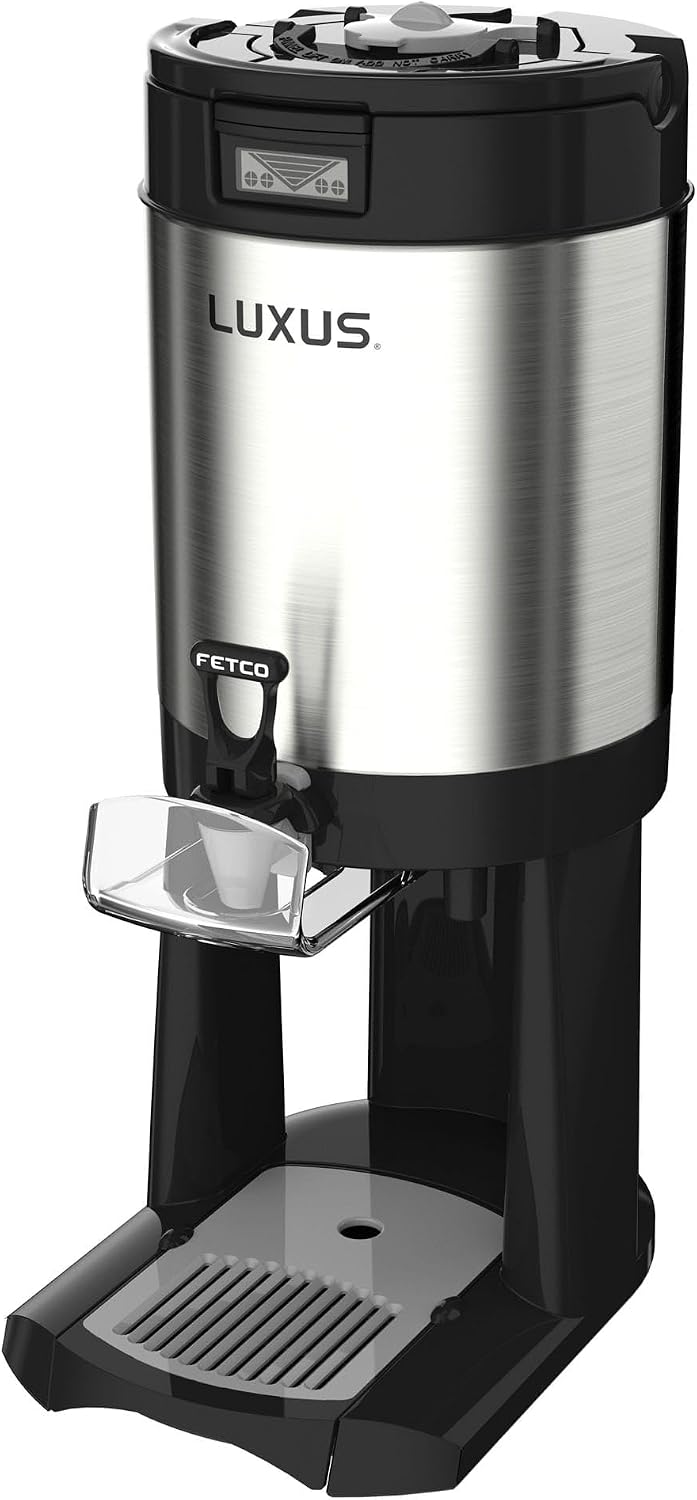
Figure 1: Front view of the Fetco Luxus D449/L4D-15 Thermal Coffee Dispenser, showcasing its stainless steel body, black base, faucet, and lid.
4. Setup
- Unpacking: Carefully remove the dispenser from its packaging. Inspect for any damage.
- Initial Cleaning: Before first use, wash all removable parts (lid, funnel, drip tray) with warm, soapy water. Rinse thoroughly and dry. Wipe the exterior with a damp cloth.
- Assembly:
- Place the drip tray onto the integrated stand.
- Ensure the funnel system is correctly seated within the lid.
- Secure the lid onto the dispenser body.
- Placement: Position the dispenser on a stable, level surface. Ensure adequate clearance for brewing equipment if used directly under a brewer.
5. Operating Instructions
5.1 Filling the Dispenser
- Ensure the dispenser is clean and dry.
- Place the dispenser directly under the brew basket of a compatible coffee brewer.
- Begin the brewing cycle. The Precision Fit Funnel Assembly will guide the brewed coffee into the dispenser while minimizing heat loss.
- Once brewing is complete, carefully remove the dispenser from under the brewer.
- Close the brew cap on the lid.
- The digital freshness timer will activate, indicating the holding time.
5.2 Dispensing Beverages
- Place a cup or mug on the drip tray directly beneath the pull faucet.
- Pull the faucet handle forward to dispense the beverage.
- Release the handle to stop the flow.
5.3 Monitoring Freshness and Volume
- The digital freshness timer on the lid displays how long the beverage has been held.
- The volume indicator provides an estimate of the remaining beverage.
6. Maintenance and Cleaning
Regular cleaning ensures optimal performance and hygiene.
6.1 Daily Cleaning
- Empty Dispenser: After each use, empty any remaining beverage.
- Disassemble: Remove the lid, funnel system, and drip tray.
- Wash Components: Wash the interior of the dispenser, lid, funnel, and drip tray with warm, soapy water. Use a soft brush for hard-to-reach areas.
- Rinse Thoroughly: Rinse all parts with clean water to remove soap residue.
- Dry: Allow all components to air dry completely or dry with a clean cloth before reassembly or storage.
- Exterior: Wipe the exterior of the dispenser with a damp cloth and dry.
6.2 Deep Cleaning (Weekly/Bi-Weekly)
For thorough cleaning and to remove mineral deposits or coffee oils, use a commercial coffee equipment cleaner following the manufacturer's instructions. Ensure all cleaning solution is thoroughly rinsed out before reuse.
Caution: Do not use harsh chemicals, abrasive cleaners, or metal scouring pads, as these can damage the dispenser's surfaces and internal components.
7. Troubleshooting
| Problem | Possible Cause | Solution |
|---|---|---|
| Beverage not staying hot | Lid not sealed properly; dispenser not pre-heated (if applicable); prolonged holding time. | Ensure lid is securely closed. Verify funnel assembly is correctly seated. For best results, fill with hot water for 5-10 minutes before brewing, then empty. |
| Faucet drips | Mineral buildup; worn gasket. | Clean faucet thoroughly. If dripping persists, contact customer support for possible gasket replacement. |
| Digital timer not working | Battery depleted; sensor obstruction. | Check battery compartment (if accessible) and replace batteries. Ensure no debris is blocking sensors on the lid. |
| Difficulty cleaning interior | Coffee oil residue buildup. | Perform a deep clean using a commercial coffee equipment cleaner. Use a long-handled brush. |
8. Specifications

Figure 2: Side view of the Fetco Luxus D449/L4D-15 Thermal Coffee Dispenser with key dimensions labeled: 23 inches height, 13.25 inches depth, and 9 inches width.
| Feature | Detail |
|---|---|
| Model Number | D449/L4D-15 |
| Capacity | 1.5 Gallons |
| Dimensions (H x W x D) | 23 x 9 x 13.25 inches |
| Item Weight | 10.5 pounds |
| Material | Stainless Steel (exterior) |
| Holding Temperature | 180-185°F (for at least 4 hours) |
| Special Features | Thermal insulation, Digital freshness timer, Volume indicator, Integrated stand, Removable drip tray |
9. Warranty and Support
For warranty information and technical support, please refer to the documentation provided with your purchase or visit the official Fetco website. Keep your purchase receipt as proof of purchase.
For further assistance, you may contact Fetco customer service directly. Contact details are typically available on the manufacturer's website.


