
1. Introduction
Thank you for choosing the Einhell TC-LD 25 Laser Distance Meter. This device is designed for quick and accurate measurement of distances up to 25 meters. Its compact design and user-friendly interface make it an ideal tool for various applications in construction, renovation, and DIY projects. Please read this manual carefully before using the device to ensure safe and optimal operation.

Figure 1: Einhell TC-LD 25 Laser Distance Meter
2. Safety Information
This device uses a Class II laser. Observe the following safety precautions:
- Do not stare directly into the laser beam.
- Do not point the laser beam at people or animals.
- Avoid direct eye exposure to the laser beam.
- Do not disassemble or modify the device. Repairs should only be performed by authorized personnel.
- Keep the device out of reach of children.
The laser diode operates at 635 nm.
3. Product Overview
Familiarize yourself with the components of your Einhell TC-LD 25.
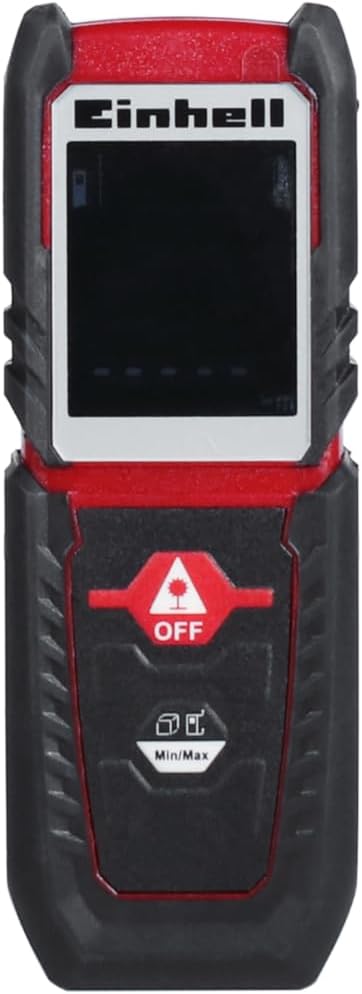
Figure 2: Front View (Display, Buttons)
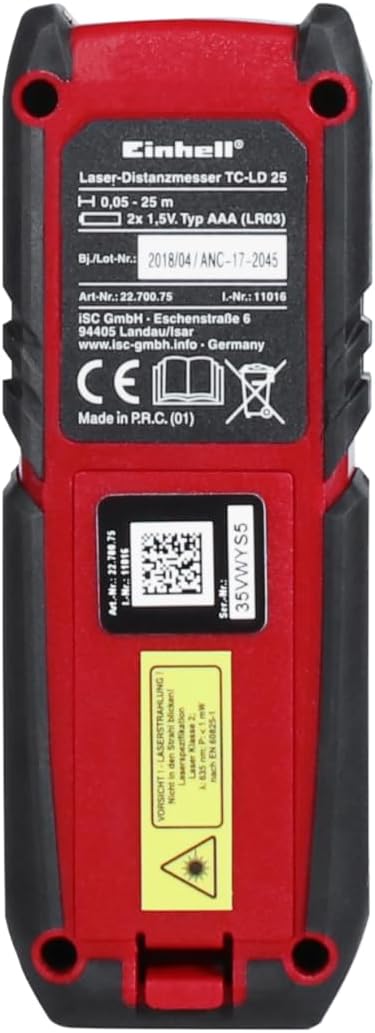
Figure 3: Back View (Battery Compartment)

Figure 4: Side View
Components:
- Laser Aperture: Emits the laser beam for measurement.
- Display Screen: Shows measurement results, mode, and battery status.
- Measurement Button (ON/MEAS): Powers on the device and initiates measurements.
- Function/Unit Button (FUNC/UNIT): Cycles through measurement modes and changes units.
- Reference Point Button: Switches between front and rear reference points.
- Clear/Off Button (C/OFF): Clears the last measurement or powers off the device.
- Battery Compartment: Located at the back for AAA batteries.
4. Setup
4.1 Battery Installation
The Einhell TC-LD 25 requires two (2) AAA alkaline batteries (not included).
- Open the battery compartment cover located on the back of the device (refer to Figure 3).
- Insert two AAA batteries, ensuring correct polarity (+/-).
- Close the battery compartment cover securely.
Figure 5: Battery Compartment
5. Operating Instructions
5.1 Turning On/Off
- To Turn On: Press the ON/MEAS button. The laser will activate.
- To Turn Off: Press and hold the C/OFF button for a few seconds. The device also features an automatic shutdown function after 3 minutes of inactivity to conserve battery life.
5.2 Basic Distance Measurement
- Turn on the device.
- Point the laser beam at the target.
- Press the ON/MEAS button once. The measured distance will be displayed on the screen.
5.3 Continuous Measurement (Min/Max)
This mode allows you to track the minimum and maximum distances as you move the device.
- Press the FUNC/UNIT button until the continuous measurement icon (often a running person or min/max symbols) appears on the display.
- Move the device slowly towards or away from the target. The display will continuously update the current, minimum, and maximum distances.
- Press ON/MEAS to stop continuous measurement and view the final minimum and maximum values.

Figure 6: Continuous Measurement Example
5.4 Changing Reference Point
The device can measure from its front edge or its rear edge. The default is usually the rear edge.
- Press the Reference Point button to toggle between front and rear measurement. An icon on the display will indicate the active reference point.

Figure 7: Measuring from Rear Edge

Figure 8: Measuring from Front Edge
5.5 Changing Units
The device primarily uses metric units (meters).
- Press the FUNC/UNIT button repeatedly to cycle through available units (e.g., m, ft, in).
6. Maintenance
- Clean the device with a soft, damp cloth. Do not use abrasive cleaners or solvents.
- Regularly check the battery compartment for corrosion. Remove batteries if the device will not be used for an extended period.
- Store the device in its included pouch in a dry, dust-free environment.

Figure 9: Included Carrying Pouch
7. Troubleshooting
| Problem | Possible Cause | Solution |
|---|---|---|
| Device does not turn on | Low or dead batteries; incorrect battery polarity | Replace batteries; check polarity |
| Inaccurate measurements | Unstable surface; obstruction in laser path; extreme temperatures | Ensure stable measurement; clear path; operate within specified temperature range |
| Laser not visible | Bright ambient light; long distance measurement | Use in lower light conditions; use a target plate for long distances |
8. Specifications
| Feature | Specification |
|---|---|
| Model Number | TC-LD 25 (2270075) |
| Measuring Range | 0.05 m - 25 m |
| Measurement Accuracy | +/- 3 mm / m |
| Laser Class | Class II |
| Laser Diode | 635 nm |
| Automatic Deactivation | 3 minutes |
| Batteries | 2 x AAA (Alkaline) |
| Dimensions (L x W x H) | 11.2 x 2.5 x 4 cm |
| Weight | 70 g |
| Material | Acrylonitrile Butadiene Styrene |
| International Protection Rating | IP54 (Water resistant) |
9. Warranty and Support
Einhell products are manufactured with high-quality materials and undergo strict quality control. For any warranty claims or technical support, please refer to your purchase documentation or contact Einhell customer service.
Spare parts availability in the EU is guaranteed for 1 year.
For further information, visit the official Einhell store: Einhell Store


