
Introduction
This manual provides detailed instructions for the setup, operation, maintenance, and troubleshooting of your Artis BT14 Wireless Portable Bluetooth Speaker. Please read this manual thoroughly before using the product to ensure proper function and longevity.
What's in the Box
Verify that all items are present in the package:
- 1 x Artis BT14 Wireless Portable Bluetooth Speaker
- 1 x Micro USB Charging Cable
- 1 x User Manual (this document)

Image: Artis BT14 speaker shown alongside its Micro USB charging cable.
Product Overview
The Artis BT14 speaker features a compact design with essential controls and ports located on its base.
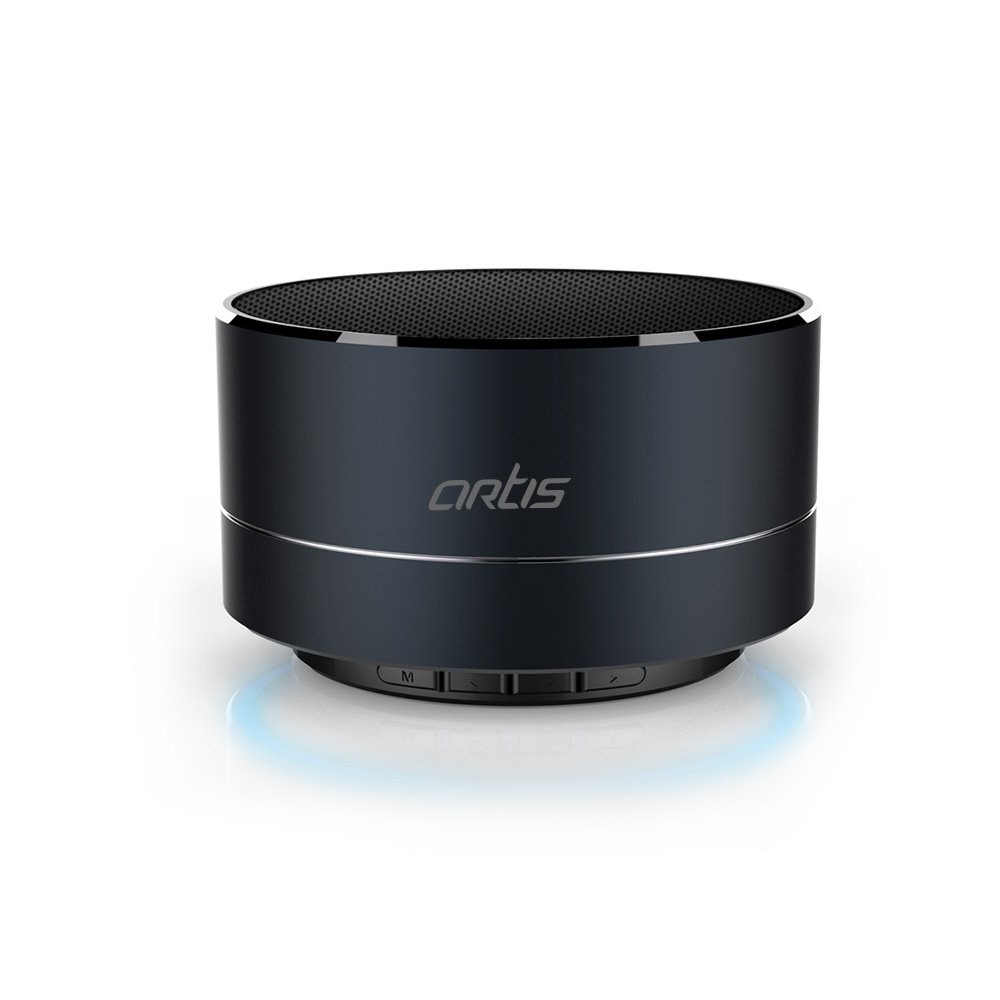
Image: Front view of the Artis BT14 speaker, showcasing its metallic black finish and top-firing speaker grille.
Controls and Ports

Image: Side view of the Artis BT14 speaker, highlighting the microphone, Micro USB charging port, TF card slot, and control buttons.
- Microphone (Mic): For hands-free calling.
- Micro USB Port: For charging the speaker.
- TF Card Slot: Insert a TF (Micro SD) card for direct music playback.
- 'M' Button (Mode): Press to switch between Bluetooth, FM Radio, and TF Card modes.
- '-' Button (Volume Down / Previous Track): Press and hold to decrease volume. Short press to go to the previous track/station.
- Play/Pause Button: Press to play or pause music. During a call, press to answer/end a call. Press and hold to reject a call.
- '+' Button (Volume Up / Next Track): Press and hold to increase volume. Short press to go to the next track/station.

Image: Bottom view of the Artis BT14 speaker, displaying the model number and specifications.
Setup
1. Charging the Speaker
Before initial use, fully charge the speaker. Connect the Micro USB charging cable to the speaker's Micro USB port and the other end to a USB power source (e.g., computer USB port, USB wall adapter). The LED indicator will illuminate during charging and turn off once fully charged. A full charge takes approximately 3 hours.
2. Power On/Off
- To Power On: Locate the power switch on the bottom of the speaker and slide it to the 'ON' position. You will hear an audible prompt indicating the speaker is powered on and in Bluetooth pairing mode.
- To Power Off: Slide the power switch to the 'OFF' position.
3. Bluetooth Pairing
After powering on, the speaker will automatically enter Bluetooth pairing mode, indicated by a flashing LED light.
- Ensure Bluetooth is enabled on your smartphone, tablet, or other Bluetooth-enabled device.
- Search for available Bluetooth devices.
- Select 'BT14' from the list of devices.
- Once paired, you will hear a confirmation tone, and the LED light will stop flashing. The speaker is now ready for audio playback.
The speaker has an operating range of up to 10 meters (33 feet) in open areas.
Operating Instructions
Bluetooth Mode
- After successful pairing, audio from your connected device will play through the speaker.
- Use the '+' and '-' buttons on the speaker to adjust volume (press and hold) or navigate tracks (short press).
- Press the Play/Pause button to pause or resume playback.
FM Radio Mode
- Press the 'M' button to switch to FM Radio mode.
- In FM mode, short press the Play/Pause button to auto-scan and save available FM stations.
- Use the '+' and '-' buttons (short press) to switch between saved stations.
TF Card Playback Mode
- Insert a TF (Micro SD) card with MP3 audio files into the TF card slot.
- Press the 'M' button to switch to TF Card mode. The speaker will automatically begin playing music from the card.
- Use the '+' and '-' buttons to adjust volume or navigate tracks.
- Press the Play/Pause button to pause or resume playback.
Hands-free Calling
- When a call comes in while connected via Bluetooth, the speaker will ring.
- Press the Play/Pause button once to answer the call.
- Press the Play/Pause button once again to end the call.
- Press and hold the Play/Pause button to reject an incoming call.
LED Light Indicator
The speaker features an LED light indicator for status updates and a separate blue bottom light for aesthetic purposes.
Maintenance
- Clean the speaker with a soft, dry cloth. Do not use abrasive cleaners or solvents.
- Avoid exposing the speaker to extreme temperatures, direct sunlight, or high humidity.
- Do not immerse the speaker in water as it is not waterproof.
- Store the speaker in a cool, dry place when not in use for extended periods.
Troubleshooting
| Problem | Possible Solution |
|---|---|
| Speaker does not power on. | Ensure the speaker is fully charged. Check the power switch position. |
| Cannot pair via Bluetooth. | Ensure the speaker is in Bluetooth pairing mode (flashing LED). Make sure Bluetooth is enabled on your device and it is within 10 meters of the speaker. Forget 'BT14' from your device's Bluetooth list and try pairing again. |
| No sound or low volume. | Increase the volume on both the speaker and your connected device. Ensure the speaker is not muted. |
| FM Radio reception is poor. | FM reception can vary based on location and environmental factors. Try repositioning the speaker. Note that FM functionality may be limited in certain areas. |
| TF Card not playing. | Ensure the TF card is inserted correctly and contains compatible audio files (e.g., MP3). Press the 'M' button to switch to TF Card mode. |
Specifications
| Feature | Detail |
|---|---|
| Brand | Artis |
| Model Number | BT14 |
| Connectivity Technology | Bluetooth, Wireless |
| Speaker Maximum Output Power | 3 Watts |
| Bluetooth Range | 10 Meters |
| Battery Capacity | 400mAh |
| Battery Average Life (Playback) | Up to 3 Hours |
| Standby Time | Up to 20 Hours |
| Charging Time | Approximately 3 Hours |
| Enclosure Material | Metal |
| Item Weight | 0.13 Kilograms |
| Control Method | Touch (buttons) |
| Features | FM Radio, TF Card Reader, Microphone, LED Light |
Warranty
The Artis BT14 Wireless Portable Bluetooth Speaker comes with a 1 Year Warranty from the date of purchase. Please retain your purchase receipt for warranty claims. For detailed warranty terms and conditions, refer to the official warranty document.
You can access the Warranty document here.
Customer Support
For further assistance, technical support, or warranty inquiries, please contact Artis customer service.
Manufacturer: Artis
Contact Information: Artis, Godown no 6, Gat No 232/4/1, Wagholi, Pune 412206


